Ubuntu 19.10 "Eoan Ermine" has arrived: download now!
After six months of development, Canonical officially released Ubuntu 19.10, codenamed "Eoan Ermine". This version brings many new features, including the belated ZFS file system.
You may have seen the feature list of Ubuntu 19.10 in many recent articles. **In this article, I will focus on some of the features and provide you with an official download link so that you can use the new Ubuntu version. **
Main features of Ubuntu 19.10
The following is a list of the main highlights in this release:
LZ4 compression for super fast startup
Compared with previous versions (Ubuntu 18.04 and 19.04), the LZ4 compression algorithm helps to reduce boot time. Abhishek found that on his Intel NUC settings, the startup time was also significantly faster.
ZFS file system supports Ubuntu 19.10
Added the option to use the ZFS file system. You can select it during the installation process.
Ubuntu 19.10 is released with GNOME 3.34
You must know the latest GNOME 3.34 version. Well, Ubuntu 19.10 contains the latest and most powerful features.
In addition to all these key functions, you will also find many important changes.

Here is what you should know before installing Ubuntu 19.10
Before you choose to install Ubuntu 19.10 on your system, I will give you some notes.
Upgrade from Ubuntu 19.04 to 19.10
If you don't want to download the ISO file separately for reinstallation, you can easily upgrade your system from Ubuntu 19.04 to 19.10.
You just need to go to the "Software and Updates" application.
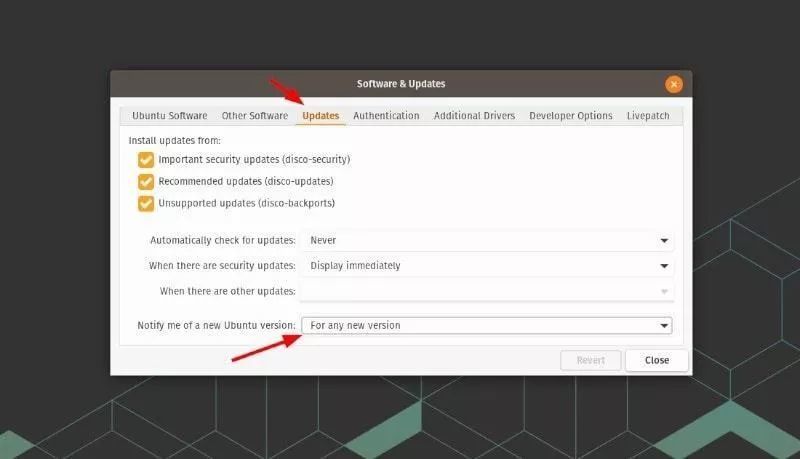
Once the software update Ubuntu 19.04 gets to you, you can navigate to the "Update" section and change the selection in "Notify me of new Ubuntu version" to "Any new version".
If it has been selected, you only need to check for updates to see if the update is available. Sometimes, it may take several days to be notified of the availability of a new version.
Remember, once you upgrade to 19.10, you cannot downgrade to 19.04. You must reinstall it.
Upgrade from Ubuntu 18.04 LTS to Ubuntu 19.10? not recommend
If you are using the long-term support version of 18.04, it is not recommended to upgrade to Ubuntu 19.10. Wait another six months and you will have Ubuntu 20.04 LTS.
To upgrade from 18.04 to 19.10, you must first upgrade to 18.10. Ubuntu 18.10 has been discontinued, so you may not see an option to upgrade to 19.04.
If you come across the tutorial describing the process of upgrading from 18.04 to 19.10 by editing sources.list, please do not do this. The core system in the two versions is different, manual upgrade may cause system damage and unusable.
Ubuntu 19.10: Available for download for all versions
According to the release notes, Ubuntu 19.10 can be downloaded immediately. You can get the torrent or ISO file on its official distribution download page.
-
Official website announcement: https://wiki.ubuntu.com/EoanErmine/ReleaseNotes*
-
Download address: https://ubuntu.com/download/desktop*
If you need other desktop environments or specific features, you can check the official versions of Ubuntu available:
- Ubuntu MATE(https://ubuntu-mate.org/download/)
- Kubuntu(https://kubuntu.org/getkubuntu/)
- Lubuntu(https://lubuntu.me/cosmic-released/)
- Ubuntu Budgie
- Ubuntu Studio
- Xubuntu
You may notice that some Ubuntu-based distributions have not yet provided the 19.10 update. It may take days/weeks/months for them to be ready to update. Then you can download or upgrade it directly.
Have you tried Ubuntu 19.10? Which Ubuntu/distro are you using? Let us know your thoughts in the comments below.
Recommended Posts