Xenomai3.1+ubuntu 18.04/16.04
xenomai is one of the important programs of linux real-time transformation, given below The specific installation and UbuntuKernel Compilation process.
The specific schematic diagram is as follows
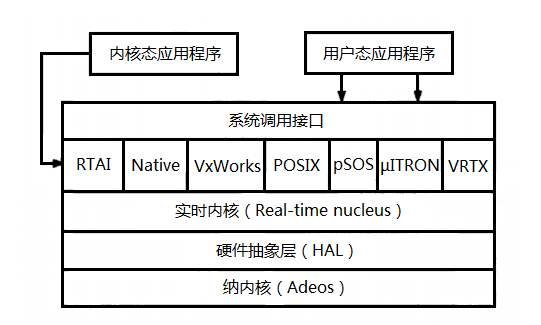 Principle
1 Download ubuntu kernel and xenomai3.1 software package##
wget https://www.kernel.org/pub/linux/kernel/v4.x/linux-4.9.38.tar.gz
wget https://xenomai.org/downloads/xenomai/stable/xenomai-3.1.tar.bz2
2 Unzip the compressed package and copy it to /usr/src
 sudo tar xf linux-4.9.38.tar.gz
 sudo tar xf xenomai-3.1.tar.bz2
 sudo cp -r linux-4.9.38/usr/src
 sudo cp -r xf xenomai-3.1/usr/src
3 Apply the xenomai patch to the ubuntu kernel and build a x86_64 bit kernel##
cd linux-4.9.38
sudo wget https://xenomai.org/downloads/ipipe/v4.x/x86/older/ipipe-core-4.9.38-x86-3.patch
.. /xenomai-3.1/scripts/prepare-kernel.sh --arch=x86_64 --ipipe=ipipe-core-4.9.38-x86-3.patch
4 Configure Kernel##
yes ""| make oldconfig
sudo apt install libncurses5-dev
make menuconfig
The specific configuration is as follows:
- General setup
-
-
Local version - append to kernel release: -xenomai-3.1
-
-
-
Timers subsystem
-
-
-
High Resolution Timer Support (Enable)
-
- Xenomai/cobalt
-
-
Sizes and static limits
-
-
-
Number of registry slots (512 --> 4096)
-
-
-
Size of system heap (Kb) (512 --> 4096)
-
-
-
Size of private heap (Kb) (64 --> 256)
-
-
-
Size of shared heap (Kb) (64 --> 256)
-
-
-
Maximum number of POSIX timers per process (128 --> 512)
-
-
-
Drivers
-
-
-
RTnet
-
-
-
RTnet, TCP/IP socket interface (Enable)
-
- - > Drivers

 - - > New intel(R) PRO/1000 PCIe (Enable)

 - - > Realtek 8169 (Enable)

 - - > Loopback (Enable)
-
-
Add-Ons
-
- - > Real-Time Capturing Support (Enable)
- Power management and ACPI options
-
-
CPU Frequency scaling
-
-
-
CPU Frequency scaling (Disable)
-
-
-
ACPI (Advanced Configuration and Power Interface) Support
-
-
-
Processor (Disable)
-
-
-
CPU Idle
-
-
-
CPU idle PM support (Disable)
-
- Pocessor type and features
-
-
Enable maximum number of SMP processors and NUMA nodes (Disable)
-
// Ref : http://xenomai.org/pipermail/xenomai/2017-September/037718.html
-
-
Processor family
-
-
-
Core 2/newer Xeon (if "cat /proc/cpuinfo | grep family" returns 6, set as Generic otherwise)
-
// Xenomai will issue a warning about CONFIG_MIGRATION, disable those in this orde
-
-
Transparent Hugepage Support (Disable)
-
-
-
Allow for memory compaction (Disable)
-
-
-
Contiguous Memory Allocation (Disable)
-
-
-
Allow for memory compaction
-
-
-
Page Migration (Disable)
-
- Device Drivers
-
-
Staging drivers
-
-
-
Unisys SPAR driver support
-
- - > Unisys visorbus driver (Disable)
5 Further build real-time kernel##
sudo apt install kernel-package
sudo apt-get install libssl-dev
6 Compile the kernel##
CONCURRENCY_LEVEL=$(nproc) make-kpkg --rootcmd fakeroot --initrd kernel_image kernel_headers
7 Install the generated system files##
cd ..
sudo dpkg -i linux-headers-4.9.38-xenomai-3.1_4.9.38-xenomai-3.1-10.00.Custom_amd64.deb linux-image-4.9.38-xenomai-3.1_4.9.38-xenomai-3.1-10.00.Custom_amd64.deb
8 Allow non-root users##
sudo addgroup xenomai --gid 1234
sudo addgroup root xenomai
sudo usermod -a -G xenomai $USER
9 Configure GRUB
sudo gedit /etc/default/grub
The specific modifications are as follows
GRUB_DEFAULT="Advanced options for Ubuntu>Ubuntu, with Linux 4.9.38-xenomai-3.1"
# GRUB_DEFAULT=saved
# GRUB_SAVEDEFAULT=true
# Comment the following lines
# GRUB_HIDDEN_TIMEOUT=0
# GRUB_HIDDEN_TIMEOUT_QUIET=true
GRUB_TIMEOUT=5
GRUB_CMDLINE_LINUX_DEFAULT="quiet splash xenomai.allowed_group=1234"
GRUB_CMDLINE_LINUX=""
Update GRUB and reboot
sudo update-grub
Restart the computer
sudo reboot
Select Ubuntu advanced kernel after reboot
10 Install xenomai user space library##
uname -r
4.9.38- xenomai-3.1
dmesg | grep Xenomai
[1.417024] [ Xenomai] scheduling class idle registered.
[1.417025] [ Xenomai] scheduling class rt registered.
[1.417045] [ Xenomai] disabling automatic C1E state promotion on Intel processo
[1.417055] [ Xenomai] SMI-enabled chipset found, but SMI workaround disabled
[1.417088] I-pipe: head domain Xenomai registered.
[1.417704] [ Xenomai] allowing access to group 1234
[1.417726] [ Xenomai] Cobalt v3.1 (Sisyphus's Boulder) [DEBUG]
cd xenomai-3.1./configure --with-pic --with-core=cobalt --enable-smp --disable-tls --enable-dlopen-libs --disable-clock-monotonic-raw
make -j`nproc`
sudo make install
11 Update bashrc
echo '
### Xenomai
export XENOMAI_ROOT_DIR=/usr/xenomai
export XENOMAI_PATH=/usr/xenomai
export PATH=$PATH:$XENOMAI_PATH/bin:$XENOMAI_PATH/sbin
export PKG_CONFIG_PATH=$PKG_CONFIG_PATH:$XENOMAI_PATH/lib/pkgconfig
export LD_LIBRARY_PATH=$LD_LIBRARY_PATH:$XENOMAI_PATH/lib
export OROCOS_TARGET=xenomai
' >>~ /.xenomai_rc
echo 'source ~/.xenomai_rc'>>~/.bashrc
source ~/.bashrc
12 test##
Increase permissions
sudo chmod -R 777/dev/rtdm/memdev-private
sudo chmod -R 777/dev/rtdm/memdev-shared
xeno latency
== Sampling period: 100 us
== Test mode: periodic user-mode task
== All results in microseconds
warming up...
RTT| 00:00:01 (periodic user-mode task, 100 us period, priority 99)
RTH|----lat min|----lat avg|----lat max|-overrun|---msw|---lat best|--lat worst
RTD| 0.174| 0.464| 1.780| 0| 0| 0.174| 1.780
RTD| 0.088| 0.464| 1.357| 0| 0| 0.088| 1.780
RTD| 0.336| 0.464| 1.822| 0| 0| 0.088| 1.822
RTD| 0.342| 0.464| 1.360| 0| 0| 0.088| 1.822
RTD| 0.327| 0.462| 2.297| 0| 0| 0.088| 2.297
RTD| 0.347| 0.463| 1.313| 0| 0| 0.088| 2.297
RTD| 0.314| 0.464| 1.465| 0| 0| 0.088| 2.297
RTD| 0.190| 0.464| 1.311| 0| 0| 0.088| 2.297
If you encounter problems during installation, please leave a message and exchange.
Recommended Posts