Python|Drawing of multi-pointed stars
1 Foreword
In the process of initial learning python, I have a certain degree of understanding of python drawing. With the help of book knowledge and seniors, I began to explore the basic skills of python drawing by myself.
2 ready
Install the python environment and pycharm.
3 step
3.1 Call turtle and start drawing
import turtle
3.2 Adjust brush size and color
turtle.pensize(10)
turtle.color("yellow")
3.3 Control the pen to move forward 200 units and turn left 160°
turtle.forward(200)
turtle.left(160)
**3.4 Repeat 3.3 instructions to control the brush operation. **
turtle.forward(200)
turtle.left(160)
turtle.forward(200)
turtle.left(160)
turtle.forward(200)
turtle.left(160)
turtle.forward(200)
turtle.left(160)
turtle.forward(200)
turtle.left(160)
turtle.forward(200)
turtle.left(160)
turtle.forward(200)
turtle.left(160)
4 effect
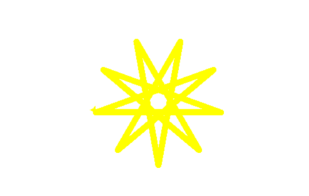
Figure 1 Running effect
5 to sum up
Through the use of python for drawing, I have mastered the call of turtle and the control of the brush in python drawing. I have a preliminary understanding of the field of programming, and at the same time I have great expectations for it.
END
Edit | Wang Wenxing
Chief Editor | Xu Aiwen
Recommended Posts