Bashtop: a powerful LinuxOSXFreeBSD resource monitoring tool

Bashtop is a terminal-based resource monitoring utility for Linux/OSX/FreeBSD. Although the tool is a command line tool, it also provides a very beautiful UI interface and can intuitively display CPU, memory, and running Statistics such as the progress and bandwidth of the computer. It has a game-style responsive terminal UI and customizable menus. The neat arrangement of various display parts makes it much easier to monitor various system indicators.
By using Bashtop, we can also sort processes and easily switch between various sorting options. In addition, we can also send SIGKILL, SIGTERM and SIGINT to the required process.
The tool runs very fast and also provides a lot of other support, such as:
Support mouse click;
Switchable mini mode;
Support personalized customization;
Display memory consumption graph;
Bashtop can be installed on Linux, macOS, and even FreeBSD. In addition, Bashtop has now released a Python version, and interested users can click https://github.com/aristocratos/bpytop to get it directly.
Features
Easy to use, with a menu system inspired by the game.
Quick response UI, with UP and DOWN keys to quickly select the process.
The detailed statistics of the selected process can be displayed.
Process can be filtered.
Easily switch between sorting options.
Send SIGTERM, SIGKILL, SIGINT to select the process.
With UI menu for changing all configuration file options.
Auto-scaling graph of network usage.
If a new version is available, a message is displayed in the menu.
Tool dependency
To install and use Bashtop, make sure that the following dependent components are ready in the system.
Bash 4.4 or higher
Git
GNU Coreutils
GNU sed, awk, grep and ps command line tools
Lm sensor-optional (used to collect CPU temperature statistics)
Tool installation
First, we will start to manually install Bashtop, the tool is applicable to all Linux-based distribution systems.
Manual installation
To install Bashtop manually, clone the git repository as shown below and compile from source using the following command:
$ git clone https://github.com/aristocratos/bashtop.git

$ cd bashtop

$ sudo make install
To uninstall Bashtop, run:
$ sudo make uninstall
Install Bashtop in Ubuntu
There are two ways to install Bashtop on Ubuntu: using snap or using the APT package manager.
To install using snap, execute:
$ snap install bashtop
To install using the APT package manager, first add the Bashtop PPA as shown below:
$ sudo add-apt-repository ppa:bashtop-monitor/bashtop
Next, update the package list and install Bashtop as shown.
$ sudo apt update

$ sudo apt install bashtop
Install Bashtop in Debian
Bashtop is available in the official repository of Debian. To install it, just run the following command:
$ sudo apt install bashtop
In addition, you can run the displayed commands.
$ git clone https://github.com/aristocratos/bashtop.git

$ cd bashtop/

$ cd DEB

$ sudo ./build
Install Bashtop in Fedora
To put Bashtop in Fedora, just run the following command:
$ sudo dnf install bashtop
Install Bashtop in CentOS/RHEL 8
For CentOS 8 / RHEL 8 systems, you need to enable EPEL repository first, and then run the following command:
$ sudo yum install epel-release

$ sudo dnf install bashtop
Install Bashtop on Arch Linux
Bashtop is available in the form of bashtop-git in AUR. To install Bashtop, simply run:
$ sudo pacman -S bashtop
How to use Bashtop Resource Monitor on Linux
To start Bashtop, simply run the following command on the terminal:
bashtop
Tool configuration items
All configuration items of the tool can be modified in the configuration file, the configuration file address is "$HOME/.config/bashtop".
**bashtop.cfg (automatically generated): **
#? Config file for bashtop v.0.9.21

#* Color theme, looks for a .theme file in"$HOME/.config/bashtop/themes" and "$HOME/.config/bashtop/user_themes"

#* Should be prefixed with either "themes/" or "user_themes/" depending on location,"Default"for builtin default theme

color_theme="Default"

#* Update time in milliseconds, increases automatically ifset below internal loops processing time, recommended 2000 ms or above for better sample times for graphs

update_ms="2500"

#* Processes sorting,"pid""program""arguments""threads""user""memory""cpu lazy""cpu responsive"

#*" cpu lazy" updates sorting over time,"cpu responsive" updates sorting directly

proc_sorting="cpu lazy"

#* Reverse sorting order,"true" or "false"

proc_reversed="false"

#* Show processes as a tree

proc_tree="false"

#* Check cpu temperature, only works if"sensors","vcgencmd" or "osx-cpu-temp" commands is available

check_temp="true"

#* Draw a clock at top of screen, formatting according to strftime, empty string to disable

draw_clock="%X"

#* Update main ui when menus are showing,setthis to falseif the menus is flickering too much for comfort

background_update="true"

#* Custom cpu model name, empty string to disable

custom_cpu_name=""

#* Enable error logging to "$HOME/.config/bashtop/error.log","true" or "false"

error_logging="true"

#* Show color gradient in process list,"true" or "false"

proc_gradient="true"

#* If process cpu usage should be of the core it's running on or usage of the total available cpu power

proc_per_core="false"

#* Optional filter for shown disks, should be names of mountpoints,"root" replaces "/", separate multiple values with space

disks_filter=""

#* Enable check fornewversionfrom github.com/aristocratos/bashtop at start

update_check="true"

#* Enable graphs with double the horizontal resolution, increases cpu usage

hires_graphs="false"

#* Enable the use of psutil python3 module for data collection,default on OSX

use_psutil="true"
Tool running screenshot
**The main UI interface of the tool will display the resource consumption details of the selected process: **
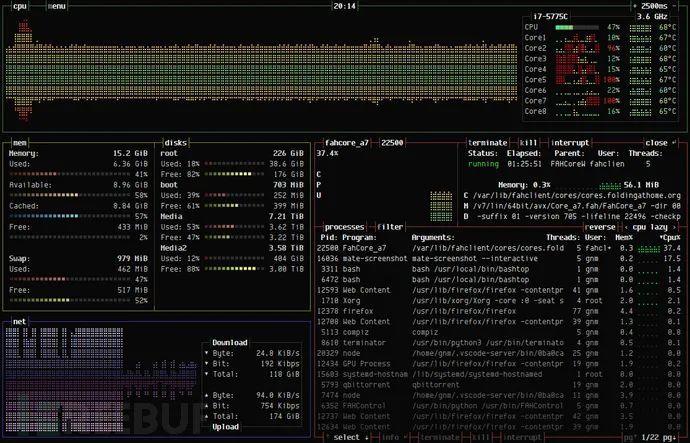
**Tools main menu: **
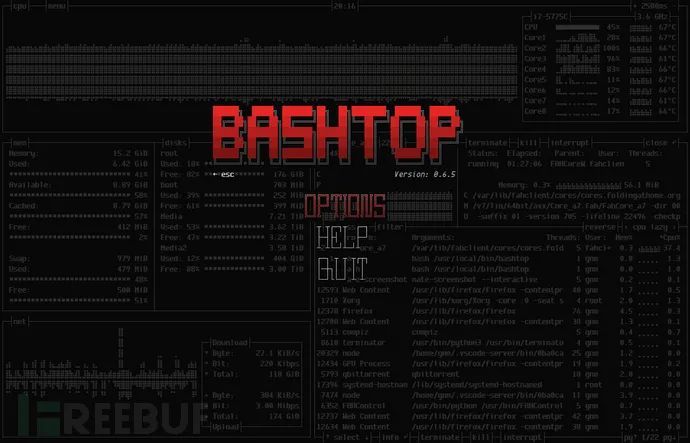
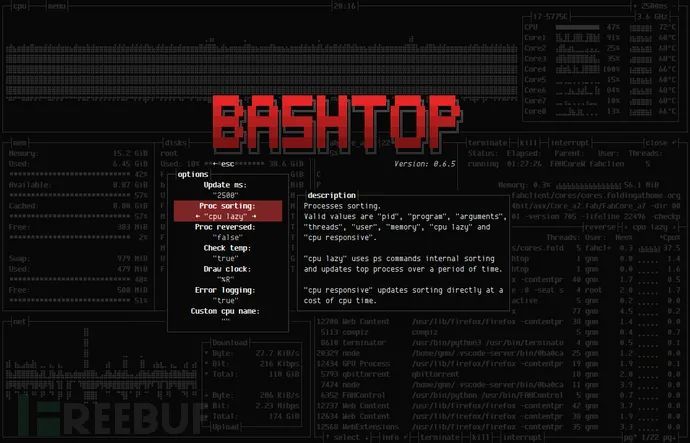
**Tool options menu: **
project address
Bashtop:https://github.com/aristocratos/bashtop