python series (five) centos6.x
Blogger QQ: 819594300
Blog address: http://zpf666.blog.51cto.com/
Friends who have any questions can contact the blogger, the blogger will help you answer, thank you for your support!
Use pyenv+virtualenv to deploy multiple versions of python
pyenvvs virtualenv
pyenv is for the management of the python version, realized by modifying the environment variables;
Virtualenv is a multi-version management for python packages. It is used as a python package virtual environment by installing the python package into a module, and switching between different package environments is achieved by switching directories.
pyenv principle
The beauty of pyenv is that it does not use the highly coupled working method of implanting different $PATH into different shells, but simply inserts a shims at the top of $PATH:
~ /.pyenv/shims:/usr/local/bin:/usr/bin:/bin. All searches for Python executable files will be intercepted by this shims path first, which empties the subsequent system path.
pyenv installation and use (installation using network yum source)
Start the official installation below:
1 ) Confirm the system version

2 ) Install dependencies

The content in the screenshot is as follows:
yum-y install gcc python-devel readline readline-devel readline-static opensslopenssl-devel openssl-static sqlite-devel bzip2-devel bzip2-libspython-setuptools

3 ) Install pyenv
pyenv requires git tools, you need to install git tools first

pyenv provides tools for automatic installation, just execute the command to install:

The address in the screenshot is as follows:
curl -L https://raw.githubusercontent.com/yyuu/pyenv-installer/master/bin/pyenv-installer| bash
There is also a website, which also provides tools for automatic installation of pyenv. Both websites are the same. You can use either one.
curl -Lhttps://raw.github.com/yyuu/pyenv-installer/master/bin/pyenv-installer | bash

After the installation is over, the above three lines will appear at the end.
To see if the installation is successful, execute the following command:
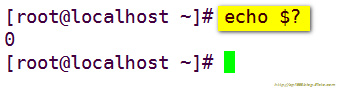
If the returned value is 0, the installation is successful.
If you want to install manually, you can execute this command:
Check out pyenv to the directory you want to install. The recommended path is: $HOME/.pyenv
$ cd
$ git clone git://github.com/yyuu/pyenv.git.pyenv
4 ) Add environment variables

This directory is dedicated to the bash information of the current user's bash shell. The file is read when logging in and every time a new shell is opened.
Add the following lines at the end:
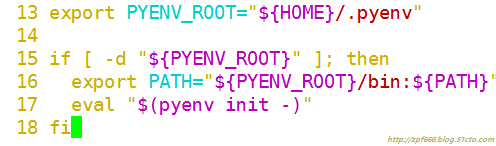
The content in the screenshot is as follows:
export PYENV_ROOT="${HOME}/.pyenv"
if [ -d "${PYENV_ROOT}" ]; then
exportPATH="
eval "$(pyenv init-)"
fi
After adding, let it take effect immediately:

At this point, pyenv installation is complete, let's see which python versions can be installed.
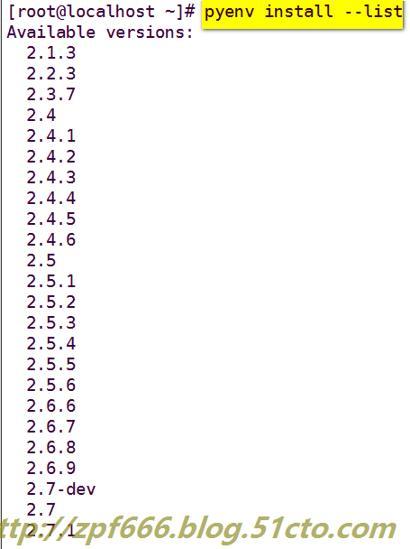
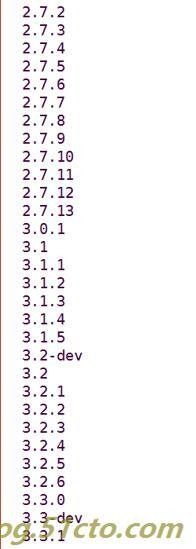
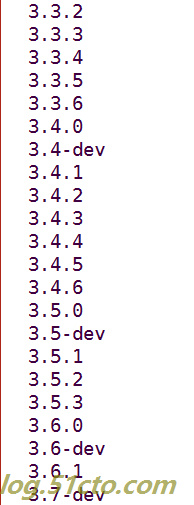
5 ) Let's take a look, what version of python is installed by default in centos6.5:
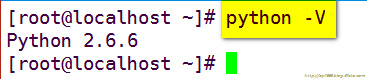
As can be seen from the above figure, centos6.5 installs version 2.6.6 by default.
Then let's install a 3.6.1 version to try:
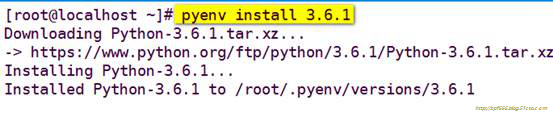
6 ) Create a virtual environment

Where my-virtual-env-3.6.1 is a custom name, you can also customize it yourself.
7 ) List the current virtual environment

8 ) Activate the virtual environment

9 ) After activating the virtual environment, you need to execute the following command to update the database

Then go directly to python to view:

10 ) View the version currently in use
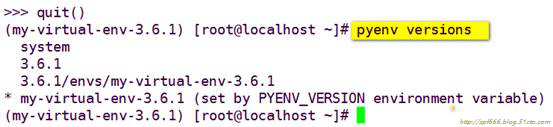
Note: The asterisk indicates the version currently in use
11 ) Exit the virtual environment

As can be seen from the above figure, our real environment is still version 2.6.6, while the virtual environment is version 3.6.1.
12 ) Delete virtual environment

One appears? , Enter a y and continue execution.
If you want to switch between the two versions, type in every time you want to use version 3.6.1:
pyenv activate my-virtual-env-3.6.1
Then enter python, you can enter version 3.6.1.
If you don’t want to use version 3.6.1, just exit and use:
The pyenvdeactivate command exits, and our 2.6.6 version can be used.
What if you don't want to be so troublesome?
Easy to handle, then create a virtual environment to run version 2.6.6.

Note: If you do not specify the python version, the current environment python version will be used by default.
Take a look at all current virtual environments:

Activate the 2.6.6 virtual environment:

Update the database:

So far, the two virtual environments of 2.6.6 and 3.6.1 are available, and now it is more convenient to switch:
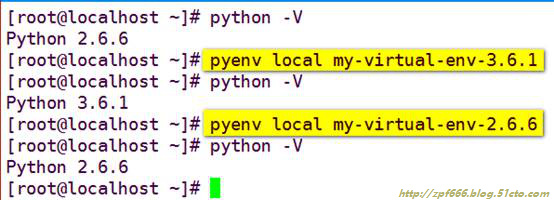
Only need these two commands to switch the two versions back and forth in the current real environment, is it very convenient?
An additional knowledge point description:
If you only have a 3.6.1 virtual environment and not create a 2.6.6 virtual environment, when you execute:
pyenvlocal my-virtual-env-3.6.1
Namely: In the current environment, I switched to version 3.6.1. There is no problem switching over. The main reason is that you have not thought about it. What if you want to use version 2.6.6? Never go back, because there is no 2.6.6 virtual environment, you can't execute:
pyenvlocal my-virtual-env-2.6.6 This command, at this time you go to create a new 2.6.6 virtual environment, it is too late, the specific solution is to go to ~/.bashrc to delete the newly added lines or Comment, then delete the 3.6.1 virtual environment, and finally restart the system to restore the python2.6.6 version to the real environment. Then you can repeat the above experiment again, remember to create two virtual environments, so it is very convenient to switch back and forth.
Recommended Posts