Ubuntu 20.04 enable hidden recording noise reduction function (recommended)
Recently, when I used the kazam of Ubuntu 20.04 to record, I found a problem:
Using the system default configuration for recording, the recorded audio will have obvious noise. I remember that in the WIndow system, there is an option for microphone noise reduction, but I have never found it on Ubuntu. Later, I found a solution to this problem on ask ubuntu. This is a hidden setting and needs to be turned on by modifying the configuration file.
To enable the noise reduction function, we need to modify our system configuration file (the configuration file /etc/pulse/default.pa),
Before modifying, we need to backup this file.
sudo cp /etc/pulse/default.pa /etc/pulse/default.pa._bak
After the backup is complete, we begin to modify this configuration file. Modifying the configuration file is also very simple, we only need to paste the configuration information to the end of the configuration file. We first use vim to open this configuration file:
sudo vim /etc/pulse/dafult.pa
After opening the file, use shift + g to jump to the end of the file, and then copy our configuration information into it.
The detailed configuration information is as follows:
# Active Noise Removal
. ifexists module-echo-cancel.so
load-module module-echo-cancel aec_method=webrtc source_name=mic source_properties=device.description=MicHD
set-default-source "mic".endif
After finishing, we reboot the system sudo reboot.
Then open the settings panel. At this time, we can see that there is an additional option (MicHD) in the drop-down list of our Settings-Sound-Input.
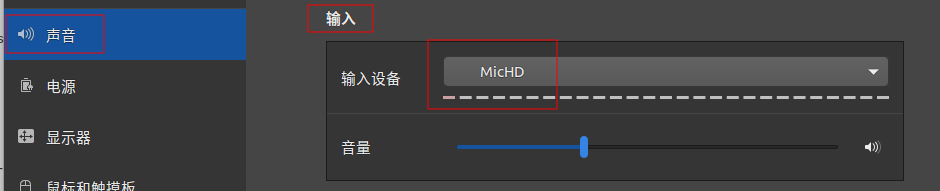
Switch the screen recording software kazam to MicHD
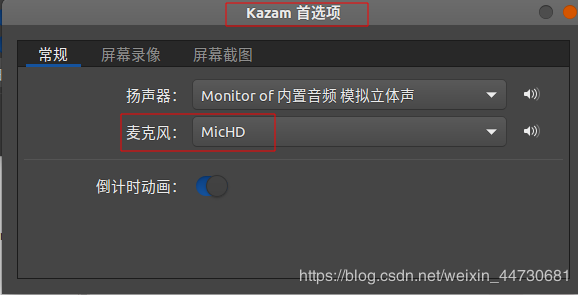
At this time, we choose MicHD, and then use the microphone to record, the recorded audio can basically not hear the background noise.