Centos7 Notes | Hard Disk, Parted Partition, Mount Command, Swap Partition Expansion, Detailed File System,

The hard disk device is composed of a large number of sectors, each sector has a capacity of 512 bytes, the first sector is the most important, and stores the master boot record and partition table information. The master boot record occupies 446, the partition table occupies 64 bytes, and the terminator is 2 bytes. Each record in the partition table occupies 16 bytes, and there are only four partitions at most. In order to solve the insufficient number of partitions, an extended partition is derived . Extended partitions can be used to create logical partitions, with a maximum of 128 logical partitions.
| Hardware device | File name |
|---|---|
| IDE device | /dev/hd[ad] |
| SCSI/SATA/U Disk/SAS | /dev/sd[ap] |
| Floppy drive | /dev/fd[0-1] |
| Printer | /dev/lp[0-15] |
| Optical drive | /dev/cdrom |
| Mouse | /dev/mouse |
| Tape drive | /dev/st0 or /dev/ht0 |
The device name of IDE hard disk interface in Linux is /dev/hda, the device name of SAS, SCSI, SATA hard disk interface in Linux is sda, and the high-efficiency cloud disk hard disk interface will be recognized as /dev/vda, etc.
The smallest storage unit of the hard disk is called Sector (sector), and each Sector stores 512 bytes. When the operating system reads the hard disk, it will not read the sectors one by one. This is very inefficient. In order to improve the reading efficiency, the operating system will read multiple sectors at a time, that is, read multiple sectors at once It is a Block.
Block composed of multiple Sectors is the smallest unit of file access. The common block sizes are 1KB, 2KB, and 4KB. Block is often set to 4KB in Linux, that is, eight consecutive sectors form a block.
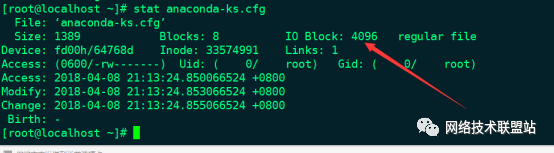
Hard disk partition is divided into (superblock), inode, block,
Superblock: The overall information of the file system, including the inode value, the used size of the block block, the remaining size, and related formats and information. (Record the correspondence between inode and block)
Inode: Record the attributes and information of the file, and generate a number for the storage location of the file (inode value: the storage location of the recorded data (where the block is located in the partition))
Block block is to store the content of the file. Because each inode and block has a number, and each file occupies an inode, there is a block number in which the file data is placed in the inode. If the inode of the file can be found, the block number of the data placed in the file can be found to read the content of the file.
1.1 Parted Partition
Parted partition format: gpt
1 ) Divide all the contents of the hard disk into one partition
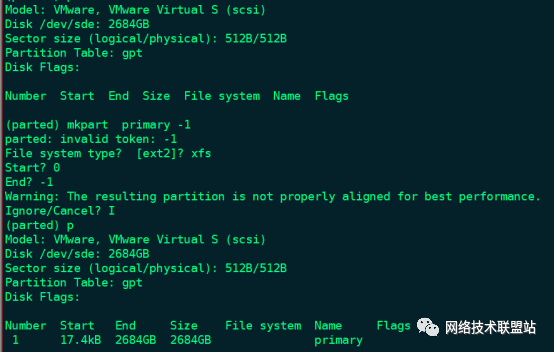
Partition 2.4T hard drive
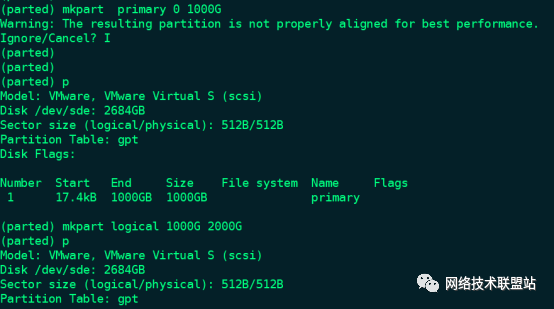
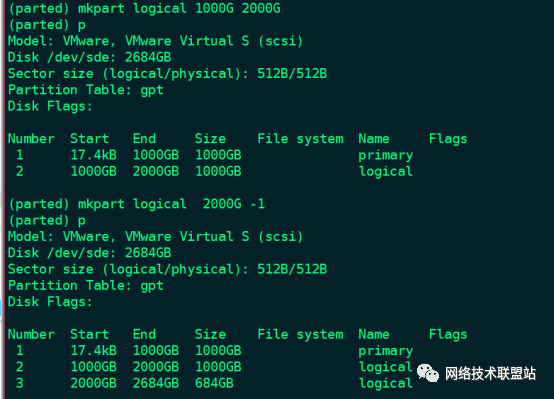
- 1 Parameters: represents all the remaining space.
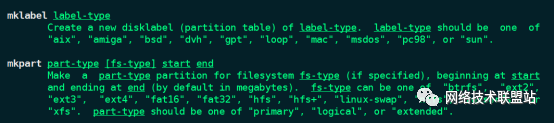
The mklabel and mkpart parameters in the Parted tool
1.2 Mount command example
Mount common cases are demonstrated as follows:
mount  /dev/sdb1  /data mount/dev/sdb1 partition to/data/table of Contents

mount /dev/cdrom   /mnt mount the Cdrom CD to/mnt directory;

mount -t ntfs-3g /dev/sdc /data1 mount/dev/sdc mobile hard drive to/data1 directory;

mount -o remount,rw /Remount in read-write mode/system;

mount -t iso9660 -o loop centos7.iso /mnt will centos7.Mount the iso image file to/mnt directory;

mount -t fat32 /dev/sdd1 /mnt USB flash drive/dev/sdd1 mounted to/mnt/table of Contents;

mount -t nfs 192.168.1.11:/data//mnt will remote 192.168.1.11:/Mount the data directory to the local/mnt directory.
1.3 Detailed File System
- EXT4 is the fourth-generation extended file system (Fourth EXtended filesystem, EXT4) is the log file system under the Linux system, and is the successor version of the EXT3 file system;
- EXT3 type file system supports up to 16TB file system and up to 2TB file;
- EXT4 supports 1EB (1EB=1024PB, 1PB=1024TB) file system and 16TB single file respectively;
- EXT3 only supports 32,000 subdirectories, while EXT4 supports an unlimited number of subdirectories;
- The number of inodes of the EXT4 disk structure supports 4 billion, and the single file size of EXT4 supports 16T (4K block size);
- XFS is a 64-bit file system that supports a single file system with a maximum of 8EB minus 1 byte. The actual deployment depends on the maximum block limit of the host operating system. 64-bit operating systems are commonly used to achieve better performance;
- XFS is a high-performance log file system, originally developed by Silicon Graphics for their IRIX operating system in 1993, and is the default file system for IRIX version 5.3;
1.4 Swap partition expansion
The dd command creates an empty file, if specifies a source /dev/zero (/dev/zero file provides a steady stream of "0" data), of specifies the storage file, bs=defines the size of the block, count=defines the number of blocks
[ root@localhost ~]# dd if=/dev/zero of=/root/test bs=100M count=2020+0 records in20+0 records out
2097152000 bytes(2.1 GB) copied,42.9902 s,48.8 MB/s
 [ root@localhost ~]# mkswap  /root/test
Setting up swapspace version 1, size =2047996 KiB
no label, UUID=13db4d1a-eb96-49fc-8e29-33e51c660ea5
 [ root@localhost ~]# free -hm
  total    used     free    shared  buff/cache   available
Mem:     976M    113M     170M    6.7M      692M        686M
Swap:2.0G     0B       2.0G
[ root@localhost ~]# swapon /root/test
swapon:/root/test: insecure permissions 0644,0600 suggested.[root@localhost ~]# free -hm
  total        used        free      shared  buff/cache   available
Mem:    976M        115M        168M        6.7M        692M        684M
Swap:4.0G          0B        4.0G
[ root@localhost ~]#
[ root@localhost ~]# swapoff  /root/test
[ root@localhost ~]#
[ root@localhost ~]# free -m
  total    used     free   shared  buff/cache   available
Mem:9761141686693685
Swap:204702047
1.5 Experiment with xfs file system superblock
1. Create an XFS file system
[ root@localhost ~]# mkfs.xfs -f /dev/sdb1meta-data=/dev/sdb1
[ root@localhost ~]# cat /etc/fstab |grep sdsb1/dev/sdb1 /test xfs defaults 00[root@localhost ~]# mount -a[root@localhost ~]# df -h
/dev/sdb1                         30G  610M   30G   2%/test
2. Unmount the file system/test, and destroy the superblock
[ root@localhost ~]# umount /test
[ root@localhost ~]# dd if=/dev/zero of=/dev/sdb1 bs=512 count=11+0 records in1+0 records out512 bytes(512 B) copied,0.00251096 s,204 kB/s
3. Mount error again
[ root@localhost ~]# mount -a
mount: wrong fs type, bad option, bad superblock on /dev/sdb1,
   missing codepage or helper program, or other error
   In some cases useful info is found in syslog -try
  dmesg | tail  or so

[ root@localhost ~]# dmesg
[22597379.623449] XFS(sdb1): bad magic number[22597379.624372]XFS(sdb1): SB validate failed
4. Restore superblock
[ root@localhost ~]# xfs_repair /dev/sdb1
Phase 1- find and verify superblock...bad primary superblock -
bad magic number !!!

attempting to find secondary superblock............found candidate secondary superblock...
verified secondary superblock...
writing modified primary superblock
sb realtime bitmap inode 18446744073709551615(NULLFSINO)
inconsistent with calculated value 129
resetting superblock realtime bitmap ino pointer to 129
sb realtime summary inode 18446744073709551615(NULLFSINO)
inconsistent with calculated value 130
resetting superblock realtime summary ino pointer to 130
Phase 2- using internal log
  - zero log...- scan filesystem freespace and inode maps...
sb_icount 0, counted 64
sb_ifree 0, counted 60
sb_fdblocks 7860552, counted 7712768- found root inode chunkPhase 3-for each AG...- scan and clear agi unlinked lists...- process known inodes and perform inode discovery...- agno =0- agno =1- agno =2- agno =3- process newly discovered inodes...
Phase 4- check for duplicate blocks...- setting up duplicate extent list...- check for inodes claiming duplicate blocks...- agno =0- agno =1- agno =2- agno =3
Phase 5- rebuild AG headers and trees...- reset superblock...Phase 6- check inode connectivity...- resetting contents of realtime bitmap and summary inodes
 - traversing filesystem ...- traversal finished ...- moving disconnected inodes to lost+found ...
Phase 7- verify and correct link counts...
Note - stripe unit(0) and width(0) fields have been reset.
Please setwith mount -o sunit=<value>,swidth=<value>done
5. Confirm whether it has been restored
[ root@localhost ~]# mount -a
[ root@localhost ~]# df -h
/dev/sdb1                        30G  610M   30G   2%/test
1.2 Fix ext4 partition superblock** problem**
[ root@localhost ~]# df -h
Filesystem               Size  Used Avail Use% Mounted on
/dev/mapper/centos-root   17G  1.7G   16G  10% /
devtmpfs                 478M     0  478M   0%/dev
tmpfs                    489M     0  489M   0%/dev/shm
tmpfs                    489M  6.7M  482M   2%/run
tmpfs                    489M     0  489M   0%/sys/fs/cgroup
/dev/sda1               1014M  127M  888M  13%/boot
tmpfs                     98M     0   98M   0%/run/user/0/dev/sdb                  20G   33M   20G   1%/test
/dev/sdc1                 20G   44M   19G   1%/test1

[ root@localhost ~]# umount /test1
[ root@localhost ~]# !dd
dd if=/dev/zero of=/dev/sdc1  bs=100M count=1010+0 records in10+0 records out
1048576000 bytes(1.0 GB) copied,1.72432 s,608 MB/s
[ root@localhost ~]# mount -a
mount: wrong fs type, bad option, bad superblock on /dev/sdc1,
  missing codepage or helper program, or other error

  In some cases useful info is found in syslog -try
  dmesg | tail or so.
[ root@localhost ~]# fsck -t ext4 /dev/sdc1
fsck from util-linux 2.23.2
e2fsck 1.42.9(28-Dec-2013)
ext2fs_open2: Bad magic number insuper-block
fsck.ext4: Superblock invalid, trying backup blocks...
fsck.ext4: Bad magic number insuper-block while trying to open /dev/sdc1

The superblock could not be read or does not describe a correct ext2
filesystem.  If the device is valid and it really contains an ext2
filesystem(and not swap or ufs or something else), then the superblock
is corrupt, and you might try running e2fsck with an alternate superblock:
 e2fsck -b 8193<device>
[ root@localhost ~]# mke2fs  -S /dev/sdc1
- S only write superblock and group descriptors
mke2fs 1.42.9(28-Dec-2013)
Filesystem label=
OS type: Linux
Block size=4096(log=2)
Fragment size=4096(log=2)
Stride=0 blocks, Stripe width=0 blocks
1310720 inodes,5242631 blocks
262131 blocks(5.00%) reserved for the super user
First data block=0
Maximum filesystem blocks=4294967296160 block groups
32768 blocks per group,32768 fragments per group
8192 inodes per group
Superblock backups stored on blocks:32768,98304,163840,229376,294912,819200,884736,1605632,2654208,4096000

Allocating group tables: done
Writing superblocks and filesystem accounting information: done
[ root@localhost ~]# mount /dev/sdc1
mount: mount /dev/sdc1 on /test1 failed: Stale file handle
[ root@localhost ~]#
[ root@localhost ~]# fsck -t ext4 -y /dev/sdc1
Check the specific type of file system (ext4), and automatically repair after -y detection is completed
fsck from util-linux 2.23.2
e2fsck 1.42.9(28-Dec-2013)/dev/sdc1 contains a file system with errors, check forced.
Resize inode not valid.  Recreate? yes
Pass 1: Checking inodes, blocks, and sizes
Root inode is not a directory.  Clear? yes
Pass 2: Checking directory structure
Pass 3: Checking directory connectivity
Root inode not allocated.  Allocate? ye
/lost+found not found.  Create? yes
Pass 4: Checking reference counts
Pass 5: Checking group summary information
Block bitmap differences:+(0--1539)+(32768--34306)+(65536--66049)+(98304--99842)+(131072--131585)+(163840--165378)+(196608--197121)+(229376--230914)
Fix? yes
Free blocks count wrong for group #0(31227, counted=31226).
Fix? yes
Free blocks count wrong(5149114, counted=5149113).
Fix? yes
Inode bitmap differences:+1+(3--10)
Fix? yes
Free inodes count wrong for group #0(8191, counted=8181).
Fix? yes
Directories count wrong for group #0(1, counted=2).
Fix? yes
Free inodes count wrong(1310719, counted=1310709).
Fix? yes
/dev/sdc1:***** FILE SYSTEM WAS MODIFIED *****/dev/sdc1:11/1310720files(0.0% non-contiguous),93518/5242631 block
[ root@localhost ~]# df -h
Filesystem               Size  Used Avail Use% Mounted on
/dev/mapper/centos-root   17G  1.7G   16G  10% /
devtmpfs                 478M     0  478M   0%/dev
tmpfs                    489M     0  489M   0%/dev/shm
tmpfs                    489M  6.7M  482M   2%/run
tmpfs                    489M     0  489M   0%/sys/fs/cgroup
/dev/sda1               1014M  127M  888M  13%/boot
tmpfs                     98M     0   98M   0%/run/user/0/dev/sdb                  20G   33M   20G   1%/test
/dev/sdc1                 20G   44M   19G   1%/test1

Study hard and work hard to make youth more radiant

The long road can be walked step by step, and the short road can’t be reached without moving your feet.