Python's little-known stories
It takes about 10 minutes to read this article.
Python, is a beautifully designed, interpreted high-level language. It provides many features that make programmers feel comfortable. But sometimes, some of the output results of Python may not seem so obvious to beginners.
This interesting project aims to collect incomprehensible and counter-intuitive examples and little-known features in Python, and try to discuss the real principles behind these phenomena!
Although some of the following examples may not make you think of WTFs, they may still tell you some interesting features of Python that you don’t know. I think this is a good way to learn the inner principles of programming languages, and I believe You will also have fun from it!
If you are a more experienced Python programmer, you can try to challenge to see if you can find the correct answer to the examples in one go. You may be familiar with some of these examples, then this may arouse you to step on these pits. Sweet memories of time.
So, let's get started...
**Note: ** All examples have been tested on the interactive interpreter of Python 3.5.2, and should be applicable to all Python versions unless otherwise specified.
I personally recommend that it is best to read the following examples in turn, and for each example:
- Read the code at the beginning of the setup example carefully. If you are an experienced Python programmer, you can expect the following results most of the time.
- Read the output,
- Confirm that the result is as you expected.
- Confirm if you know the rationale behind this.
- If you don’t know, take a deep breath and read the instructions
- If you know, give yourself a reward, and then go to the next example.
> Strings can be tricky sometimes/ subtle string*
>>> a ="some_string">>>id(a)140420665652016>>>id("some"+"_"+"string") #Note that the id values of the two are the same.140420665652016
>>> a ="wtf">>> b ="wtf">>> a is b
True

>>> a ="wtf!">>> b ="wtf!">>> a is b
False

>>> a, b ="wtf!","wtf!">>> a is b #Only applicable to 3.7 or less,3.The return result after 7 is False.
True
>>>' a'*20 is 'aaaaaaaaaaaaaaaaaaaa'
True
>>>' a'*21 is 'aaaaaaaaaaaaaaaaaaaaa'
False
It's easy to understand, right?
**? Description: **
- These behaviors are due to the fact that Cpython will try to use existing immutable objects instead of creating a new object every time when compiling and optimizing. (This behavior is called string interning [string interning])
- After the resident occurs, many variables may point to the same string object in memory. (thus saving memory)
- In the above code, the string is implicitly resident. When the implicit resident occurs depends on the specific implementation. Here are some methods to guess whether the string will be resident:
- All strings of length 0 and length 1 are resident.
- The string is implemented at compile time (
'wtf'will be resident, but''.join(['w','t','f']will not be resident) - If the string contains only letters, numbers or underscores, it will be resident. So
'wtf!'is not resident because it contains!. CPython's implementation of this rule can be found here. - When the values of
aandbare set to"wtf!"on the same line, the Python interpreter will create a new object, and then reference the second variable at the same time (Translation: only applicable to 3.7 or less, details Please see here for the situation). If you perform assignment operations on different rows, it will not "know" that there is already awtf!Object (because"wtf!"is not implicitly resident in the way mentioned above). It is a compiler optimization, especially suitable for interactive environments. - Constant folding is a peephole optimization technique in Python. This means that the expression
'a'*20will be replaced with'aaaaaaaaaaaaaaaaaaaa'to reduce runtime Clock cycle. Only strings with a length less than 20 will undergo constant folding. (Why? Imagine the size of the.pycfile generated due to the expression'a'*10**10). Related source code The implementation is here.
> Time for some hash brownies!/It's time for some cake!
- Hash brownie refers to a kind of cake that contains cannabis, so here is a pun
some_dict ={}
some_dict[5.5]="Ruby"
some_dict[5.0]="JavaScript"
some_dict[5]="Python"
Output:
>>> some_dict[5.5]"Ruby">>> some_dict[5.0]"Python">>> some_dict[5]"Python"
" "Python" eliminates the existence of "JavaScript"?
**? Description: **
- The Python dictionary determines whether two keys are the same by checking whether the key values are equal and comparing the hash values.
- Immutable objects with the same value always have the same hash value in Python.
>>>5==5.0
 True
 >>> hash(5)==hash(5.0)
 True
**Note: ** Objects with different values may also have the same hash value (hash collision).
- When executing the
some_dict[5] = "Python"statement, because Python recognizes5and5.0as the same key ofsome_dict, the existing value "JavaScript" is overwritten by "Python". - This StackOverflow answer beautifully explains the rationale behind this.
**> Return return everywhere!/Return everywhere! **
def some_func():try:return'from_try'finally:return'from_finally'
Output:
>>> some_func()'from_finally'
**? Description: **
- After executing
return,breakorcontinuein thetryof the "try...finally" statement, thefinallyclause will still be executed. - The return value of the function is determined by the last executed
returnstatement. Since thefinallyclause must be executed, thereturnin thefinallyclause will always be the last executed statement.
**> Deep down, we're all the same./In essence, we are all the same. ***
classWTF:
 pass
Output:
>>> WTF()==WTF() #Two different objects should not be equal
False
>>> WTF() is WTF() #Not the same
False
>>> hash(WTF())==hash(WTF()) #The hash value should also be different
True
>>> id(WTF())==id(WTF())
True
**? Description: **
- When the
idfunction is called, Python creates an object of theWTFclass and passes it to theidfunction. Then theidfunction gets its id value (that is, the memory address), and then discards the object. The object is Was destroyed. - When we perform this operation twice in a row, Python will assign the same memory address to the second object. Because (in CPython) the id function uses the memory address of the object as the id value of the object, so the value of the two objects The id value is the same.
- In summary, the id value of an object is only unique during the life cycle of the object. After the object is destroyed or before it is created, other objects can have the same id value.
- So why the result of the
isoperation isFalse? Let's look at this code.
classWTF(object):
 def __init__(self):print("I")
 def __del__(self):print("D")
Output:
>>> WTF() is WTF()
 I
 I
 D
 D
 False
 >>> id(WTF())==id(WTF())
 I
 D
 I
 D
 True
As you can see, the order of object destruction is responsible for all the differences.
> For what?/why?
some_string ="wtf"
some_dict ={}for i, some_dict[i]inenumerate(some_string):
 pass
Output:
>>> some_dict #Index dictionary created.{0:'w',1:'t',2:'f'}
**? Description: **
- The definition of
forin Python syntax is:
for_stmt:'for' exprlist 'in' testlist ':' suite ['else'':' suite]
Among them, exprlist refers to the allocation target. This means that an operation similar to {exprlist} = (next_value} is performed for each item in the iterable object.
An interesting example illustrates this:
for i inrange(4):print(i)
  i =10
Output:
0123
Do you think this loop will only run once?
**? Description: **
- Due to the way loops work in Python, the assignment statement
i = 10does not affect the iteration loop. Before each iteration starts, the next element generated by the iterator (here,range(4)) is unpacked And assigned to the variable of the target list (here refers toi). - In each iteration, the
enumerate(some_string)function generates a new valuei(counter increment) and obtains a character fromsome_string. Then the dictionarysome_dictkeyi(just assigned ) Is set to this character. The expansion of the loop in this example can be simplified to:
>>> i, some_dict[i]=(0,'w')>>> i, some_dict[i]=(1,'t')>>> i, some_dict[i]=(2,'f')>>> some_dict
> Evaluation time discrepancy/execution timing difference
array =[1,8,15]
g =(x for x in array if array.count(x)>0)
array =[2,8,22]
Output:
>>> print(list(g))[8]
array_1 =[1,2,3,4]
g1 =(x for x in array_1)
array_1 =[1,2,3,4,5]

array_2 =[1,2,3,4]
g2 =(x for x in array_2)
array_2[:]=[1,2,3,4,5]
Output:
>>> print(list(g1))[1,2,3,4]>>>print(list(g2))[1,2,3,4,5]
? Description
- In generator expressions, the in clause is executed at the time of declaration, while the conditional clause is executed at runtime.
- So before running,
arrayhas been reassigned to[2, 8, 22], so for the previous1,8and15, only the result ofcount(8)is greater than0, so the generator will only generate8. - The difference in the output of
g1andg2in the second part is caused by the way the variablesarray_1andarray_2are reassigned. - In the first case,
array_1is bound to the new object[1,2,3,4,5], because theinclause is executed at the time of declaration, so it still refers to the old object[1,2,3,4](not destroyed). - In the second case, the slice assignment of
array_2will update the same old object[1,2,3,4]in place to[1,2,3,4,5]. Thereforeg2andarray_2still refer to the same object (this object has now been updated to[1,2,3,4,5]).
> is is not what it is!/Unexpectedly is!
Below is a very famous example on the Internet.
>>> a =256>>> b =256>>> a is b
True

>>> a =257>>> b =257>>> a is b
False

>>> a =257; b =257>>> a is b
True
**? Description: **
The difference between is and ==
The isoperator checks whether two operands refer to the same object (that is, it checks whether the two budget objects are the same).==The operator compares whether the values of two operands are equal.- Therefore,
ismeans the same reference,==means the value is equal. The following example can illustrate this point well,
>>>[]==[]
 True
 >>>[] is [] #The two empty lists are located at different memory addresses.
 False
**256 Is an existing object, and 257 is not **
When you start Python, the values from -5 to 256 are already assigned. These numbers are suitable for being prepared in advance because they are frequently used.
Quoted from https://docs.python.org/3/c-api/long.html
The current implementation keeps an array of integer objects for all integers between -5 and 256. When you create an integer in this range, you only need to return a reference to the existing object. So it is possible to change the value of 1. . I suspect this behavior is undefined behavior in Python. :-)
>>> id(256)10922528>>> a =256>>> b =256>>>id(a)10922528>>>id(b)10922528>>>id(257)140084850247312>>> x =257>>> y =257>>>id(x)140084850247440>>>id(y)140084850247344
The interpreter here is not smart enough to realize that we have created an integer 257 when executing y = 257, so it creates another object in memory.
When a and b are initialized with the same value in the same line, they will point to the same object.
>>> a, b =257,257>>>id(a)140640774013296>>>id(b)140640774013296>>> a =257>>> b =257>>>id(a)140640774013392>>>id(b)140640774013488
- When a and b are set to
257on the same line, the Python interpreter will create a new object and refer to the second variable at the same time. If you do it on different lines, it will not "know" that it has been There is a257object. - This is a compiler optimization made especially for interactive environments. When you enter two lines in the real-time interpreter, they will be compiled separately, so they will also be optimized separately. If you try in the
.pyfile In this example, you will not see the same behavior because the file is compiled all at once.
> A tic-tac-toe where X wins in the first attempt!/Swipe!
# We first initialize a variable row
row =[""]*3 #row i['','','']
# And create a variable board
board =[row]*3
Output:
>>> board
[['','',''],['','',''],['','','']]>>> board[0]['','','']>>> board[0][0]''>>> board[0][0]="X">>> board
[[' X','',''],['X','',''],['X','','']]
Have we ever assigned 3 "X"s?
**? Description: **
When we initialize the row variable, the following picture shows the situation in memory.
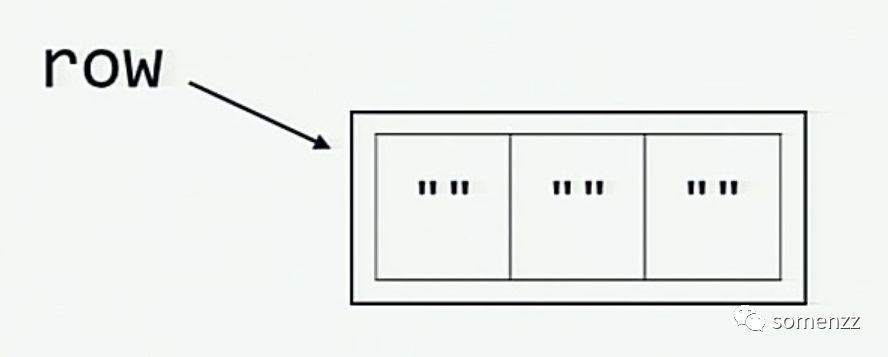
When the board is initialized by multiplying the row, the situation in the memory is as shown in the figure below (each element board[0], board[1] and board[2] are all Refers to the same list as row.)
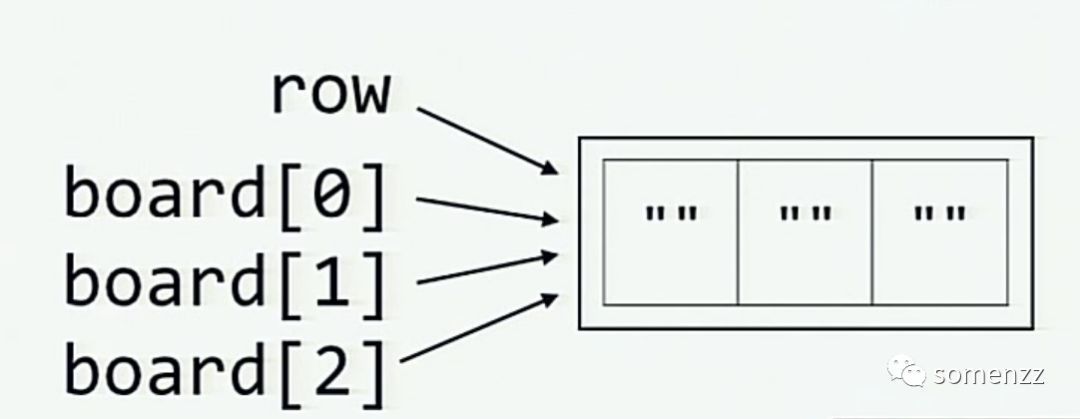
We can avoid this situation by not using variable row to generate board. (This issue proposes this requirement.)
>>> board =[['']*3for _ inrange(3)]>>> board[0][0]="X">>> board
[[' X','',''],['','',''],['','','']]
> The sticky output function/troublesome output
funcs =[]
results =[]for x inrange(7):
 def some_func():return x
 funcs.append(some_func)
 results.append(some_func()) #Note that this function is executed

funcs_results =[func()for func in funcs]
Output:
>>> results
[0,1,2,3,4,5,6]>>> funcs_results
[6,6,6,6,6,6,6]
Even if the value of x before adding some_func to funcs in each iteration is different, all functions still return 6.
// Another example
>>> powers_of_x =[lambda x: x**i for i inrange(10)]>>>[f(2)for f in powers_of_x][512,512,512,512,512,512,512,512,512,512]
**? Description: **
- When defining a function inside a loop, if the function uses a loop variable in its body, the closure function will be bound to the loop variable, not its value. Therefore, all functions are used and finally assigned to the variable Is calculated.
- The expected result can be obtained by passing the loop variable as a named variable to the function. Why is this feasible? Because this will define a local variable again within the function.
 funcs =[]for x inrange(7):
  def some_func(x=x):return x
  funcs.append(some_func)
**Output:**
>>> funcs_results =[func()for func in funcs]>>> funcs_results
    [0,1,2,3,4,5,6]
> is not … is not is (not …)/is not … is not is (not …)
>>>' something' is not None
True
>>>' something'is(not None)
False
**? Description: **
is notis a single binary operator, which is different from usingisandnotseparately.- If the variables on both sides of the operator point to the same object, the result of
is notisFalse, otherwise the result isTrue.
> The surprising comma/accidental comma
Output:
>>> def f(x, y,):...print(x, y)...>>> def g(x=4, y=5,):...print(x, y)...>>> def h(x,**kwargs,):
 File "<stdin>", line 1
 def h(x,**kwargs,):^
SyntaxError: invalid syntax
>>> def h(*args,):
 File "<stdin>", line 1
 def h(*args,):^
SyntaxError: invalid syntax
**? Description: **
- In the formal parameter list of Python functions, trailing commas are not necessarily legal.
- In Python, part of the parameter list is defined with a leading comma, and some with a trailing comma. This conflict causes the comma to be caught in the middle, and there is no rule to define it. (Translation: I am also very confused by this sentence, I can only force Turn it over. See the discussion thread below for a detailed explanation at a glance
- Note: The trailing comma problem has been fixed in Python 3.6. This post briefly discusses the different uses of trailing commas in Python.
> Backslashes at the end of string/Backslashes at the end of string
Output:
>>> print("\\ C:\\")
\ C:\
>>> print(r"\ C:")
\ C:>>>print(r"\ C:\")

 File "<stdin>", line 1print(r"\ C:\")^
SyntaxError: EOL while scanning string literal
**? Description: **
- In the original string beginning with
r, the backslash has no special meaning.
>>> print(repr(r"wt\"f"))'wt\\"f'
- What the interpreter does is simply change the behavior of the backslash, so it will directly pass the backslash and the next character. This is why the backslash does not work at the end of the original string.
> not knot!/Don't entangle!
x = True
y = False
Output:
>>> not x == y
True
>>> x == not y
 File "<input>", line 1
 x == not y
           ^
SyntaxError: invalid syntax
**? Description: **
- The precedence of operators affects the evaluation order of expressions, and the precedence of the
==operator in Python is higher than thenotoperator. - So
not x == yis equivalent tonot (x == y), and also equivalent tonot (True == False), and the final operation result isTrue. - The reason why
x == not ythrows aSyntaxErrorexception is because it will be considered equivalent to(x == not) yinstead of thex == (not y)`. - The interpreter expects the
nottoken to be part of thenot inoperator (because the==andnot inoperators have the same precedence), but it cannot find theinafter thenottoken Flag, so aSyntaxErrorexception will be thrown.
> Half triple-quoted strings/three quotation marks
Output:
>>> print('wtfpython''')
wtfpython
>>> print("wtfpython""")
wtfpython
>>> # The following statement will throw`SyntaxError`abnormal
>>> # print('''wtfpython')>>> # print("""wtfpython")
**? Description: **
- Python provides implicit string linking, for example,
>>> print("wtf""python")
 wtfpython
 >>> print("wtf""") # or "wtf"""
 wtf
'''And""are also string delimiters in Python. When the Python interpreter encounters three quotation marks first, it will try to find three terminating quotation marks as delimiters. If it does not exist, it will cause aSyntaxErrorException.
> Midnight time doesn't exist?/Doesn't exist midnight?
from datetime import datetime

midnight =datetime(2018,1,1,0,0)
midnight_time = midnight.time()

noon =datetime(2018,1,1,12,0)
noon_time = noon.time()if midnight_time:print("Time at midnight is", midnight_time)if noon_time:print("Time at noon is", noon_time)
Output:
(' Time at noon is', datetime.time(12,0))
midnight_time is not output.
**? Description: **
Before Python 3.5, if datetime.timeObject Storage is UTC's midnight time (translation: is 00:00), then its boolean value will be considered as False. When using If obj: statement is used to check whether obj is null or some "empty" value, it is easy to make mistakes.
> What's wrong with booleans?/Booleans?
# A simple example,Count the number of boolean values and integer values in the iterable objects below
mixed_list =[False,1.0,"some_string",3, True,[], False]
integers_found_so_far =0
booleans_found_so_far =0for item in mixed_list:ifisinstance(item, int):
  integers_found_so_far +=1
 elif isinstance(item, bool):
  booleans_found_so_far +=1
Output:
>>> integers_found_so_far
4>>> booleans_found_so_far
0
another_dict ={}
another_dict[True]="JavaScript"
another_dict[1]="Ruby"
another_dict[1.0]="Python"
Output:
>>> another_dict[True]"Python"
>>> some_bool = True
>>>" wtf"*some_bool
' wtf'>>> some_bool = False
>>>" wtf"*some_bool
''
**? Description: **
- Boolean is a subclass of
int
>>> isinstance(True, int)
 True
 >>> isinstance(False, int)
 True
- So the integer value of
Trueis1, and the integer value ofFalseis0.
>>> True ==1==1.0 and False ==0==0.0
 True
- For the principle behind it, please see this StackOverflow answer.
> Class attributes and instance attributes/Class attributes and instance attributes
classA:
 x =1classB(A):
 pass

classC(A):
 pass
Output:
>>> A.x, B.x, C.x(1,1,1)>>> B.x =2>>> A.x, B.x, C.x(1,2,1)>>> A.x =3>>> A.x, B.x, C.x(3,2,3)>>> a =A()>>> a.x, A.x(3,3)>>> a.x +=1>>> a.x, A.x(4,3)
classSomeClass:
 some_var =15
 some_list =[5]
 another_list =[5]
 def __init__(self, x):
  self.some_var = x +1
  self.some_list = self.some_list +[x]
  self.another_list +=[x]
Output:
>>> some_obj =SomeClass(420)>>> some_obj.some_list
[5,420]>>> some_obj.another_list
[5,420]>>> another_obj =SomeClass(111)>>> another_obj.some_list
[5,111]>>> another_obj.another_list
[5,420,111]>>> another_obj.another_list is SomeClass.another_list
True
>>> another_obj.another_list is some_obj.another_list
True
**? Description: **
- Class variables and instance variables are handled internally through the dictionary of the class object (translation: it is the
**dict**attribute). If you can't find it in the dictionary of the current class, go to its parent class. +=Operators modify mutable objects in place, instead of creating new ones. Therefore, modifying the properties of one instance will affect other instance and class properties.
> yielding None/Generate None
some_iterable =('a','b')

def some_func(val):return"something"
Output:
>>>[ x for x in some_iterable]['a','b']>>>[(yield x)for x in some_iterable]<generator object <listcomp> at 0x7f70b0a4ad58>>>>list([(yield x)for x in some_iterable])['a','b']>>>list((yield x)for x in some_iterable)['a', None,'b', None]>>>list(some_func((yield x))for x in some_iterable)['a','something','b','something']
**? Description: **
- The source and explanation can be found here: https://stackoverflow.com/questions/32139885/yield-in-list-comprehensions-and-generator-expressions
- Related bug report: http://bugs.python.org/issue10544
> Mutating the immutable!/It’s hard for a strong man
some_tuple =("A","tuple","with","values")
another_tuple =([1,2],[3,4],[5,6])
Output:
>>> some_tuple[2]="change this"
TypeError:'tuple' object does not support item assignment
>>> another_tuple[2].append(1000) #No error here
>>> another_tuple([1,2],[3,4],[5,6,1000])>>> another_tuple[2]+=[99,999]
TypeError:'tuple' object does not support item assignment
>>> another_tuple([1,2],[3,4],[5,6,1000,99,999])
I thought tuples are immutable...
**? Description: **
- Reference https://docs.python.org/2/reference/datamodel.html
Immutable sequence
Once created, an object of an immutable sequence cannot be changed. (If the object contains references to other objects, these other objects may be mutable and may be modified; however, the collection of objects directly referenced by the immutable object cannot be changed .) +=The operator modifies the list in place. The element assignment operation does not work, but when the exception is thrown, the element has been modified in place.
( Translation: For immutable objects, this refers to tuple, += is not an atomic operation, but two actions of extend and =, where the = operation will throw an exception, but the extend operation has been The modification was successful. Detailed explanation can be found here)
> The disappearing variable from outer scope/The disappearing external variable
e =7try:
 raise Exception()
except Exception as e:
 pass
Output (Python 2.x):
>>> print(e)
# prints nothing
Output (Python 3.x):
>>> print(e)
NameError: name 'e' is not defined
**? Description: **
- Source: https://docs.python.org/3/reference/compound_stmts.html#except
When usingasto assign an exception to the target, the exception will be cleared at the end of the except clause.
It's like
 except E as N:
  foo
Will be translated into
 except E as N:try:
   foo
  finally:
   del N
This means that the exception must be assigned to other variables before it can be referenced after the except clause. The reason why the exception is cleared is that the additional traceback information (trackback) will be formed with the stack frame Circular references, so that all local variables in the stack frame are active before the next garbage collection occurs. (Translation: that is, will not be collected)
- Clause has no independent scope in Python. Everything in the example is in the same scope, so the variable
ewill be deleted due to the execution of theexceptclause. For those with independent internal scope The situation is different for functions. The following example illustrates this:
  def f(x):del(x)print(x)

  x =5
  y =[5,4,3]
**Output:**
>>> f(x)
  UnboundLocalError: local variable 'x' referenced before assignment
  >>> f(y)
  UnboundLocalError: local variable 'x' referenced before assignment
  >>> x
  5>>> y
     [5,4,3]
- In Python 2.x, the
Exception()instance is assigned to the variablee, so when you try to print the result, its output is empty. (Translation: a normal Exception instance is printed out as empty)
Output (Python 2.x):
>>> e
 Exception()>>> print e
 # Nothing is printed!
> When True is actually False/真亦假
True = False
if True == False:print("I've lost faith in truth!")
Output:
I've lost faith in truth!
**? Description: **
- Initially, Python didn’t have the bool type (people use 0 for false values and non-zero values such as 1 for true values). Later they added the types
True,False, andbool, but, in order to For backward compatibility, they can't setTrueandFalseas constants, but set them as built-in variables. - Since Python 3 no longer requires backward compatibility, this problem can finally be fixed, so this example cannot be executed in Python 3.x!
> From filled to None in one instruction…/from there to nothing…
some_list =[1,2,3]
some_dict ={"key_1":1,"key_2":2,"key_3":3}

some_list = some_list.append(4)
some_dict = some_dict.update({"key_4":4})
Output:
>>> print(some_list)
None
>>> print(some_dict)
None
**? Description: **
Most methods of modifying sequence/mapping objects, such as list.append, dict.update, list.sort, etc., modify the object in place and return None. The reason for this is that if The operation can be done in situ, so you can avoid creating a copy of the object to improve performance. (refer here)
> Subclass relationships*
Output:
>>> from collections import Hashable
>>> issubclass(list, object)
True
>>> issubclass(object, Hashable)
True
>>> issubclass(list, Hashable)
False
The subclass relationship should be transitive, right? (i.e., if A is a subclass of B and B is a subclass of C, then Ashould be C Subclass.)
**? Description: **
- The subclass relationship in Python does not have to be transitive. Anyone can define
**subclasscheck**in the metaclass at will. - When
issubclass(cls, Hashable)is called, it just looks for the "**hash__" method or the method inherited from "__hash**" incls. - Since
objectis hashable, butlistis not hashable, it breaks this transitive relationship. - A more detailed explanation can be found here.
> The mysterious key type conversion/The mysterious key type conversion*
classSomeClass(str):
 pass

some_dict ={'s':42}
Output:
>>> type(list(some_dict.keys())[0])
str
>>> s =SomeClass('s')>>> some_dict[s]=40>>> some_dict #expected:Two different key-value pairs
{' s':40}>>>type(list(some_dict.keys())[0])
str
**? Description: **
- Since
SomeClasswill automatically inherit the**hash**method fromstr, the hash value of thesobject and the"s"string are the same. - And
SomeClass("s") == "s"isTruebecauseSomeClassalso inherits the**eq**method of thestrclass. - Since the hash values of the two are the same and equal, they represent the same key in the dictionary.
- If we want to achieve the desired function, we can redefine the
**eq**method ofSomeClass.
classSomeClass(str):
 def __eq__(self, other):return(type(self) is SomeClass
   and type(other) is SomeClass
   and super().__eq__(other))

 # When we customize__eq__Method time,Python will no longer automatically inherit__hash__method
 # So we also need to define it
 __ hash__ = str.__hash__

 some_dict ={'s':42}
Output:
>>> s =SomeClass('s')>>> some_dict[s]=40>>> some_dict
 {' s':40,'s':42}>>> keys =list(some_dict.keys())>>>type(keys[0]),type(keys[1])(__main__.SomeClass, str)
> Let's see if you can guess this?/See if you can guess this?
a, b = a[b]={},5
Output:
>>> a
{5:({...},5)}
**? Description: **
- According to the Python language reference, the form of the assignment statement is as follows
( target_list "=")+(expression_list | yield_expression)
The assignment statement evaluates the expression list (remember this can be a single expression or a comma-separated list, the latter returns a tuple) and assigns a single result object to each item in the target list from left to right.
( The+in target_list "=")+means there can be one or more target lists. In this example, the target lists area, banda[b](note the expression There can only be one expression list, in our example it is(), 5).- After the expression list is calculated, the value is automatically unpacked and assigned to the target list from left to right. Therefore, in our example, first combine
(), 5tuples Assign values toa, b, then we can geta = ()andb = 5. aThe assigned()is a mutable object.- The second target list is
a[b](you may think that an error will be reported here, because in the previous statement, bothaandbhave not yet been defined. But don’t forget, we just addedaAssign()and assignbto5). - Now, we will create a circular reference by setting the value of the key
5in the dictionary to the tuple({}, 5)(the{...}in the output refers to the same object asa) . The following is a simpler circular reference example
>>> some_list = some_list[0]=[0]>>> some_list
 [[...]]>>> some_list[0][[...]]>>> some_list is some_list[0]
 True
 >>> some_list[0][0][0][0][0][0]== some_list
 True
Our example is this situation (a[b][0] and a are the same object)
- To summarize, you can also disassemble the example into
 a, b ={},5
 a[b]= a, b
And it can be proved that it is a circular reference by a[b][0] and a being the same object
>>> a[b][0] is a
 True
If you’re tired, let’s take a break, and we will continue to share similar stories later.
( Finish)