Python Automated Office | A colleague asked me to help write up 178 daily Word newspapers! Stop it!

Author: Ryoko
Source: Bump Data
Not long ago, a colleague had a project to talk to the leader, and part of the work was based on the daily data in the excel sheet, organized into a daily report and written in word according to the format.
Good guys! It takes a full 178 days to make up. If you need to copy and paste, isn’t it the liver to vomit blood? (You can solve it by yourself!)
Ok ojbk, it's time to offer Python office automation.

1. Basic data sorting
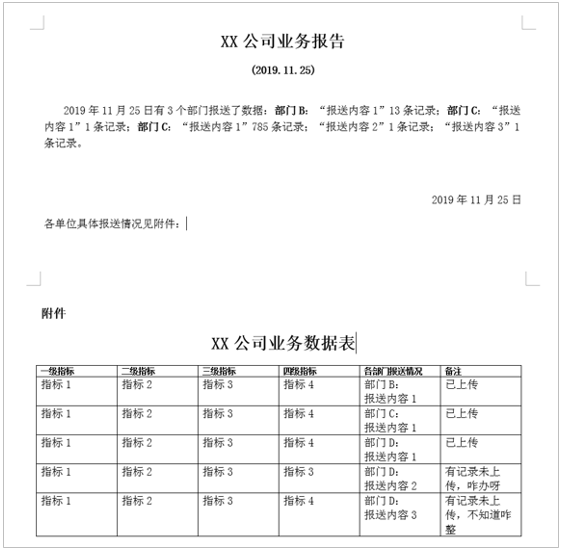
First, let's take a look at the requirements of data samples and output documents (sensitive data has been processed harmoniously): There are n sub-tables in the original excel file, and each sub-table is data for one day. There are no records and there are records (number of departments) ≥ 1, the number of records in each department ≥ 1) In two cases, it needs to be sorted into two daily reports, one is a plain text description, and the other is a document with a table.


Roll up your sleeves and curse!
Oh no, start writing code!
First, combine the sub-tables into one, which is convenient for the unified observation of the rules of daily data recording, and also convenient for later processing. Use the xlrd library to read the table, get the name of the active table in the workbook, and then use the pandas library to traverse the sub-tables to merge. The data in the dataframe format has excellent compatibility with the excel table.
def merge_sheet(filepath): #Combine multiple subtables with the same header
 wb = xlrd.open_workbook(filepath)
 sheets = wb.sheet_names()
 df_total = pd.DataFrame()for name in sheets:
  df = pd.read_excel(filepath, sheet_name=name)
  df_total = df_total.append(df)
 df_total.to_excel("merge.xlsx", index=False)
Two, output two daily reports
(1) Plain text document
According to the daily report format that needs to be output, to output the daily report without records, just read the [Date] column and the [Report Department] column, and the [Report Department] is listed as the non-date period and output daily. Observe the data in the original table, and directly filter the data with no reported records and drop them into the sub-table named "None".
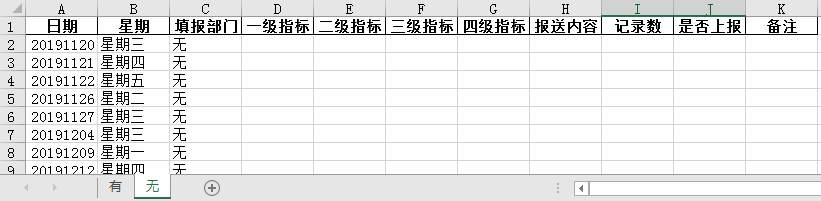
Here you can also use .groupby() to group the [Department to fill in] column, and choose the "None" group, but one thing to note: Although Python is very powerful, you don't need to leave everything to Python.
Import libraries and modules are as follows:
import pandas as pd
import xlrd
from docx import Document
from docx.shared import Pt
from docx.shared import Inches
from docx.oxml.ns import qn
from docx.enum.text import WD_PARAGRAPH_ALIGNMENT
from docx.enum.section import WD_ORIENTATION
The basic process is very simple, read in the data without reporting records and output word documents by date.
def wu_to_word(filepath):
 df = pd.read_excel(filepath, sheet_name="no")
 date_list =list(df['date'])for d in date_list:
  filename = wordname+str(d)+").docx"  #Output word file name
  title ="("+str(d)[:4]+"."+str(d)[4:6]+"."+str(d)[6:8]+")"  #Subtitle date XXXX.XX.XX
  word =str(d)[:4]+"year"+str(d)[4:6]+"month"+str(d)[6:8]+"day"  # 开头、落款day期XXXXyearXXmonthXXday
  wu_doc(title, word, filename)print(f"file:{filename},{title},{word}Saved")
The same content that will be used in each document can also be set first.
wordname = "XX company business data sheet (daily report" all_title = "XX company business report"
It is relatively easy to generate word content without adding a table. Pay attention to adjusting the format.
def wu_doc(title,word,filename):  #Pass in the date of the subtitle, the beginning of the paragraph and the date of signing, and the file name
 doc =Document()  #Create document object
 section = doc.sections[0]  #Get page node
section.orientation = WD_ORIENTATION.LANDSCAPE  #Set the page orientation to horizontal
new_width, new_height = section.page_height, section.page_width  #Swap the original length and width to realize the vertical page into horizontal
 section.page_width = new_width
 section.page_height = new_height
 # Global settings for paragraphs
 doc.styles['Normal'].font.name = u'Song Ti'  #Font
 doc.styles['Normal']._element.rPr.rFonts.set(qn('w:eastAsia'), u'Song Ti')  #Chinese fonts need to add this setting
 doc.styles['Normal'].font.size =Pt(14)  #Font size four corresponds to 14
 t1 = doc.add_paragraph()  #Add a paragraph
 t1.paragraph_format.alignment = WD_PARAGRAPH_ALIGNMENT.CENTER  #Centered
 _ t1 = t1.add_run(all_title)  #Add paragraph content (headline)
 _ t1.bold = True  #Bold
 _ t1.font.size =Pt(22)
 t2 = doc.add_paragraph()  #Add another paragraph
 t2.paragraph_format.alignment = WD_PARAGRAPH_ALIGNMENT.CENTER  #Centered
 _ t2 = t2.add_run(title +"\n")  #Add paragraph content (subtitle)
 _ t2.bold = True
 doc.add_paragraph(word +"no record.\n\n").paragraph_format.first_line_indent =Inches(0.35)  #Add paragraph while adding content, and set the first line indent
 doc.add_paragraph(word).paragraph_format.alignment = WD_PARAGRAPH_ALIGNMENT.RIGHT  #Signing date right aligned
 doc.save(dir+filename)  #By path+File name save
carried out! Just write 104 daily newspapers with no record of reporting. Let's just do the business, and I don't want to study the rest hahaha.

(2) Attached form documents
The processing of the reported data is relatively complicated. Let's take a look at the original data first.
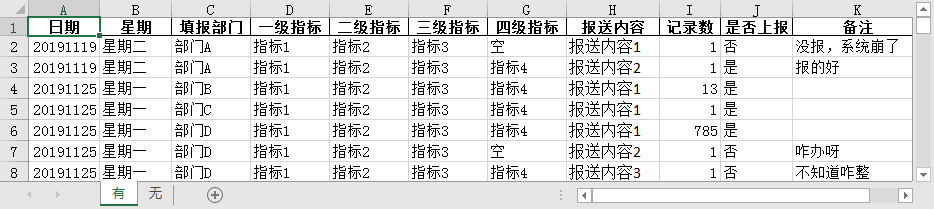
For example, on X year X month X day, N departments have filled in data. According to the document sample, the paragraph description part needs to be organized into the following format:
Department A: "Submission Content 1" X records; "Submission Content 2" Y records; Department B: ...; Department C: ...;
And the attachment table part needs to be organized into the following format, you can expect to organize a list of the data needed for each row, and write it into the table by row:
| Level 1 Index | Level 2 Index | Level 3 Index | Level 4 Index | Submissions by Departments | Remarks |
|---|---|---|---|---|---|
| lalala | hahaha | balabala | If it is empty, continue to the superior | Department A: Submit content 1 | There are records but not uploaded, not reported, the system crashed |
| aaa | bbb | ccc | ddd | Department A: Submission 2 | Uploaded, good report |
| ... | ... | ... | ... | Department B: Submit content 1 | ... |
The basic process is similar. After reading the meter, first group by date, each group contains one or more department data in a day, and then generate the form required for the attachment of a certain day, then organize the paragraph description, and finally output the word of each day by date Document.
def what_to_word(filepath):
 df = pd.read_excel(filepath, sheet_name="Have")
 df.fillna('', inplace=True)  #Replace nan with a null character
 dates =[]  #Date list
 df_total =[]  #All df saved by date
 list_total =[]  #A collection of table data required in each word
 for d in df.groupby('date'):
  dates.append(d[0])
  df_total.append(d[1])for index,date inenumerate(dates):
  list_oneday =[]  #Table data required for a certain word
  for row inrange(len(df_total[index])):
   list_row =get_table_data(df_total, index, row)  #One row of data
   list_oneday.append(list_row)
  list_total.append(list_oneday)for index, date inenumerate(dates):
  filename = wordname+str(date)+").docx"  #Output word file name
  title ="("+str(date)[:4]+"."+str(date)[4:6]+"."+str(date)[6:8]+")"  #Subtitle date XXXX.XX.XX
  word =str(date)[:4]+"year"+str(date)[4:6]+"month"+str(date)[6:8]+"day"  # 开头、落款day期XXXXyearXXmonthXXday
  sentence =get_sentence(df_total, index)  #A description of the day
  what_doc(title, word, sentence, list_total[index], filename)  #Output the document after passing in the required content
  print(f"file:{filename}Saved")
Let's take a look at how to organize tables, organize paragraphs, and output documents.
1、 Organize the table
Get a row of data in the excel table (Description: df_total[df_index] is a dataframe, and its values is a two-dimensional numpy array), sort out indicators at all levels, submission status and remarks by each department, Return a list.
def get_table_data(df_total, df_index, table_row):
 list1 = df_total[df_index].values[table_row]  #a row in excel table
 list2 = list1[3:7]  #One to four indicators
 for i inrange(len(list2)):  #If the current indicator is empty, the superior indicator will be used
  if list2[i]=='air' and i !=0:
   list2[i]= list2[i -1]
 content = list1[2]+":\n"+ list1[-4]  #Submit content
 if'no'in list1[-2]:  #Remarks
  remark ='Some records have not been uploaded,'+str(list1[-1])else:
  remark ='uploaded'
 list3 = list2.tolist()  #Need to fill in the table data in word, from numpy array to list list
 list3.append(str(content))
 list3.append(str(remark))return list3
2、 Organize paragraphs
Counting the unique values in the column of [Reporting Department] in the data of the day, we know that N departments have filled in data. Group the departments, get their relevant information, and combine them into the format of [(content to be reported, number of records, whether to report, remarks)], and then sort out the format like "N departments have submitted data: Department X:" Submit content XXX "X records;..." description string.
def get_sentence(df_total, df_index):
 df_oneday = df_total[df_index]
 num = df_oneday['Reporting department'].nunique()  #Number of departments
 group =[]  #Department name
 detail =[]  #Combine the data of a certain department, where the elements are in tuple format(,,,)
 info =''  #Reporting situation description
 for item in df_oneday.groupby('Reporting department'):
  group.append(item[0])
  detail.append(list(zip(list(item[1]['Submit content']),list(item[1]['Records']),list(item[1]['Whether to report']),list(item[1]['Remarks']))))for index, g inenumerate(group):  #Sort out the reporting status of each department
  mes =str(g)+':'  #Department start
  for i inrange(len(detail[index])):
   _ mes = detail[index][i]ifint(_mes[1])>0:
    mes = mes + f'“{_mes[0]}”{_mes[1]}Records;'
  info = info + mes
 info = info[:-1]+"。"  #Replace the last semicolon with a period
 sentence = f"Have{num}Each department submitted data:{info}"return sentence
3、 Output document
(Warning patience!) The operation of adjusting the text and table styles in word is cumbersome and needs to be set step by step. The preset headers are as follows:
table_title = ['First-level indicators','Second-level indicators','Third-level indicators','Four-level indicators','Submission status of each department','Remarks']
See code comments for other details.
def what_doc(title, word, sentence, table, filename):  #Incoming subtitle date, beginning/Date of signing, paragraph, table data, file name
 doc =Document()
 section = doc.sections[0]
 new_width, new_height = section.page_height, section.page_width
 section.orientation = WD_ORIENTATION.LANDSCAPE
 section.page_width = new_width
 section.page_height = new_height
 # Global settings for paragraphs
 doc.styles['Normal'].font.name = u'Song Ti'  #Font
 doc.styles['Normal']._element.rPr.rFonts.set(qn('w:eastAsia'), u'Song Ti')  #Chinese fonts need to add this setting
 doc.styles['Normal'].font.size =Pt(14)  #Font size four corresponds to 14
 t1 = doc.add_paragraph()  #Headline
 t1.paragraph_format.alignment = WD_PARAGRAPH_ALIGNMENT.CENTER  #Centered
 _ t1 = t1.add_run(all_title)
 _ t1.bold = True
 _ t1.font.size =Pt(22)
 t2 = doc.add_paragraph()  #subtitle
 t2.paragraph_format.alignment = WD_PARAGRAPH_ALIGNMENT.CENTER  #Centered
 _ t2 = t2.add_run(title +"\n")
 _ t2.bold = True
 doc.add_paragraph(word + sentence +"\n\n").paragraph_format.first_line_indent =Inches(0.35)  #First line indent
 doc.add_paragraph(word).paragraph_format.alignment = WD_PARAGRAPH_ALIGNMENT.RIGHT  #Align right
 doc.add_paragraph("Please refer to the attachment for the specific reporting status of each department:")

 doc.add_page_break()  #Pagination---------------------------------------------------------------
 fujian = doc.add_paragraph().add_run("\nAccessories")
 fujian.bold = True
 fujian.font.size =Pt(16)
 t3 = doc.add_paragraph()  #Attachment headline
 t3.paragraph_format.alignment = WD_PARAGRAPH_ALIGNMENT.CENTER  #Centered
 _ t3 = t3.add_run("XX company business data sheet")
 _ t3.bold = True
 _ t3.font.size =Pt(22)

 rows =len(table)+1
 word_table = doc.add_table(rows=rows, cols=6, style='Table Grid')  #Create a table with rows and 6 columns
 word_table.autofit=True  #Add border
 table =[table_title]+ table  #Fixed header+Table data
 for row inrange(rows):  #Write form
  cells = word_table.rows[row].cells
  for col inrange(6):
   cells[col].text =str(table[row][col])for i inrange(len(word_table.rows)):    #Traverse the ranks and modify the styles one by one
  for j inrange(len(word_table.columns)):for par in word_table.cell(i, j).paragraphs:  #Modify font size
    for run in par.runs:
     run.font.size =Pt(10.5)for par in word_table.cell(0, j).paragraphs:  #Bold the first line
    for run in par.runs:
     run.bold = True
 doc.save(dir+filename)
carried out! 74 daily newspapers with records have also been written, a total of 178 copies.

The operation was fierce, and the daily reports were finally generated in batches. It's time to add a chicken leg to the lunch...

Source Download
If you are interested in the source code and data in the article, you can download it by opening the link below on the computer web page
https://alltodata.cowtransfer.com/s/9c8f675d2f7544