Start the k8s journey from KubeOperator
What is KbueOperator?
FIT2CLOUD Feizhi Cloud officially released the first project in the container field-KubeOperator in November 2019
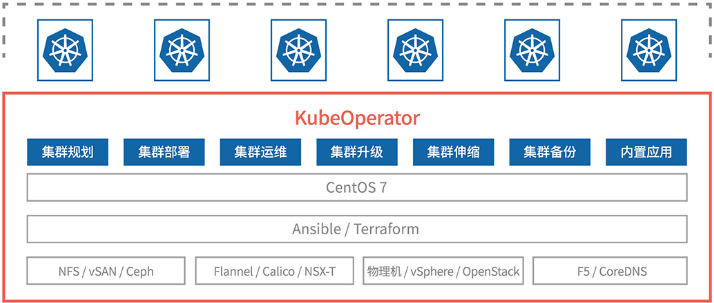
KubeOperator is an open source project that plans, deploys and operates production-level Kubernetes clusters on VMware, Openstack, or physical machines through a visual Web UI in an offline network environment. KubeOperator is another new masterpiece of the Jumpserver star open source team in the Kubernetes field.
The product architecture of KubeOperator is shown in the figure:
KubeOperator's technical advantages
-
Create on demand: call the cloud platform API to quickly create and deploy a Kubernetes cluster (ie Kubernetes as a Service) with one click;
-
On-demand scaling: quickly scale Kubernetes clusters to optimize resource usage efficiency;
-
On-demand patching: Quickly upgrade and patch Kubernetes clusters, and synchronize with the latest version of the community to ensure security;
-
Self-healing: Ensure cluster availability by rebuilding failed nodes;
-
Offline deployment: Continuously update offline packages including Kubernetes and common components;
-
Multi-AZ support: ensure high availability by distributing the Kuernetes cluster Master nodes in different fault domains;
Deployment method
- One-master multi-node type: k8s cluster is composed of one master node and one or more worker nodes
2 ) Multi-master multi-node type: K8S set consists of three master nodes and three or more worker nodes
Deployment mode
KubeOperator supports two deployment modes, one is manual deployment and the other is automatic deployment.
-
Manual mode: Users need to prepare physical or virtual machines and NFS persistent storage by themselves.
-
Automatic mode: Users only need to bind cloud platform (such as VMware) account information, and KubeOperator will automatically create hosts according to a predefined deployment plan to achieve one-click automated deployment.
Kubernetes offline installation package
KubeOperator provides a complete offline Kubernetes installation package. Each installation package will be built into an independent container image for KubeOperator to use. The offline installation package includes the following three contents:
-
Kubenetes core components: including Kubenetes, Docker and etcd;
-
Kubenetes accessory components (mirror): including network, storage, monitoring, Dashboard and common tools;
-
Operating system RPM package: other necessary RPMs except CentOS 7.6 Minimal. After the installation package container runs, it is a standard Yum source server.
Resource download address: https://download.csdn.net/download/xinshuzhan/11994743
Take the Kubernetes offline package v1.15.4 as an example, and its contents are as follows:
Kubenetes core components
Classification Component name Version
Core kubernetes 1.15.4
Core etcd 3.3.10
Core docker docker-ce-18.09.9
Installation environment preparation
1 Environmental requirements
-
Minimum hardware configuration: 2 CPU, 4G memory, 50G disk (recommended size is: 4 core 8G memory 100G disk)
-
Operating system requirements: CentOS 7.6 / 7.7 Minimal (CentOS 8 is not supported)
Note: CentOS 7.6 Minimal ISO download link:
Link: https://pan.baidu.com/s/1potf65zMMCrUS0MvklAHEw
Extraction code: 4igp
2 Download offline package
Please download the complete offline package of KubeOperator by yourself and copy it to the /tmp directory of the target machine.
- Download link:
- Link: https://pan.baidu.com/s/1Ujxukvbhfdk-jMQwvfnmgg
Extraction code: khql
Install KubeOperator
  $ cd /tmp

 # Unzip offline package

 $ tar zxvf kubeOperator-v2.1.xx-release.tar.gz

 # View firewall status

 $ firewall-cmd --state

 # Turn off the firewall

 $ systemctl stop firewalld.service

 # Enter the project directory

 $ cd kubeOperator-v2.1.xx-release

 # Run the installation script

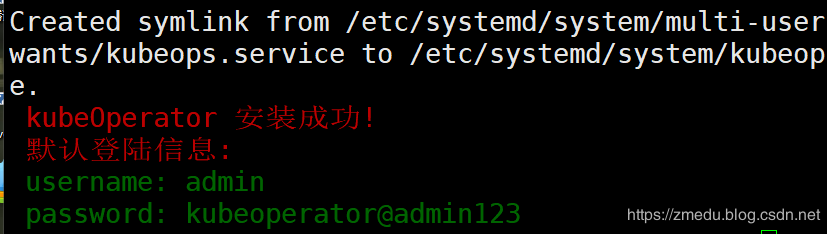
 $ ./kubeopsctl.sh install

 # View KubeOperator status

 $ systemctl status kubeops
Visit KubeOperator
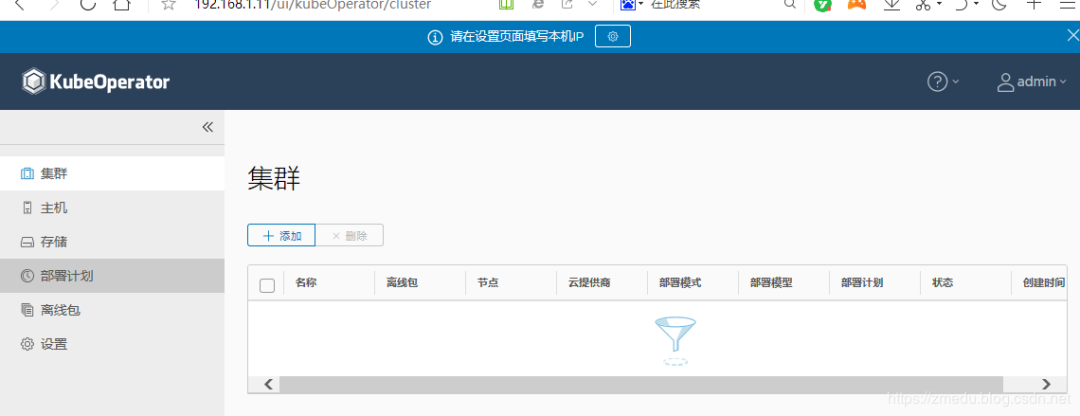
KubeOperator listens on HTTP 80 port by default. After installation, please log in to the KubeOperator management console using a browser.
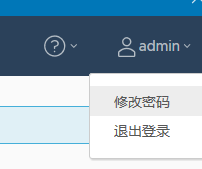
Note: The default user name and password of KubeOperator are: admin / kubeoperator@admin123 To ensure the security of the system, please click "Modify Password" in the upper right corner of the console to reset the password after logging in.
change Password
Upgrade KubeOperator
 $ cd /tmp
 # Download the new version offline package
 $ wget http://xxxxxxx.kubeOperator-v2.1.xx-release.tar.gz
 # Unzip offline package
 $ tar zxvf kubeOperator-v2.1.xx-release.tar.gz
 # Enter the project directory
 $ cd kubeOperator-v2.1.xx-release
 # Run the upgrade script
 $ ./kubeopsctl.sh upgrade
 # View KubeOperator status
 $ systemctl status kubeops
I tried to add a voice, this voice is automatically generated, and may not be suitable for technical articles, but the effect of delving into these new products is also good.
Recommended Posts