Python-crawling links on a page
In addition to C/C++, I have also been exposed to many popular languages, PHP, java, javascript, python, among which python can be said to be the most convenient language to operate with the least shortcomings.
I wanted to write a crawler a few days ago, but after discussing it with my friends, I decided to write together again in a few days. An important part of the crawler is to grab the links on the page. I will implement it briefly here.
First, we need to use an open source module, requests. This is not a module that comes with python, it needs to be downloaded, decompressed and installed from the Internet:
$ curl -OL https://github.com/kennethreitz/requests/zipball/master
$ python setup.py install
Windows users directly click to download. After decompression, use the command python setup.py install locally to install it.
I am also slowly translating the documentation of this module, and I will pass it up to you after the translation (the English version is first posted in the attachment). As stated in its description, built for human beings, designed for human beings. It is very convenient to use, read the document by yourself. The simplest, requests.get() is to send a get request.
code show as below:
# coding:utf-8import re
import requests

# Get web content
r = requests.get('http://www.163.com')
data = r.text

# Find all connections using regular
link_list =re.findall(r"(?<=href=\").+?(?=\")|(?<=href=\').+?(?=\')",data)for url in link_list:
 print url
First import the re and requests modules. The re module is a module that uses regular expressions.
data = requests.get('http://www.163.com'), submit a get request to the NetEase homepage, and get a requests object r, where r.text is the source code of the obtained webpage, which is stored in the string data.
Then use the regular to find all the links in the data. My regular is relatively rough. I can directly obtain the information between href="" or href=". This is the link information we want.
What re.findall returns is a list. Use a for loop to traverse the list and output:
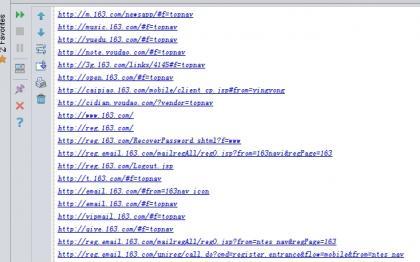
This is part of all the connections I get.
The above is a simple implementation of getting all the links in the website, without handling any exceptions, without considering the type of hyperlinks, the code is for reference only. See the attachment for the requests module documentation.