MHA展開に関する注意事項(centos6 + mysql5.6)
環境とソフトウェアのバージョン:
CentOS6.5x86_64
MySQL5.6.34コンパイルおよびインストールバージョン
MHAバージョン:mha4mysql-manager-0.56-0.el6.noarch.rpm mha4mysql-node-0.56-0.el6.noarch.rpm
ノードの役割:
node93:10.1.20.93デフォルトのメインライブラリ
node94:10.1.20.94スレーブライブラリ1、元のメインライブラリはダウンした後にメインライブラリにアップグレードできます[mha管理ノードもこのマシンにデプロイされています]
node95:10.1.20.95スレーブライブラリ2、マスターライブラリへの昇格は許可されていません
用意されているVIPは10.1.20.100/24です。
ステップ1、マスターとスレーブの関係を構成します##
node93の/etc/my.cnf構成ファイルの重要な部分:
[ mysqld]
port = 3306
socket = /tmp/mysql.sock
datadir = /bdata/data/nowdb2
innodb_file_per_table=ON
character-set-server = utf8
default_storage_engine = InnoDB
skip-innodb_adaptive_hash_index
master_info_repository = TABLE
relay_log_info_repository = TABLE
relay_log_recovery = 1 #crash safe
log-bin=mysql-bin
binlog_format=row
sync_binlog = 1#トランザクションの送信時にBINLOGがディスクに配置されていることを確認します
log-slave-updates
log_bin_trust_function_creators =1
binlog_rows_query_log_events = ON#実行されたステートメントをBINLOGクエリイベントに記録します
server-id=1020093
relay_log_purge=0
read_only=1
node94の/etc/my.cnf構成ファイルの重要な部分:
[ mysqld]
port = 3306
socket = /tmp/mysql.sock
datadir = /bdata/data/nowdb2
innodb_file_per_table=ON
character-set-server = utf8
default_storage_engine = InnoDB
skip-innodb_adaptive_hash_index
master_info_repository = TABLE
relay_log_info_repository = TABLE
relay_log_recovery = 1 #crash safe
log-bin=mysql-bin
binlog_format=row
sync_binlog = 1#トランザクションの送信時にBINLOGがディスクに配置されていることを確認します
log-slave-updates
log_bin_trust_function_creators =1
binlog_rows_query_log_events = ON#実行されたステートメントをBINLOGクエリイベントに記録します
server-id=1020094
relay_log_purge=0
read_only=1
node95の/etc/my.cnf構成ファイルの重要な部分:
[ mysqld]
port = 3306
socket = /tmp/mysql.sock
datadir = /bdata/data/nowdb2
innodb_file_per_table=ON
character-set-server = utf8
default_storage_engine = InnoDB
skip-innodb_adaptive_hash_index
master_info_repository = TABLE
relay_log_info_repository = TABLE
relay_log_recovery = 1 #crash safe
log-bin=mysql-bin
binlog_format=row
sync_binlog = 1#トランザクションの送信時にBINLOGがディスクに配置されていることを確認します
log-slave-updates
log_bin_trust_function_creators = 1
binlog_rows_query_log_events = ON#実行されたステートメントをBINLOGクエリイベントに記録します
server-id=1020095
relay_log_purge=0
read_only=1
node93、GRANT REPLICATION SLAVE、REPLICATION CLIENT ON 。 TO'rpl '@ '10 .1。%。%' IDENTIFIED BY'rpl 'でレプリケーション権限を持つアカウントを作成します。
次に、1つのマスターと2つのスレーブを構成します(特定の手順をスキップします)。
注:マスターデータベースになることができるノード(node93、node94)にマスタースレーブ同期アカウントがあることを確認する必要があります。rplアカウントがnode94に存在しない場合は、node94ノードに移動して手動で追加してください。
マスターとスレーブの関係が確立されたら、マスターにmha管理アカウントを作成します。これは、後で使用されます。
grant all on . to 'mhauser'@'10.1.%.%' identified by 'Abcd@1234';
( 管理アカウントは、node93、node94、およびnode95のすべてのノードに存在する必要があります)
ステップ2、MHAをインストールします##
MHAはSSHに依存しているため、SSHキーレスログインを3つのホスト間で確立する必要があります。ステップスキップ。
3 すべてのノードにperlパッケージをインストールします:
yum install perl perl-DBD-MySQL perl-CPAN perl-devel perl-Time-HiRes
node93-node95にノードパッケージをインストールします:
rpm -ivh mha4mysql-node-0.56-0.el6.noarch.rpm
node94にManagerパッケージをインストールします(もちろん、3つのノードすべてにManagerパッケージをインストールできます):
rpm -ivh mha4mysql-manager-0.56-0.el6.noarch.rpm
node94でMHAを初期化します
mkdir /etc/masterha/
vim / etc / masterha / app1.cnfの内容は次のとおりです。
[ server default]
user=mhauser
password=Abcd@1234
manager_workdir=/data/masterha/app1
manager_log=/data/masterha/app1/manager.log
remote_workdir=/data/masterha/app1
ssh_user=root
repl_user=rpl
repl_password=rpl
ping_interval=1
master_binlog_dir = / bdata / data / nowdb2 /#このパスは、mysqlbinlogストレージパスと同じである必要があります
master_ip_failover_script=/etc/masterha/master_ip_failover
report_script=/etc/masterha/send_report
ターゲットのメインライブラリがサードパーティのマシンを介して稼働しているかどうかを確認する必要はありません。稼働していない場合でも、使用できます。
secondary_check_script=masterha_secondary_check -s remote_host1 -s remote_host2
障害発生後にホストをシャットダウンするスクリプトは必要ありませんが、空に設定する必要があります
shutdown_script=""
VIPスクリプトをオンラインで手動で切り替える必要はありません。存在しない場合でも、使用できます。
VIPを切り替えるために生き続けている場合は、それを使用できます。
master_ip_online_change_script==/etc/masterha/master_ip_online_change
[ server1]
hostname=10.1.20.93
candidate_master=1
[ server2]
hostname=10.1.20.94
candidate_master=1
[ server3]
hostname=10.1.20.95
no_master = 1#禁止
node94にスクリプト/ etc / masterha / master_ip_failoverを追加します(関連するVIP情報を入力します)
#! /usr/bin/env perl
use strict;
use warnings FATAL => 'all';
use Getopt::Long;
my (
$command, $ssh_user, $orig_master_host, $orig_master_ip,
$orig_master_port, $new_master_host, $new_master_ip, $new_master_port,
$orig_master_ssh_port, $new_master_ssh_port
);
my $vip ='10.1.20.100'; # Virtual IP
my $devic='eth0';
my $key = "0";
my$net_mask='255.255.255.0';
my $ssh_start_vip ="/sbin/ifconfig
my $ssh_stop_vip ="/sbin/ifconfig
my$mysql_conf="/etc/my.cnf";
my $open_readonly="/bin/sed-i 's/.read_only./read_only=1/g' $mysql_conf ";
my $close_readonly="/bin/sed-i 's/.read_only./read_only=0/g' $mysql_conf ";
my $open_relaylog_purge="/bin/sed-i 's/.relay_log_purge./relay_log_purge=0/g' $mysql_conf ";
my$close_relaylog_purge="/bin/sed -i's/.relay_log_purge./relay_log_purge=0/g' $mysql_conf ";
GetOptions(
'command=s' =>$command,
'ssh_user=s' =>$ssh_user,
'orig_master_host=s' => $orig_master_host,
'orig_master_ip=s' =>$orig_master_ip,
'orig_master_port=i' => $orig_master_port,
'orig_master_ssh_port=i' => $orig_master_ssh_port,
'new_master_host=s' => $new_master_host,
'new_master_ip=s' =>$new_master_ip,
'new_master_port=i' =>$new_master_port,
'new_master_ssh_port=i' => $new_master_ssh_port,
);
exit &main();
sub main {
print "\n\nIN SCRIPTTEST====
if ( $command eq "stop" || $command eq "stopssh" ) {
# $orig_master_host,
# If you manage master ip address atglobal catalog database,
# invalidate orig_master_ip here.
my $exit_code = 1;
eval {
print "Disabling the VIP onold master: $orig_master_host \n";
&stop_vip();
$exit_code = 0;
};
if ($@) {
warn "Got Error: $@\n";
exit $exit_code;
}
exit $exit_code;
}
elsif ( $command eq "start" ) {
# all arguments are passed.
# If you manage master ip address atglobal catalog database,
# activate new_master_ip here.
# You can also grant write access(create user, set read_only=0, etc) here.
my $exit_code = 10;
eval {
print "Enabling the VIP - $vipon the new master - $new_master_host \n";
&start_vip();
$exit_code = 0;
};
if ($@) {
warn $@;
exit $exit_code;
}
exit $exit_code;
}
elsif ( $command eq "status" ) {
print "Checking the Status of thescript.. OK \n";
# ssh $ssh_user\@cluster1 \"$ssh_start_vip \";
exit 0;
}
else {
&usage();
exit 1;
}
}
A simple system call that enablethe VIP on the new master
sub start_vip() {
ssh $ssh_user\@$new_master_host \" $ssh_start_vip \";
print "Disable read_only and relay_log_purge in my.cnf - on the new master - $new_master_host\n";
ssh $ssh_user\@$new_master_host \" $close_readonly \";
ssh $ssh_user\@$new_master_host \" $close_relaylog_purge \";
}
A simple system call thatdisable the VIP on the old_master
sub stop_vip() {
ssh $ssh_user\@$orig_master_host \" $ssh_stop_vip \";
print "Enable read_only and relay_log_purge in my.cnf - on the orig master - $orig_master_host\n";
ssh $ssh_user\@$orig_master_host \" $open_readonly \";
ssh $ssh_user\@$orig_master_host \" $open_relaylog_purge \";
}
sub usage {
"Usage: master_ip_failover --command=start|stop|stopssh|status--orig_master_host=host --orig_master_ip=ip --orig_master_port=port--new_master_host=host --new_master_ip=ip --new_master_port=port--orig_master_ssh_port=ssh_port --new_master_ssh_port = ssh_port\n";
}
node94にスクリプト/ etc / masterha / send_reportを追加します(関連するsmtpアカウント情報を入力します):
#! /usr/bin/perl
Copyright (C) 2011 DeNA Co.,Ltd.
This program is free software; you can redistribute it and/or modify
it under the terms of the GNU General Public License as published by
the Free Software Foundation; either version 2 of the License, or
(at your option) any later version.
This program is distributed in the hope that it will be useful,
but WITHOUT ANY WARRANTY; without even the implied warranty of
MERCHANTABILITY or FITNESS FOR A PARTICULAR PURPOSE. See the
GNU General Public License for more details.
You should have received a copy of the GNU General Public License
along with this program; if not, write to the Free Software
Foundation, Inc.,
51 Franklin Street, Fifth Floor, Boston, MA 02110-1301 USA
Note: This is a sample scriptand is not complete. Modify the script based on your environment.
use strict;
use warnings FATAL => 'all';
use Mail::Sender;
use Getopt::Long;
new_master_host and new_slave_hostsare set only when recovering master succeeded
my (
my$smtp='smtp.exmail.qq.com';
my$mail_from='[email protected]';
my$mail_user='[email protected]';
my $mail_pass='xxxxxxx';
my$mail_to=['[email protected]'];
GetOptions(
'orig_master_host=s' => $dead_master_host,
'new_master_host=s' =>$new_master_host,
'new_slave_hosts=s' =>$new_slave_hosts,
'subject=s' =>$subject,
'body=s' => $body,
'conf=s' => $conf,
);
mailToContacts(
check_if_sendmail_ok('/tmp/monitormail.log');
sub mailToContacts {
my ( $smtp, $mail_from, $user, $passwd, $mail_to, $subject, $msg ) = @_;
open my $DEBUG, "> /tmp/monitormail.log"
or die "Can't open the debug file:$!\n";
my $sender = new Mail::Sender {
ctype => 'text/plain; charset=utf-8',
encoding => 'utf-8',
smtp => $smtp,
from => $mail_from,
auth => 'LOGIN',
TLS_allowed => '0',
authid => $user,
authpwd => $passwd,
to => $mail_to,
subject => $subject,
debug => $DEBUG
};
$sender->MailMsg(
{ msg => $msg,
debug => $DEBUG
}
) or print $Mail::Sender::Error;
return 1;
}
sub check_if_sendmail_ok{
#>>250 2.0.0 Ok: queued as 3532C6DA009D
#<<QUIT
#>>221 2.0.0 Bye
my$logf = shift;
openRLOG, $logf or die "cannot open file $logf.\n";
my@log =
closeRLOG;
my$val = 0;
if(
print"Meet Bye.\t";
$val++;
}
if(
print"Meet QUIT.\t";
$val++;
}
if(
print"Meet queued.\t";
$val++;
}
print"\n";
if($val== 3){
print"send mail success.\n";
}
else{
print"send mail failed.check DNS/SMTP config\n";
}
return$val;
}
Do whatever you want here
exit 0;
node94にスクリプト/ etc / masterha / master_ip_online_changeを追加します(関連するVIP情報を入力します):
#! /usr/bin/env perl
Copyright (C) 2011 DeNA Co.,Ltd.
This program is free software; you can redistribute it and/or modify
it under the terms of the GNU General Public License as published by
the Free Software Foundation; either version 2 of the License, or
(at your option) any later version.
This program is distributed in the hope that it will be useful,
but WITHOUT ANY WARRANTY; without even the implied warranty of
MERCHANTABILITY or FITNESS FOR A PARTICULAR PURPOSE. See the
GNU General Public License for more details.
You should have received a copy of the GNU General Public License
along with this program; if not, write to the Free Software
Foundation, Inc.,
51 Franklin Street, Fifth Floor, Boston, MA 02110-1301 USA
Note: This is a sample scriptand is not complete. Modify the script based on your environment.
use strict;
use warnings FATAL => 'all';
use Getopt::Long;
use MHA::DBHelper;
use MHA::NodeUtil;
use Time::HiRes qw( sleepgettimeofday tv_interval );
use Data::Dumper;
my $_tstart;
my $_running_interval = 0.1;
my (
$command, $orig_master_is_new_slave, $orig_master_host,
$orig_master_ip, $orig_master_port, $orig_master_user,
$orig_master_password, $orig_master_ssh_user, $new_master_host,
$new_master_ip, $new_master_port, $new_master_user,
$new_master_password, $new_master_ssh_user
);
my $vip ='10.1.20.100/24';
my $key = '0';
my
my
my $orig_master_ssh_port = 22;
my $new_master_ssh_port = 22;
GetOptions(
'command=s' =>$command,
'orig_master_is_new_slave' => $orig_master_is_new_slave,
'orig_master_host=s' =>$orig_master_host,
'orig_master_ip=s' =>$orig_master_ip,
'orig_master_port=i' =>$orig_master_port,
'orig_master_user=s' =>$orig_master_user,
'orig_master_password=s' =>$orig_master_password,
'orig_master_ssh_user=s' =>$orig_master_ssh_user,
'new_master_host=s' =>$new_master_host,
'new_master_ip=s' =>$new_master_ip,
'new_master_port=i' =>$new_master_port,
'new_master_user=s' =>$new_master_user,
'new_master_password=s' =>$new_master_password,
'new_master_ssh_user=s' =>$new_master_ssh_user,
'orig_master_ssh_port=i' =>$orig_master_ssh_port,
'new_master_ssh_port=i' =>$new_master_ssh_port,
);
exit &main();
sub current_time_us {
my ( $sec, $microsec ) = gettimeofday();
my
return $curdate . " " . sprintf( "%06d", $microsec);
}
sub sleep_until {
my
if ( $_running_interval > $elapsed ) {
sleep( $_running_interval - $elapsed );
}
}
sub get_threads_util {
my $dbh = shift;
my $my_connection_id =shift;
my $running_time_threshold = shift;
my $type =shift;
my @threads;
my $sth = $dbh->prepare("SHOW PROCESSLIST");
$sth->execute();
while ( my $ref = $sth->fetchrow_hashref() ) {
my $id = $ref->{Id};
my $user = $ref->{User};
my $host = $ref->{Host};
my
my $state = $ref->{State};
my $query_time = $ref->{Time};
my $info = $ref->{Info};
next if ( $my_connection_id == $id );
next if ( defined($query_time) && $query_time < $running_time_threshold);
next if ( defined($command) && $command eq "Binlog Dump" );
next if ( defined($user) && $user eq "system user" );
next
if ( defined($command)
&& $command eq "Sleep"
&& defined($query_time)
&& $query_time >= 1);
if ( $type >= 1 ) {
next if ( defined(
next if ( defined(
}
if ( $type >= 2 ) {
next if ( defined($info) && $info=~ m/^select/i );
next if ( defined($info) && $info=~ m/^show/i );
}
push @threads, $ref;
}
return @threads;
}
sub main {
if ( $command eq "stop" ) {
## Gracefully killing connections on the current master
# 1. Set read_only= 1 on the new master
# 2. DROP USER so that no app user can establish new connections
# 3. Set read_only= 1 on the current master
# 4. Kill current queries
# * Any database access failure will result in script die.
my $exit_code = 1;
eval {
## Setting read_only=1 on the new master(to avoid accident)
my $new_master_handler = newMHA::DBHelper();
# args: hostname, port, user, password,raise_error(die_on_error)_or_not
$new_master_user, $new_master_password,1 );
print current_time_us() . " Setread_only on the new master.. ";
$new_master_handler->enable_read_only();
if ( $new_master_handler->is_read_only()) {
print "ok.\n";
}
else {
die "Failed!\n";
}
$new_master_handler->disconnect();
# Connecting to the orig master, die ifany database error happens
my $orig_master_handler = newMHA::DBHelper();
## Drop application user so that nobodycan connect. Disabling per-session binlog beforehand
$orig_master_handler->disable_log_bin_local();
print current_time_us() . " Drppingapp user on the orig master..\n";
#FIXME_xxx_drop_app_user($orig_master_handler);
## Waiting for N * 100 milliseconds sothat current connections can exit
my $time_until_read_only = 15;
$_tstart = [gettimeofday];
my @threads = get_threads_util($orig_master_handler->{dbh},
$orig_master_handler->{connection_id} );
while ( $time_until_read_only > 0&& $#threads >= 0 ) {
if ( $time_until_read_only % 5 == 0 ) {
printf
" %s Waiting all running %dthreads are disconnected.. (max %d milliseconds)\n",
current_time_us(),
if ( $#threads < 5 ) {
printData::Dumper->new( [$_] )->Indent(0)->Terse(1)->Dump ."\n"
foreach (@threads);
}
}
sleep_until();
$_tstart = [gettimeofday];
$time_until_read_only--;
@threads = get_threads_util($orig_master_handler->{dbh},
$orig_master_handler->{connection_id} );
}
## Setting read_only=1 on the currentmaster so that nobody(except SUPER) can write
print current_time_us() . " Setread_only=1 on the orig master.. ";
$orig_master_handler->enable_read_only();
if ($orig_master_handler->is_read_only() ) {
print "ok.\n";
}
else {
die "Failed!\n";
}
## Waiting for M * 100 milliseconds sothat current update queries can complete
my $time_until_kill_threads = 5;
@threads = get_threads_util($orig_master_handler->{dbh},
$orig_master_handler->{connection_id} );
while ( $time_until_kill_threads > 0&& $#threads >= 0 ) {
if ( $time_until_kill_threads % 5 == 0) {
printf
" %s Waiting all running %dqueries are disconnected.. (max %d milliseconds)\n",
current_time_us(),
if ( $#threads < 5 ) {
print Data::Dumper->new( [$_])->Indent(0)->Terse(1)->Dump . "\n"
foreach (@threads);
}
}
sleep_until();
$_tstart = [gettimeofday];
$time_until_kill_threads--;
@threads = get_threads_util($orig_master_handler->{dbh},
$orig_master_handler->{connection_id} );
}
## Terminating all threads
print current_time_us() . " Killingall application threads..\n";
$orig_master_handler->kill_threads(@threads)if ( $#threads >= 0 );
print current_time_us() . "done.\n";
$orig_master_handler->enable_log_bin_local();
$orig_master_handler->disconnect();
## After finishing the script, MHAexecutes FLUSH TABLES WITH READ LOCK
eval {
ssh -p$orig_master_ssh_port$orig_master_ssh_user\@$orig_master_host \" $ssh_stop_vip \";
};
if ($@) {
warn $@;
}
$exit_code = 0;
};
if ($@) {
warn "Got Error: $@\n";
exit $exit_code;
}
exit $exit_code;
}
elsif ( $command eq "start" ) {
## Activating master ip on the new master
# 1. Create app user with write privileges
# 2. Moving backup script if needed
# 3. Register new master's ip to the catalog database
We don't return error eventhough activating updatable accounts/ip failed so that we don't interruptslaves' recovery.
If exit code is 0 or 10, MHAdoes not abort
my $exit_code = 10;
eval {
my $new_master_handler = newMHA::DBHelper();
# args: hostname, port, user, password,raise_error_or_not
$new_master_user, $new_master_password,1 );
## Set read_only=0 on the new master
$new_master_handler->disable_log_bin_local();
print current_time_us() . " Setread_only=0 on the new master.\n";
$new_master_handler->disable_read_only();
## Creating an app user on the new master
print current_time_us() . " Creatingapp user on the new master..\n";
#FIXME_xxx_create_app_user($new_master_handler);
$new_master_handler->enable_log_bin_local();
$new_master_handler->disconnect();
## Update master ip on the catalogdatabase, etc
ssh -p$new_master_ssh_port$new_master_ssh_user\@$new_master_host \" $ssh_start_vip \";
$exit_code = 0;
};
if ($@) {
warn "Got Error: $@\n";
exit $exit_code;
}
exit $exit_code;
}
elsif ( $command eq "status" ) {
# do nothing
exit 0;
}
else {
&usage();
exit 1;
}
}
sub usage {
" Usage:master_ip_online_change --command=start|stop|status --orig_master_host=host--orig_master_ip=ip --orig_master_port=port --new_master_host=host--new_master_ip=ip --new_master_port=port\n";
die;
}
node94でMHAのSSH構成が正しいかどうかを確認します:
masterha_check_ssh--conf=/etc/masterha/app1.cnf
「すべてのSSH接続テストに合格しました。」と表示された場合、構成は正常です。
MHAのマスタースレーブレプリケーションがnode94で正しく構成されているかどうかを確認します:
masterha_check_repl--conf=/etc/masterha/app1.cnf
「MySQLReplicationHealthはOKです」と表示されている場合、構成はOKです。
node94のフォアグラウンドでMHAを開始します:
masterha_manager--conf = / etc / masterha / app1.cnf--ignore_last_failoverフォアグラウンドで監視を開始します
node93masterのダウンタイムをシミュレートし、マスターの自動切り替えを観察します。
node93のmysqlサービスを停止すると、node94で開始されたmasterha_managerプロセスがこの時点で自動的に終了していることがわかります。他のノードに移動して確認すると、マスタースレーブスイッチが見つかります。
次に、node93のmysqlを起動します。再びオンラインになっても、自動的にマスターにはなりません
[!!注:node93を直接オンラインにすると、クラスター内に2つのマスターノードがあり、スプリットブレイン、masterha_mangerを開始できません]、手動でスレーブノードに変更する必要があります。操作は次のとおりです。
node93で、以下を実行します。
change master to
master_host='10.1.20.94',
master_user='rpl',
master_password='rpl',
master_log_file='mysql-bin.000003',
master_log_pos = 1881;#ここの場所では、node94の/ data / masterha / app1ディレクトリにあるmanager.logの内容を調べて、特定のbinlogの場所を見つける必要があります。
start slave;
show slave status\G
node93をクラスターに追加し直した後、node94マネージャーノードでmasterha_manager--conf = / etc / masterha / app1.cnf --ignore_last_failoverを再度実行したところ、スタートアップが終了しなかったことがわかりました。 (検証プロセス中はこのウィンドウを閉じないでください)
現在のマスタースレーブ構成を確認してください:
node94は別のxshellウィンドウを開き、masterha_check_repl--conf = / etc / masterha /app1.cnfを実行できます。
マスターノードとスレーブノードが変更されたことがわかります。
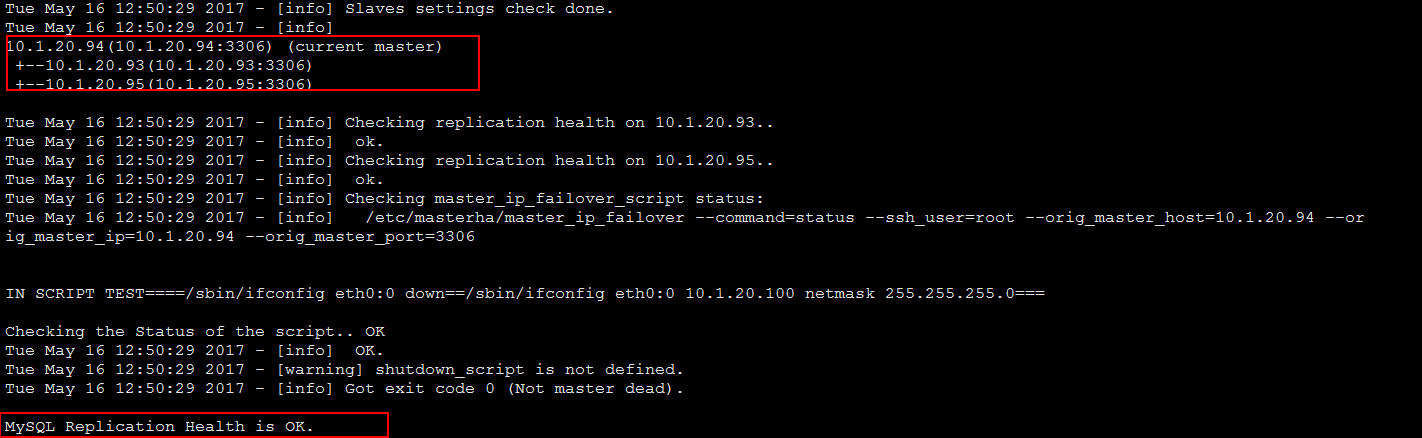
masterhaが開始されているかどうかを確認します:
さらに、xshellウィンドウを開くと、masterha_check_status--conf = / etc / masterha /app1.cnfを実行できます。

masterhaを停止する必要がある場合は、stopまたはkillを使用せず、次のコマンドを使用します。
masterha_stop--conf=/etc/masterha/app1.cnf
マスターとスレーブを手動で切り替える方法:
masterha_master_switch-hヘルプ情報を表示する
masterha_master_switch--conf=/etc/masterha/app1.cnf --master_state=alive --new_master_host=10.1.20.93--new_master_port=3306 --orig_master_is_new_slave --running_updates_limit=10000
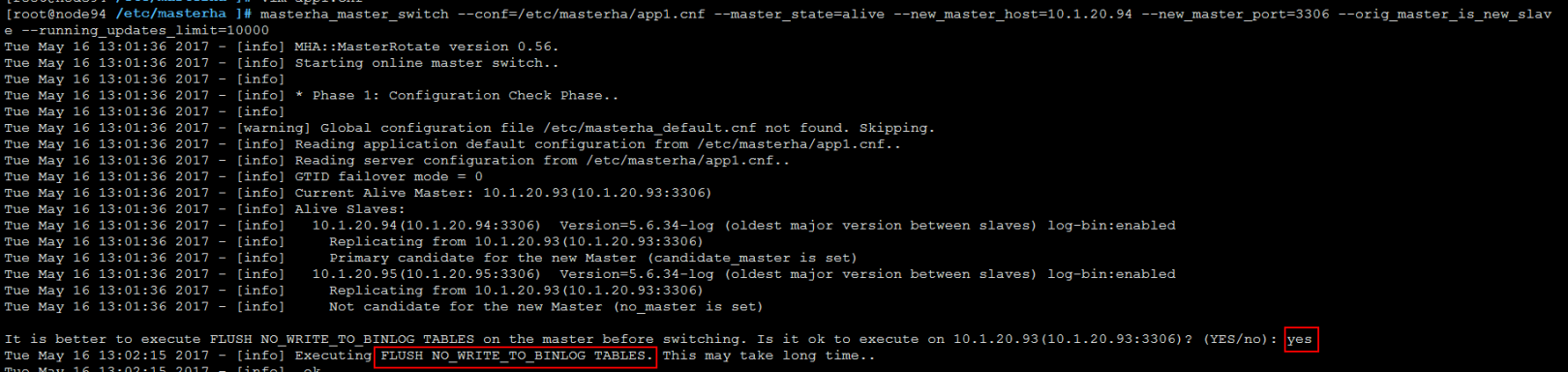
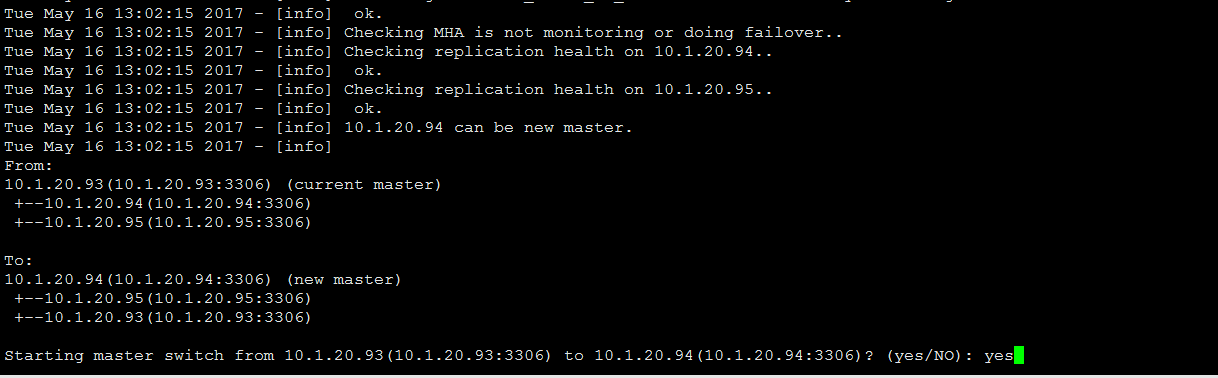
手動で切り替える場合は、次の2つの点に注意してください。
1、 手動切り替えを実行するときは、最初にマスターにプロモートされるホストの古いマスターとイベントスケジューラをオフにする必要があります。オフにしないと、切り替えることができません(set global event_scheduler = OFF;)
2、 手動切り替えを実行する場合は、MHA監視をオフにする必要がありますmasterha_stop--conf = / etc / masterha / app1.cnf)
3、 手動切り替えスクリプトを実行すると、元のマスターでFLUSH TABLES WITH READ LOCKが自動的に実行されます。切り替えが完了すると、UNLOCKTABLESは元のマスターロックを解放します。
メールを送信するためのスクリプトでは、最初にプラグインをインストールする必要があります:
yuminstall perl-Mail-Sender
送信が失敗した場合は、/ tmp /monitormail.logをチェックして失敗の理由を見つけることができます。
MHAが異常な場合:
ログパスを表示できます:/ data / masterha / app1 /
masterha_managerには、いくつかの便利な起動パラメーターもあります。
--remove_dead_master_confこのパラメーターは、マスタースレーブの切り替えが発生すると、古いマスターライブラリのIPが構成ファイルから削除されることを表します。
--manger_logログの保存場所、管理ログを標準化する場合は追加できます
--ignore_last_failoverこのパラメーターは、最後のMHAトリガースイッチによって生成されたファイルを無視することを表します。デフォルトでは、MHA切り替えが発生した後、app1.failover.completeファイルがログディレクトリに生成されます。これは、上記で設定した/ dataであり、次回は再び切り替えられます。ファイルがディレクトリに存在することが判明した場合、最初の切り替え後にファイルが削除されない限り、切り替えをトリガーすることはできません。デフォルトでは、MHAが継続的なダウンタイムを検出し、2つのダウンタイムの間隔が不十分な場合フェイルオーバーは8時間実行されません。この制限の理由は、ピンポン効果を回避するためです。 [強制的に切り替える必要がある場合は、最初にこのファイルapp1.failover.completeを削除する必要があります]