[ xenomai](https://cloud.tencent.com/?fromSource=gwzcw.2212127.2212127.2212127&utm_medium=cpd&utm_id=gwzcw.2212127.2212127.2212127&from=10680)は、[linux](https://cloud.tencent.com/product/cvm?from=10680)リアルタイム変換の重要なプログラムの1つです。特定のインストールとUbuntu [カーネルコンパイル](https://cloud.tencent.com/product/cbs?from=10680)プロセス。
具体的な概略図は次のとおりです。
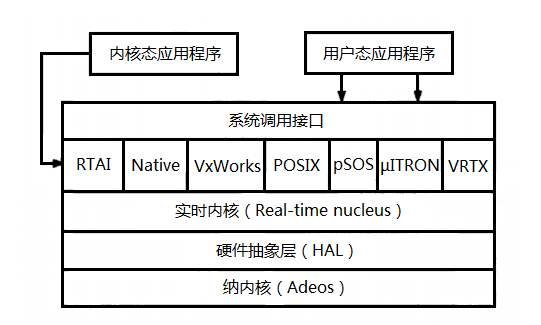原則
wget https://www.kernel.org/pub/linux/kernel/v4.x/linux-4.9.38.tar.gz
wget https://xenomai.org/downloads/xenomai/stable/xenomai-3.1.tar.bz2
 sudo tar xf linux-4.9.38.tar.gz
 sudo tar xf xenomai-3.1.tar.bz2
 sudo cp -r linux-4.9.38/usr/src
 sudo cp -r xf xenomai-3.1/usr/src
cd linux-4.9.38
sudo wget https://xenomai.org/downloads/ipipe/v4.x/x86/older/ipipe-core-4.9.38-x86-3.patch
.. /xenomai-3.1/scripts/prepare-kernel.sh --arch=x86_64 --ipipe=ipipe-core-4.9.38-x86-3.patch
yes ""| make oldconfig
sudo apt install libncurses5-dev
make menuconfig
具体的な構成は次のとおりです。
Local version - append to kernel release: -xenomai-3.1
Timers subsystem
High Resolution Timer Support (Enable)
Sizes and static limits
Number of registry slots (512 --> 4096)
Size of system heap (Kb) (512 --> 4096)
Size of private heap (Kb) (64 --> 256)
Size of shared heap (Kb) (64 --> 256)
Maximum number of POSIX timers per process (128 --> 512)
Drivers
RTnet
RTnet, TCP/IP socket interface (Enable)
- - > Drivers

 - - > New intel(R) PRO/1000 PCIe (Enable)

 - - > Realtek 8169 (Enable)

 - - > Loopback (Enable)
Add-Ons
- - > Real-Time Capturing Support (Enable)
CPU Frequency scaling
CPU Frequency scaling (Disable)
ACPI (Advanced Configuration and Power Interface) Support
Processor (Disable)
CPU Idle
CPU idle PM support (Disable)
Enable maximum number of SMP processors and NUMA nodes (Disable)
// Ref : http://xenomai.org/pipermail/xenomai/2017-September/037718.html
Processor family
Core 2/newer Xeon (if "cat /proc/cpuinfo | grep family" returns 6, set as Generic otherwise)
// Xenomai will issue a warning about CONFIG_MIGRATION, disable those in this orde
Transparent Hugepage Support (Disable)
Allow for memory compaction (Disable)
Contiguous Memory Allocation (Disable)
Allow for memory compaction
Page Migration (Disable)
Staging drivers
Unisys SPAR driver support
- - > Unisys visorbus driver (Disable)
sudo apt install kernel-package
sudo apt-get install libssl-dev
CONCURRENCY_LEVEL=$(nproc) make-kpkg --rootcmd fakeroot --initrd kernel_image kernel_headers
cd ..
sudo dpkg -i linux-headers-4.9.38-xenomai-3.1_4.9.38-xenomai-3.1-10.00.Custom_amd64.deb linux-image-4.9.38-xenomai-3.1_4.9.38-xenomai-3.1-10.00.Custom_amd64.deb
sudo addgroup xenomai --gid 1234
sudo addgroup root xenomai
sudo usermod -a -G xenomai $USER
sudo gedit /etc/default/grub
具体的な変更点は次のとおりです。
GRUB_DEFAULT="Advanced options for Ubuntu>Ubuntu, with Linux 4.9.38-xenomai-3.1"
# GRUB_DEFAULT=saved
# GRUB_SAVEDEFAULT=true
# Comment the following lines
# GRUB_HIDDEN_TIMEOUT=0
# GRUB_HIDDEN_TIMEOUT_QUIET=true
GRUB_TIMEOUT=5
GRUB_CMDLINE_LINUX_DEFAULT="quiet splash xenomai.allowed_group=1234"
GRUB_CMDLINE_LINUX=""
GRUBを更新して再起動します
sudo update-grub
コンピューターを再起動します
sudo reboot
再起動後にUbuntuアドバンストカーネルを選択します
uname -r
dmesg | grep Xenomai
cd xenomai-3.1./configure --with-pic --with-core=cobalt --enable-smp --disable-tls --enable-dlopen-libs --disable-clock-monotonic-raw
make -j`nproc`
sudo make install
echo '
### Xenomai
export XENOMAI_ROOT_DIR=/usr/xenomai
export XENOMAI_PATH=/usr/xenomai
export PATH=$PATH:$XENOMAI_PATH/bin:$XENOMAI_PATH/sbin
export PKG_CONFIG_PATH=$PKG_CONFIG_PATH:$XENOMAI_PATH/lib/pkgconfig
export LD_LIBRARY_PATH=$LD_LIBRARY_PATH:$XENOMAI_PATH/lib
export OROCOS_TARGET=xenomai
' >>~ /.xenomai_rc
echo 'source ~/.xenomai_rc'>>~/.bashrc
source ~/.bashrc
権限を増やす
sudo chmod -R 777/dev/rtdm/memdev-private
sudo chmod -R 777/dev/rtdm/memdev-shared
xeno latency
== Sampling period: 100 us
== Test mode: periodic user-mode task
== All results in microseconds
warming up...
RTT| 00:00:01 (periodic user-mode task, 100 us period, priority 99)
RTH|----lat min|----lat avg|----lat max|-overrun|---msw|---lat best|--lat worst
RTD| 0.174| 0.464| 1.780| 0| 0| 0.174| 1.780
RTD| 0.088| 0.464| 1.357| 0| 0| 0.088| 1.780
RTD| 0.336| 0.464| 1.822| 0| 0| 0.088| 1.822
RTD| 0.342| 0.464| 1.360| 0| 0| 0.088| 1.822
RTD| 0.327| 0.462| 2.297| 0| 0| 0.088| 2.297
RTD| 0.347| 0.463| 1.313| 0| 0| 0.088| 2.297
RTD| 0.314| 0.464| 1.465| 0| 0| 0.088| 2.297
RTD| 0.190| 0.464| 1.311| 0| 0| 0.088| 2.297
インストール中に問題が発生した場合は、メッセージを残して交換してください。
Recommended Posts