Bashtop:強力なLinuxOSXFreeBSDリソース監視ツール

Bashtopは、Linux / OSX / FreeBSD用の端末ベースのリソース監視ユーティリティです。このツールはコマンドラインツールですが、非常に美しいUIインターフェイスも提供し、CPU、メモリ、および実行中の情報を直感的に表示できます。コンピューターの進行状況や帯域幅などの統計。ゲームスタイルのレスポンシブターミナルUIとカスタマイズ可能なメニューを備えています。さまざまな表示パーツがきちんと配置されているため、さまざまなシステムインジケーターの監視がはるかに簡単になります。
Bashtopを使用することで、プロセスを並べ替えたり、さまざまな並べ替えオプションを簡単に切り替えることもできます。さらに、必要なプロセスにSIGKILL、SIGTERM、およびSIGINTを送信することもできます。
このツールは非常に高速に実行され、次のような他の多くのサポートも提供します。
マウスクリックをサポートします。
切り替え可能なミニモード。
パーソナライズされたカスタマイズをサポートします。
メモリ消費グラフを表示します。
Bashtopは、Linux、macOS、さらにはFreeBSDにもインストールできます。さらに、BashtopはPythonバージョンをリリースしました。興味のあるユーザーは、https://github.com/aristocratos/bpytopをクリックして直接入手できます。
特徴 ##
ゲームにインスパイアされたメニューシステムを備えた使いやすい。
プロセスをすばやく選択するためのUPキーとDOWNキーを備えたクイックレスポンスUI。
選択したプロセスの詳細な統計を表示できます。
プロセスをフィルタリングできます。
並べ替えオプションを簡単に切り替えることができます。
プロセスを選択するには、SIGTERM、SIGKILL、SIGINTを送信します。
すべての構成ファイルオプションを変更するためのUIメニュー付き。
ネットワーク使用量の自動スケーリンググラフ。
新しいバージョンが利用可能な場合は、メニューにメッセージが表示されます。
ツールの依存関係
Bashtopをインストールして使用するには、次の依存コンポーネントがシステムに用意されていることを確認してください。
バッシュ4.4以上
Git
GNU Coreutils
GNU sed、awk、grep、およびpsコマンドラインツール
Lmセンサー-オプション(CPU温度統計の収集に使用)
ツールのインストール
まず、Bashtopの手動インストールを開始します。このツールは、すべてのLinuxベースの配布システムに適用できます。
手動インストール
Bashtopを手動でインストールするには、以下に示すようにgitリポジトリのクローンを作成し、次のコマンドを使用してソースからコンパイルします。
$ git clone https://github.com/aristocratos/bashtop.git

$ cd bashtop

$ sudo make install
Bashtopをアンインストールするには、次のコマンドを実行します。
$ sudo make uninstall
UbuntuにBashtopをインストールする
UbuntuにBashtopをインストールするには、スナップを使用する方法とAPTパッケージマネージャーを使用する方法の2つがあります。
スナップを使用してインストールするには、以下を実行します。
$ snap install bashtop
APTパッケージマネージャーを使用してインストールするには、最初に以下に示すようにBashtopPPAを追加します。
$ sudo add-apt-repository ppa:bashtop-monitor/bashtop
次に、パッケージリストを更新し、図のようにBashtopをインストールします。
$ sudo apt update

$ sudo apt install bashtop
DebianにBashtopをインストールする
Bashtopは、Debianの公式リポジトリで入手できます。これをインストールするには、次のコマンドを実行するだけです。
$ sudo apt install bashtop
さらに、表示されたコマンドを実行できます。
$ git clone https://github.com/aristocratos/bashtop.git

$ cd bashtop/

$ cd DEB

$ sudo ./build
FedoraにBashtopをインストールします
BashtopをFedoraに配置するには、次のコマンドを実行するだけです。
$ sudo dnf install bashtop
CentOS / RHEL8にBashtopをインストールします
CentOS 8 / RHEL 8システムの場合、最初にEPELリポジトリを有効にしてから、次のコマンドを実行する必要があります。
$ sudo yum install epel-release

$ sudo dnf install bashtop
ArchLinuxにBashtopをインストールする
Bashtopは、AURでbashtop-gitの形式で入手できます。 Bashtopをインストールするには、次のコマンドを実行するだけです。
$ sudo pacman -S bashtop
LinuxでBashtopResourceMonitorを使用する方法
Bashtopを起動するには、ターミナルで次のコマンドを実行するだけです。
bashtop
ツール構成アイテム
ツールのすべての構成アイテムは、構成ファイルで変更できます。構成ファイルのアドレスは「$ HOME / .config / bashtop」です。
bashtop.cfg(自動生成):
#? Config file for bashtop v.0.9.21

#* Color theme, looks for a .theme file in"$HOME/.config/bashtop/themes" and "$HOME/.config/bashtop/user_themes"

#* Should be prefixed with either "themes/" or "user_themes/" depending on location,"Default"for builtin default theme

color_theme="Default"

#* Update time in milliseconds, increases automatically ifset below internal loops processing time, recommended 2000 ms or above for better sample times for graphs

update_ms="2500"

#* Processes sorting,"pid""program""arguments""threads""user""memory""cpu lazy""cpu responsive"

#*" cpu lazy" updates sorting over time,"cpu responsive" updates sorting directly

proc_sorting="cpu lazy"

#* Reverse sorting order,"true" or "false"

proc_reversed="false"

#* Show processes as a tree

proc_tree="false"

#* Check cpu temperature, only works if"sensors","vcgencmd" or "osx-cpu-temp" commands is available

check_temp="true"

#* Draw a clock at top of screen, formatting according to strftime, empty string to disable

draw_clock="%X"

#* Update main ui when menus are showing,setthis to falseif the menus is flickering too much for comfort

background_update="true"

#* Custom cpu model name, empty string to disable

custom_cpu_name=""

#* Enable error logging to "$HOME/.config/bashtop/error.log","true" or "false"

error_logging="true"

#* Show color gradient in process list,"true" or "false"

proc_gradient="true"

#* If process cpu usage should be of the core it's running on or usage of the total available cpu power

proc_per_core="false"

#* Optional filter for shown disks, should be names of mountpoints,"root" replaces "/", separate multiple values with space

disks_filter=""

#* Enable check fornewversionfrom github.com/aristocratos/bashtop at start

update_check="true"

#* Enable graphs with double the horizontal resolution, increases cpu usage

hires_graphs="false"

#* Enable the use of psutil python3 module for data collection,default on OSX

use_psutil="true"
スクリーンショットを実行しているツール
ツールのメインUIインターフェイスには、選択したプロセスのリソース消費の詳細が表示されます。
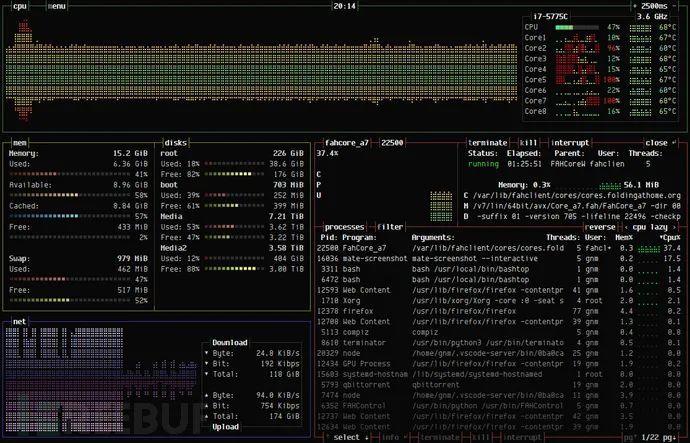
ツールのメインメニュー:
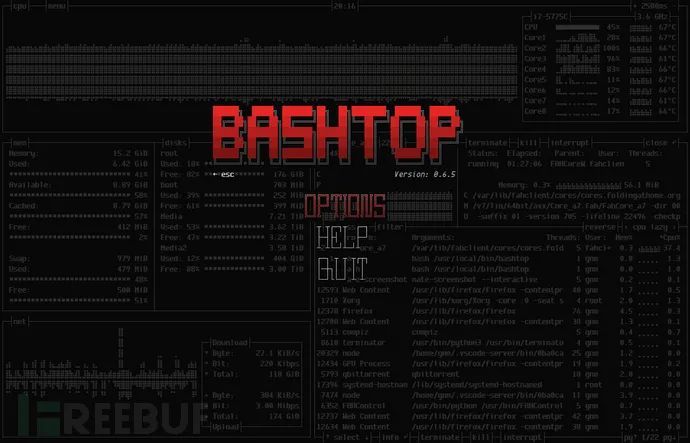
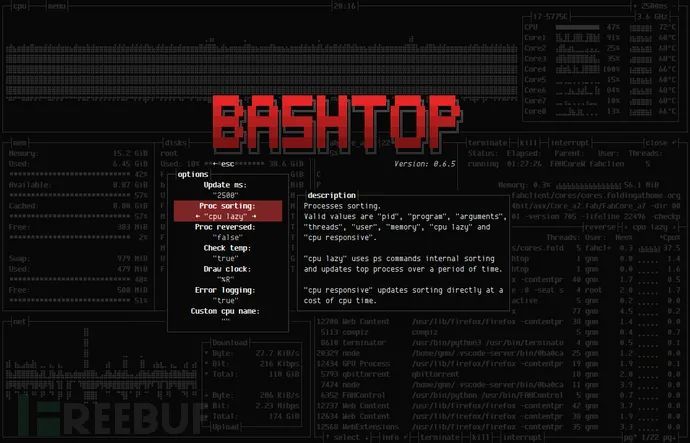
ツールオプションメニュー:
プロジェクトアドレス
Bashtop:https://github.com/aristocratos/bashtop