Centos7 fstab that 99% of people don't know
- 1、 Isn't fstab the only one?
- 2、 Demo: Mount with
systemd - 3、 Problem summary
centos7 fstab may not be what you want
The origin of the problem is that when I was researching
docker, I searched foroverlaymounts, and suddenly found that the execution results of/etc/fstabandmountcommands are very different.
**1、 Isn't fstab the only one? **
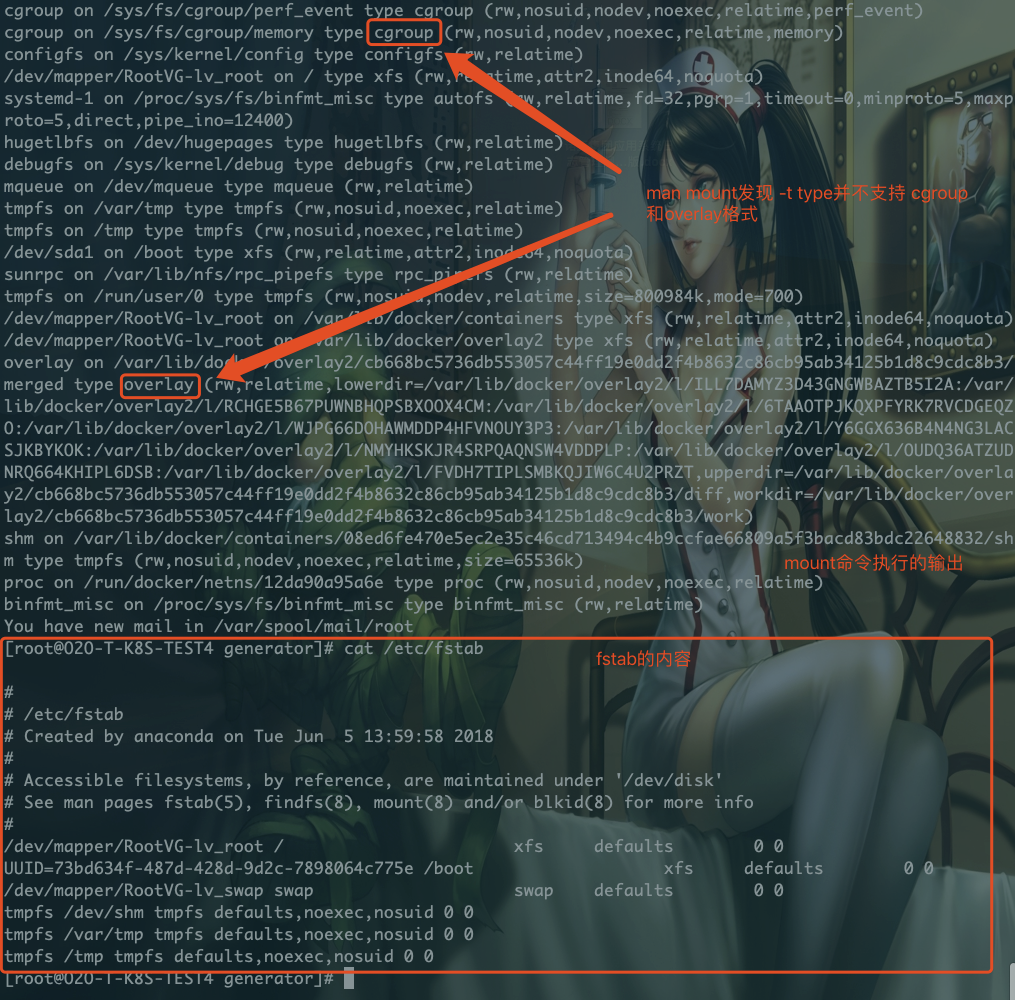
fstab
Then the question is as follows:
The contents of /etc/fstaband/proc/mount** are quite different, but the contents of /proc/mount will still be automatically mounted** after the system restarts. Why? (Everyone knows that /etc/fstab takes effect permanently, but why can other items take effect permanently?)The two formats type cgroupandoverlayare not supported in themount mandocument. Why can they be mounted normally?
In fact, **Starting with CentOS 7, a method for systemd to mount the file system is also provided. ** That is, /etc/fstab is no longer the only permanent mounting method. In CentOS 7&8, the content of /etc/fstab is very small, as we can also find in the figure above.
**In CentOS 7, we configure /etc/fstab, the system does not directly use this configuration, systemd actually converts the file into a mount file ending with mount. systemd is in the system initialization , It reads these files ending with .mount. **
. The mountfile is stored in/run/systemd/generator.
[ root@O2O-T-K8S-TEST4 generator]# ls -l /run/systemd/generator/
total 20-rw-r--r--1 root root 254 Apr 1418:55 boot.mount
- rw-r--r--1 root root 181 Apr 1418:55 dev-mapper-RootVG\x2dlv_swap.swap
..
In addition, systemd also provides commands for us to view the system mount
- View the file system being mounted
[ root@O2O-T-K8S-TEST4 generator]# systemctl -t mount
UNIT                                    LOAD   ACTIVE SUB     DESCRIPTION
- . mount                                 loaded active mounted /
boot.mount                              loaded active mounted /boot
dev-hugepages.mount                     loaded active mounted Huge Pages File System
dev-mqueue.mount                        loaded active mounted POSIX Message Queue File System
..
systemdmount point location
[ root@O2O-T-K8S-TEST4 generator]# ls /usr/lib/systemd/system/*.mount
/usr/lib/systemd/system/dev-hugepages.mount
/usr/lib/systemd/system/dev-mqueue.mount
/usr/lib/systemd/system/proc-fs-nfsd.mount
/usr/lib/systemd/system/proc-sys-fs-binfmt_misc.mount
/usr/lib/systemd/system/sys-fs-fuse-connections.mount
.
.
2、 Demo: Mount with systemd
- Case: Mount
/dev/sdb1under/tmp_dir
[ root@rhel-8 system]# cat tmp_dir.mount
# This file is part of systemd.[Unit]
Description=Test Directory(/tmp_dir)
DefaultDependencies=no
Conflicts=umount.target
Before=local-fs.target umount.target
After=swap.target

[ Mount]
What=/dev/disk/by-uuid/cea0757d-6329-4bf8-abbf-03f9c313b07f
Where=/tmp_dir
Type=ext4
Options=defaults

[ Install]
WantedBy=multi-user.target
- Glossary
What=Indicates the absolute path of the device node, file or other device to be mounted.`man 8 mount`see more

Where=The device mount point needs to write an absolute path. This must not be a link address.

Type=The type of file system, usually a string

Options=Mount options, separated by commas, support multiple options in parallel.
reload daemonmakessystemdeffective
systemctl daemon-reload
3、 Question summary
- The first question, starting with
centos 7, aftersysvis handed over tosystemdfor maintenance,/etc/fstabis no longer the only mount control item,systemdcan also complete this work, andSystemddoes not read the content of/etc/fstab, but converts it to a file ending in.mount. Looking at the trend, I feel that the follow-up may completely take over/etc/fstab. However, there is not much research onsystemd, and the dominant family does not know whether it is good or bad. According to the style oflinus,systmdmay be strongly supported - The second question is that
man mountis not updated.centos 7must supportcgroup, overlaytypes.
Reference reading: https://www.golinuxcloud.com/mount-filesystem-without-fstab-systemd-rhel-8/