ELK log alarm plug-in ElastAlert
In daily operation and maintenance, use elk to uniformly manage, store, trace, and analyze business access logs, equipment and software operation logs. The ideal status of daily operation and maintenance is to be able to monitor the status of the log in real time, and to actively send alarm events to quickly locate the fault when an abnormal log is generated. However, there is no open alarm function in the elastic open source basic version. We can use logstash to connect to zabbix to achieve alarms, or use the third-party plug-in Elastalert to achieve alarms. Next, we will introduce how to use the Elastalert tool to implement log alarms.
Elastalert is an ELK log alarm plug-in developed by Yelp based on python. Elastalert checks the records in ElasticSearch for comparison, and configures alarm rules to alert the logs of matching rules. Elastalert uses Elasticsearch with two types of components (rule types and alerts). Regularly query Elasticsearch and pass the data to the rule type, which determines when a match is found. When a match occurs, one or more alerts will be provided for that alert, and these alerts will take action based on the match. It is configured by a set of rules. Each rule defines a query, a rule type and a set of alarms.
Elastalert project open source address
https://github.com/Yelp/elastalert
Elastalert User Manual
https://elastalert.readthedocs.io/en/latest/elastalert.html#overview
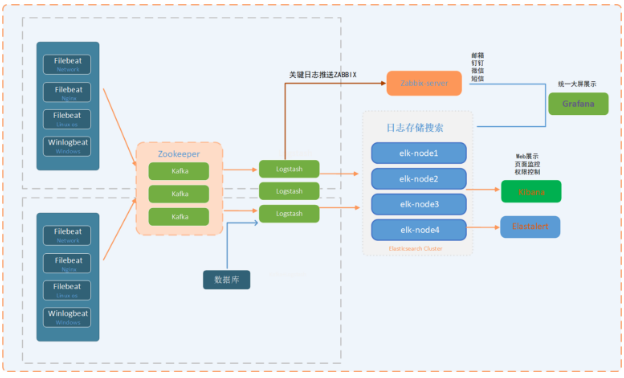
Platform architecture diagram
software version
elastalert:0.2.0
Python 3.6.8
elastic 6.8
Centos 8.1.1911
install software
dnf install -y wget   gcc openssl-devel epel-release git
dnf  install -y  python3  python3-devel
install elastalert
mkdir -p  /app/
git clone https://github.com/Yelp/elastalert.git
cd  /app/elastalert/
pip3  install "setuptools>=11.3"
pip3  install -r requirements.txt
# Choose according to version
# pip3 uninstall elasticsearch
# pip3 install "elasticsearch<7,>6"
python3 setup.py install
** elastalert configuration file**
. egrep  -v "*#|^$" config.yaml
rules_folder: example_rules
run_every:
 minutes:1
buffer_time:
 minutes:15
es_host:192.168.99.185
es_port:9200
es_username: elastic
es_password:******
writeback_index: elastalert_status
writeback_alias: elastalert_alerts
alert_time_limit:
 days:2
Field parameter explanation
rules_folder:The location from which ElastAlert loads the rule configuration file. run_every:How often does ElastAlert query Elasticsearch?
buffer_time:Used to set the range of the time field in the request, the default is 15 minutes
Es_host:    elasticsearch host ip
Es_port:    elasticsearch port
writeback_index:Is the name of the index where ElastAlert will store data
writeback_alias:Alias
alert_time_limit:Retry window for failed alerts
Create elastalert-create-index
Used to create an index in elasticsearch so that ElastAlert can save information and metadata about its query and its alerts back to Elasticsearch. For auditing, testing is very useful, and restarting elastalert does not affect counting and sending alerts.
elastalert-create-index --config config.yaml
View creation index name
curl -u elastic:xxxxx -XGET http://192.168.99.185:9200/_cat/indices |grep elastalert |sort -n
elastalert_status_status
ElastAlert uses elastalert_status to determine the time range to query when it is first started to avoid repeated queries. For each rule, it will start querying from the nearest end time. include:
- @ timestamp: The time when the file was uploaded to Elasticsearch. This is after running the query and the results have been processed.
- rule_name: The name of the corresponding rule.
- starttime: The start timestamp of the query.
- endtime: query ending timestamp.
- hits: The number of query results.
- matches: The number of matches returned by the rule after processing the hit. Please note that this does not necessarily mean that the alarm is triggered.
- time_taken: The number of seconds required for this query to run.
ElastAlert rule type
any,blacklist,whitelist,change,frequency,spike,flatline,new_term,cardinality 。
any: alarm as long as there is a match;
blacklist: The content of the compare_key field matches any content in the blacklist array;
whitelist: None of the contents of the compare_key field can match the contents of the whitelist array;
change: Under the same query_key condition, the content of the compare_key field will be changed within the timeframe;
frequency: Under the same query_key condition, there are num_events filtered out exceptions in the timeframe range;
spike: Under the same query_key condition, the ratio of the difference between the amount of data in the two timeframes before and after it exceeds spike_height. Among them, you can set the specific up and down direction through spike_type-up, down, both. You can also use threshold_ref to set the lower limit of the data volume required in the previous cycle, and threshold_cur to set the lower limit of the data volume required in the current cycle. If the data volume is less than the lower limit, it will not trigger;
flatline: within the timeframe range, the amount of data is less than the threshold;
new_term: data other than the maximum terms_size (default 50) results in terms_window_size (default 30 days) before the fields field appears newly;
cardinality: Under the same query_key condition, the value of cardinality_field in the timeframe exceeds max_cardinality or is lower than min_cardinality
Examples of warning rules
Find examples of different types of rules in example_rules/.
example_spike.yaml is an example of the "spike" rule type, which allows you to warn that the average event rate within a certain period of time increases by a given factor. This example will send an email alert when there are 3 times more events matching the filter in the past 2 hours than the number of events in the previous 2 hours.
example_frequency.yaml is an example of the "frequency" rule type, which will alert when a given number of events occur within a period of time. This example will send an email when 50 documents matching the given filter appear within 4 hours.
example_change.yaml is an example of the "change" rule type, which will alert when a field in two documents changes. In this example, when two documents have the same "username" field but different values for the "country_name" field, an alert email will be sent within 24 hours.
example_new_term.yaml is an example of a "new term" rule type, which will alert when one or more new values appear in one or more fields. In this example, when a new value ("username", "computer") is encountered in the example login log, an email will be sent.
Configure alert rules
es_host:192.168.99.185
es_port:9200
es_username: elastic
es_password:******
name: networklogs-alert
type: frequency
index: networklogs-*
num_events:1
timeframe:
 minutes:10
filter:- query:
 query_string:
 query:"count: Failed"
alert:-"email"
email:-"[email protected]"
smtp_host: smtp.qq.com
smtp_port:25
from_addr: [email protected]
smtp_auth_file:/app/elastalert/elastalert/example_rules/email_auth.yaml
alert_subject:"Network device operation log is abnormal"
alert_text_type: alert_text_only
alert_text:|
 Network device operation log is abnormal
 > time:{}>hostname:{}>count:{}>source:{}
alert_text_args:-"@timestamp"- hostname
 - count
 - source
Introduction to Rule Parameters
# Elasticsearch machine
es_host:192.168.99.185

# Elasticsearch port
es_port:9200

# Whether to use ssl link
# use_ssl: True

# If elasticsearch is authenticated, fill in the username and password
# es_username: username
# es_password: password

# The rule name must be unique, otherwise an error will be reported. After this definition is completed, it will become the title of the alarm email
name: xx-xx-alert

# The frequency is configured, and two conditions need to be met, in the same query_Under the key condition, there is num in the timeframe range_events filtered exceptions
type: frequency

# Specify index, support regular matching, support multiple indexes, and if you find it troublesome, go directly*It can also. index: es-nginx*,winlogbeat*

# Times of departure
num_events:5

# And num_Events parameter association, which means that the alarm will be triggered 5 times within 4 minutes
timeframe:
 minutes:4

# Used to combine alarm rules, elasticsearch query statement, support AND&OR etc. filter:- query:
 query_string:
  query:"message:error OR Error"

# Alarm mode, common mailbox alarm and nail alarm
alert:-"email"
# The address of the alarm mailbox,You can specify more than one. email:-"[email protected]"-"[email protected]"
# Smtp server for alarm mailbox
smtp_host: smtp.126.com
# Smtp port of alarm mailbox
smtp_port:25
# The authentication information needs to be written into an additional configuration file, and two attributes of user and password are required
smtp_auth_file:/app/elastalert/elastalert/example_rules/email_auth.yaml
from_addr:****@qq.com
Email account authentication information
# /app/elastalert/elastalert/example_rules/email_auth.yaml
user:"[email protected]"
password:"******"
Test elastalert rules
elastalert-test-rule example_rules/network.yaml
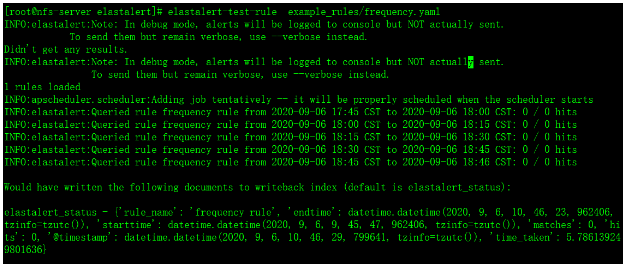
Run alert rules
python3 -m elastalert.elastalert --verbose --rule example_rules/network.yaml
Email alert
Email alert module configuration file
alert:-"email"
email:-"[email protected]"
smtp_host: smtp.qq.com
smtp_port:25
from_addr: [email protected]
smtp_auth_file:/app/elastalert/elastalert/example_rules/email_auth.yaml
alert_text_type: alert_text_only
aalert_text:|
 The network device operation log is abnormal! ! !
 > time:{}>hostname:{}>count:{}>source:{}
alert_text_args:-"@timestamp"- hostname
 - count
 - source
Mail authentication information
The password used is not the password for logging in to the mailbox, but the mailbox authorization code for the mailbox
# /app/elastalert/elastalert/example_rules/email_auth.yaml
user:"[email protected]"
password:"******"
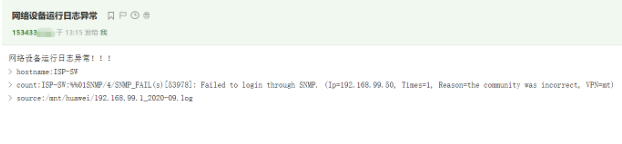
Dingding alarm
Dingding alarm plugin installation
wget https://github.com/xuyaoqiang/elastalert-dingtalk-plugin/archive/master.zip
unzip master.zip
cd elastalert-dingtalk-plugin-master
pip3 install pyOpenSSL==16.2.0
pip3 install setuptools==46.1.3
cp -r elastalert_modules /app/elastalert/
Dingding alarm module configuration file
alert:-"elastalert_modules.dingtalk_alert.DingTalkAlerter"
dingtalk_webhook:"https://oapi.dingtalk.com/robot/send?access_token=xxxxxx"
dingtalk_msgtype:"text"
alert_subject:"Network device operation log is abnormal"
alert_text_type: alert_text_only
alert_text:|
 Network device operation log is abnormal
 > time:{}>hostname:{}>count:{}>source:{}
alert_text_args:-"@timestamp"- hostname
 - count
 - source
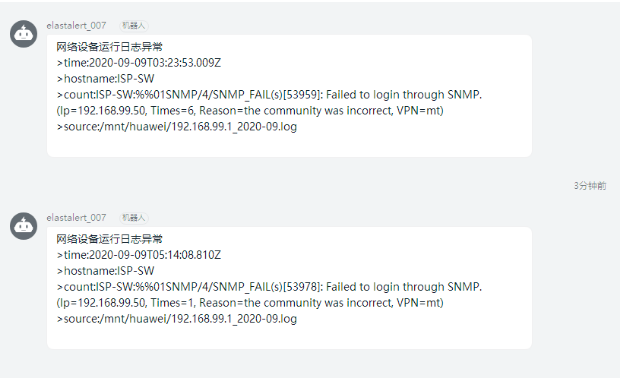
systemctl runs in the background
elastalert01.service
# vim /usr/lib/systemd/system/elastalert01.service
[ Unit]
Description=elastalert01
After=elastalert01.service
[ Service]
Type=simple
User=root
Group=root
Restart=on-failure
PIDFile=/usr/local/elastalert01.pid
WorkingDirectory=/app/elastalert
ExecStart=/usr/local/bin/elastalert --config /app/elastalert/config.yaml --rule /app/elastalert/example_rules/network1.yaml
ExecStop=/bin/kill -s QUIT $MAINPID
ExecReload=/bin/kill -s HUP $MAINPID
[ Install]
WantedBy=multi-user.target
elastalert02.service
# vim /usr/lib/systemd/system/elastalert02.service
[ Unit]
Description=elastalert02
After=elastalert02.service
[ Service]
Type=simple
User=root
Group=root
Restart=on-failure
PIDFile=/usr/local/elastalert02.pid
WorkingDirectory=/app/elastalert
ExecStart=/usr/local/bin/elastalert --config /app/elastalert/config.yaml --rule /app/elastalert/example_rules/network.yaml
ExecStop=/bin/kill -s QUIT $MAINPID
ExecReload=/bin/kill -s HUP $MAINPID
[ Install]
WantedBy=multi-user.target
Start elastalert01.service
systemctl start elastalert01.service
systemctl enable elastalert01.service
View elastalert process
ps -ef |grep elastalert
